SereneCare, a healthcare management platform designed to bridge the gap between patients, doctors, and administrators, is focused on creating a unified, full-stack system that supports appointment scheduling, group consultations, health resource sharing, and role-based workflows. Built entirely using open source technologies, SereneCare aims to offer a modular, scalable, and secure solution for modern healthcare challenges.
As developers exploring the intersection of healthcare and open source technology, we noticed a common thread: many existing platforms were either too specialised or lacked the flexibility to adapt to varied medical workflows. With that in mind, we set out to build SereneCare, a healthcare management system that prioritises usability, modularity, and data privacy.
The platform was conceptualised with real-world challenges in mind—limited access to in-person consultations, the need for support group integration, and growing concerns over the security of patient data. SereneCare was our attempt to create something that could support remote healthcare delivery without becoming overly complex for either patients or medical staff.
From the ground up, we built the system using tools we were familiar with — React for the frontend, Node.js and Express for the backend, and MongoDB to store flexible, evolving data structures. But beyond the tech stack, what really drove the project was our desire to build something meaningful: a platform that could be used in universities, clinics, or even small NGOs running wellness programmes. Every feature — from appointment management to real-time group discussions — was designed with adaptability in mind.
Role-based user interface design
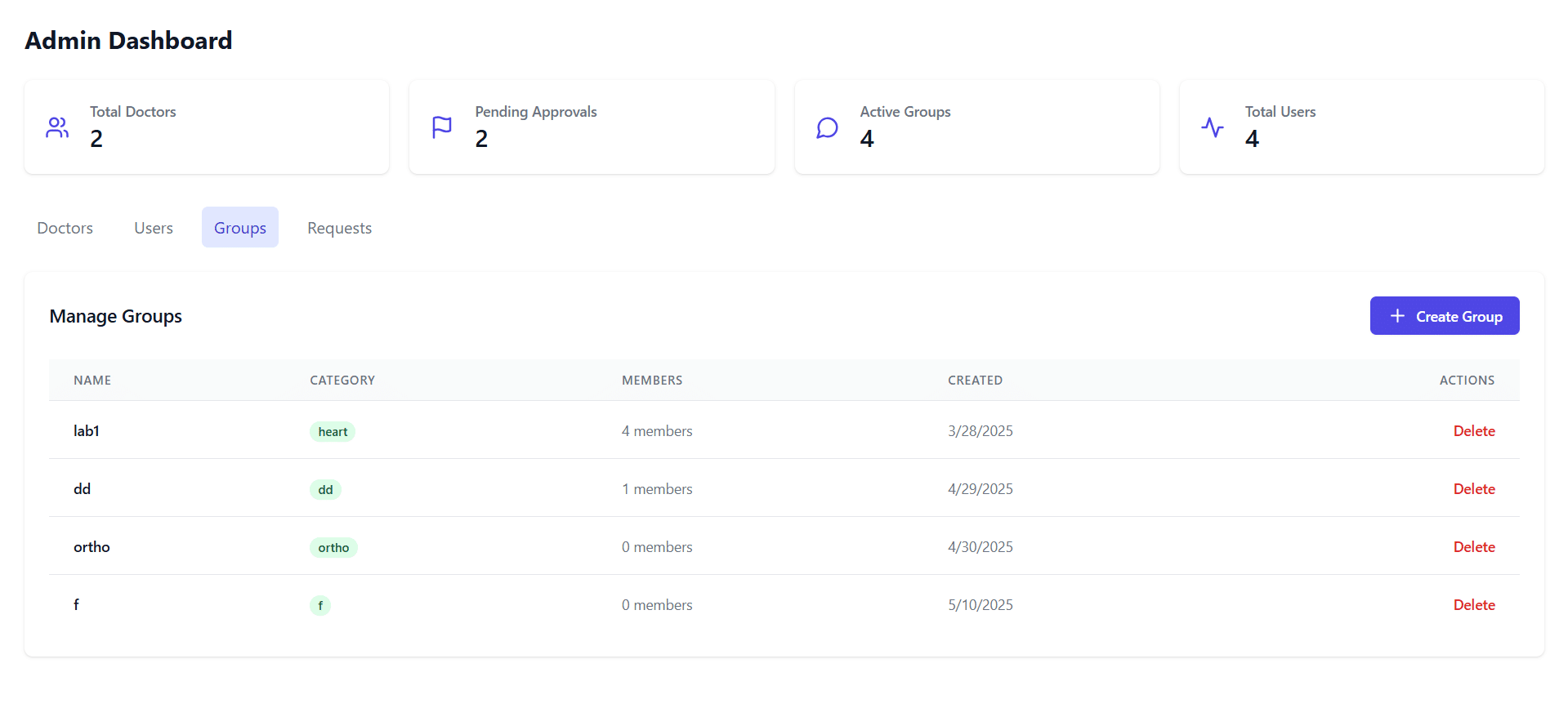
Admin dashboard
For admins, we focused on functionality that allows them to control and monitor the entire system. The dashboard presents metrics like the number of registered users, pending approvals, and active support groups. Admins can easily verify new doctor signups, approve users, assign moderators to groups, and keep an eye on activity across the platform.
An admin-facing interface summarises system status and allows for user/group management in just a few clicks.
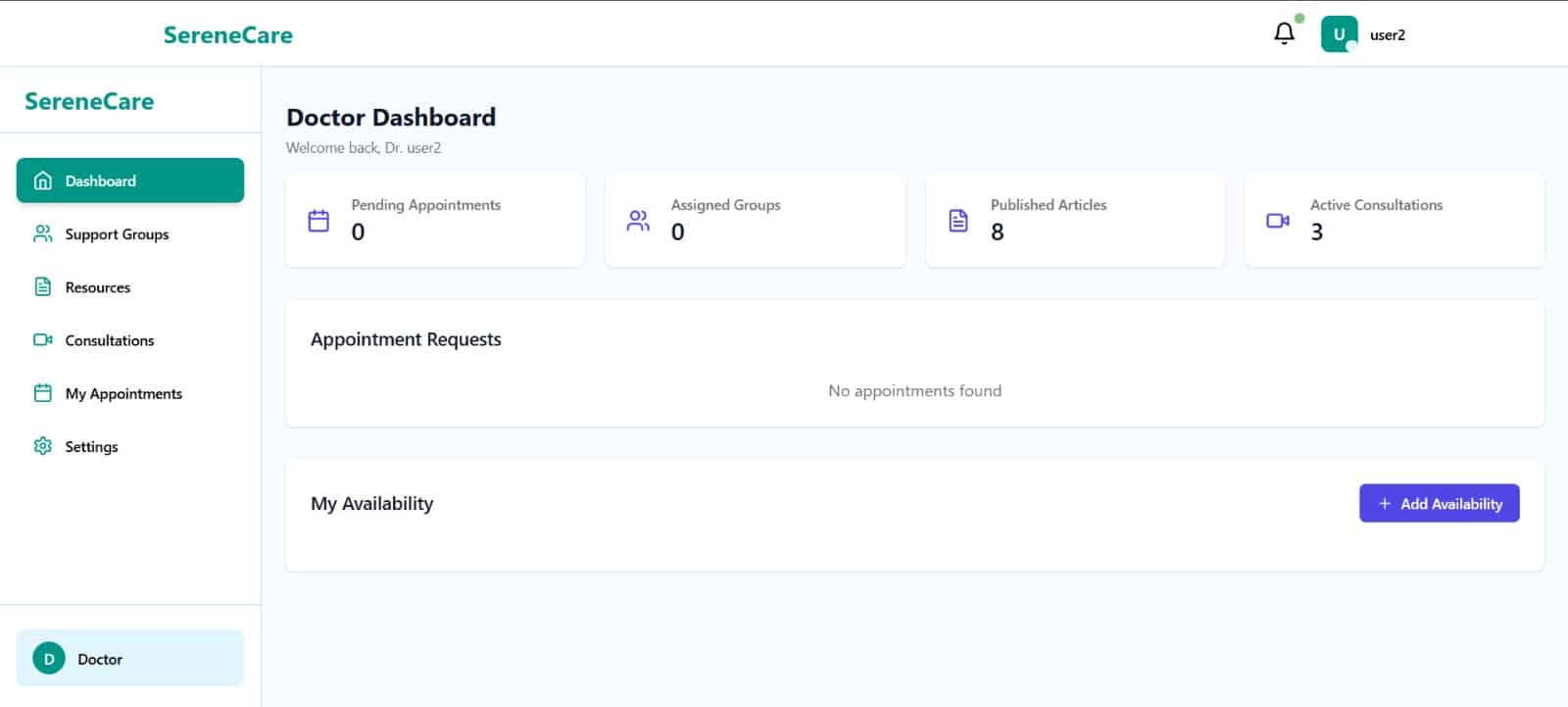
Doctor dashboard
Doctors needed more than just a schedule; they also needed a way to engage with patients outside of direct consultations. So, we built them a dashboard where they can:
- Review and manage appointment requests
- Moderate the support groups they’re assigned to
- Share articles or documents with their patients
- Track their availability and upcoming sessions
The design borrows from minimalistic medical record tools; so it feels familiar and focused.
This panel allows doctors to oversee appointments, engage in support groups, and contribute educational resources.
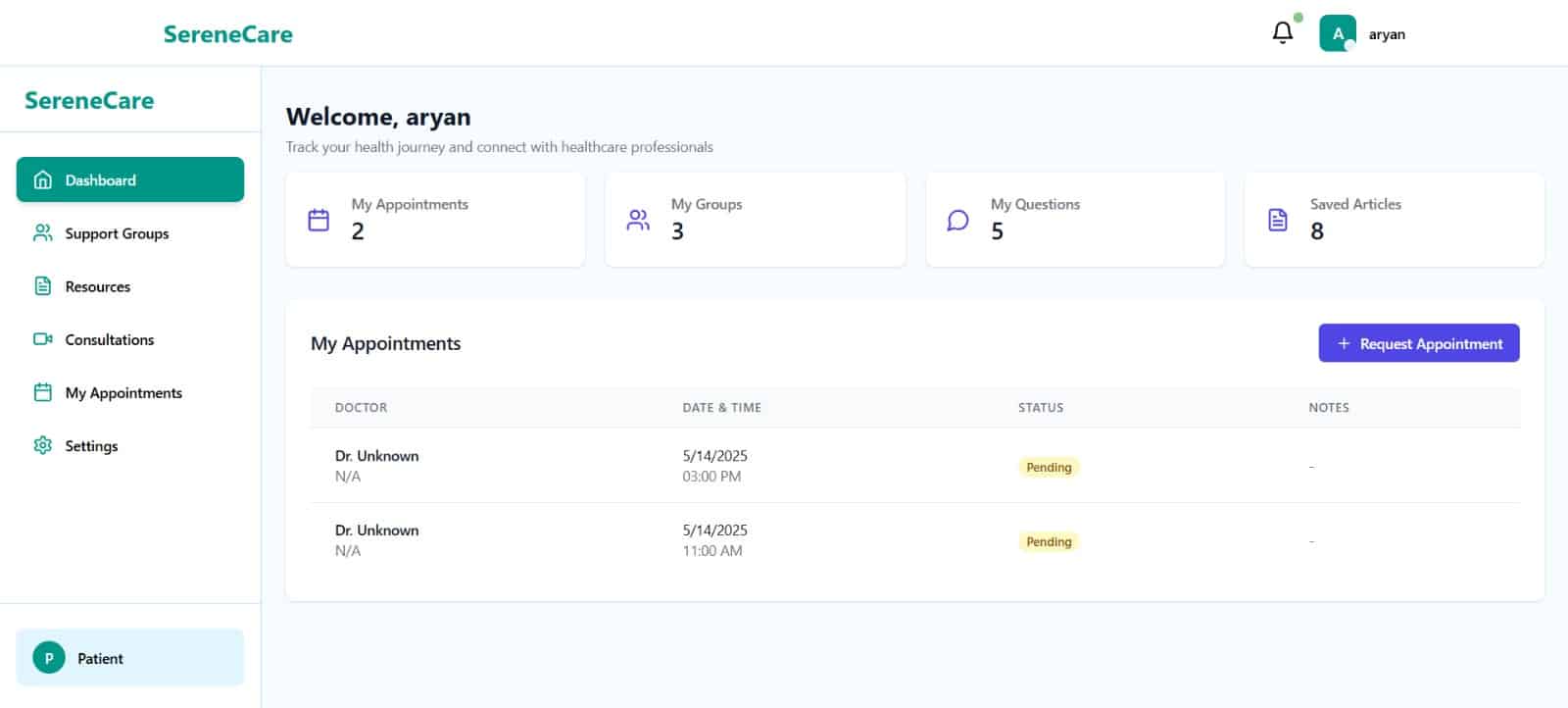
Patient dashboard
The patient interface was where we invested a lot of time. We wanted it to feel like a personal assistant for managing health, and not just a generic portal. Patients can:
- Schedule or reschedule appointments
- Join support groups based on interest or condition
- Browse health documents shared by doctors
- Ask questions and bookmark content for later
The layout was tested among peers to make sure it worked well across devices, especially phones and tablets.
Patients get a streamlined dashboard where they can interact with doctors, track appointments, and access wellness materials.
What made this part interesting for us as developers was the way React Context helped in dynamically rendering role-based views. Instead of hard-coding separate routes for each user type, we used a central logic to determine what each user sees based on their JWT token data. In short, this UI structure didn’t just improve usability — it helped us enforce role-based restrictions and data privacy from the frontend itself.
System architecture
When we started building SereneCare, we knew we needed more than just working code — we needed a structure that could grow with time, handle real-world data securely, and stay organised across multiple features. To achieve that, we leaned on a modular, service-oriented architecture, separating major components into logical units right from the beginning.
This design allowed us to isolate responsibilities across different services: user management, appointments, groups, and shared resources. It also meant that we could work on and test each part of the system without accidentally breaking something else — a huge time-saver during development.
Backend foundation
We built the backend using Node.js with Express.js, mainly for its speed, non-blocking nature, and the large number of libraries available. Instead of having one large API doing everything, we broke the functionality into smaller modules with dedicated routers and middleware.
Each module exposes a clear set of REST APIs that can be consumed by the frontend and are protected by middleware for authentication and role checks. We also included a lightweight API gateway logic, which allows all incoming requests to be routed through a common entry point before being dispatched to the respective module.
Database design with MongoDB
We chose MongoDB as our database mainly for its schema-less flexibility. Working in a healthcare-related domain, we found that patient data, appointment details, and uploaded resources can all have slightly different structures. MongoDB gave us the freedom to evolve our models quickly as new features were added.
We used separate collections for:
- Users – storing personal details and roles
- Appointments – tracking patient-doctor interactions
- Groups – for community discussions and moderation
- Resources – documents uploaded by doctors
Each record also includes metadata like timestamps, access flags, and audit logs where necessary.
Frontend architecture
On the frontend, our goal was to keep things modular and responsive. We built the UI using React + TypeScript, which gave us type safety and consistent component behaviour.
Here’s how we structured it:
- React Router handles client-side routing.
- Axios manages all API calls, with an interceptor to attach the user’s token.
- React Context is used to manage shared app state, such as logged-in user info and role-specific view rendering.
We also set up centralised error handling, global toasts for feedback, and route guards to redirect unauthorised users, especially useful when switching between roles.
Real-time support with WebSockets
Though we’ve already touched on this in our frontend section, it’s worth noting here: our architecture includes a WebSocket channel using Socket.IO for real-time updates. This layer is particularly important for features like:
- Appointment status changes
- Live chat within support groups
- Notifications when new documents are published
The WebSocket connection is established during login and lives throughout the session, allowing us to push updates without the frontend needing to poll the server continuously.
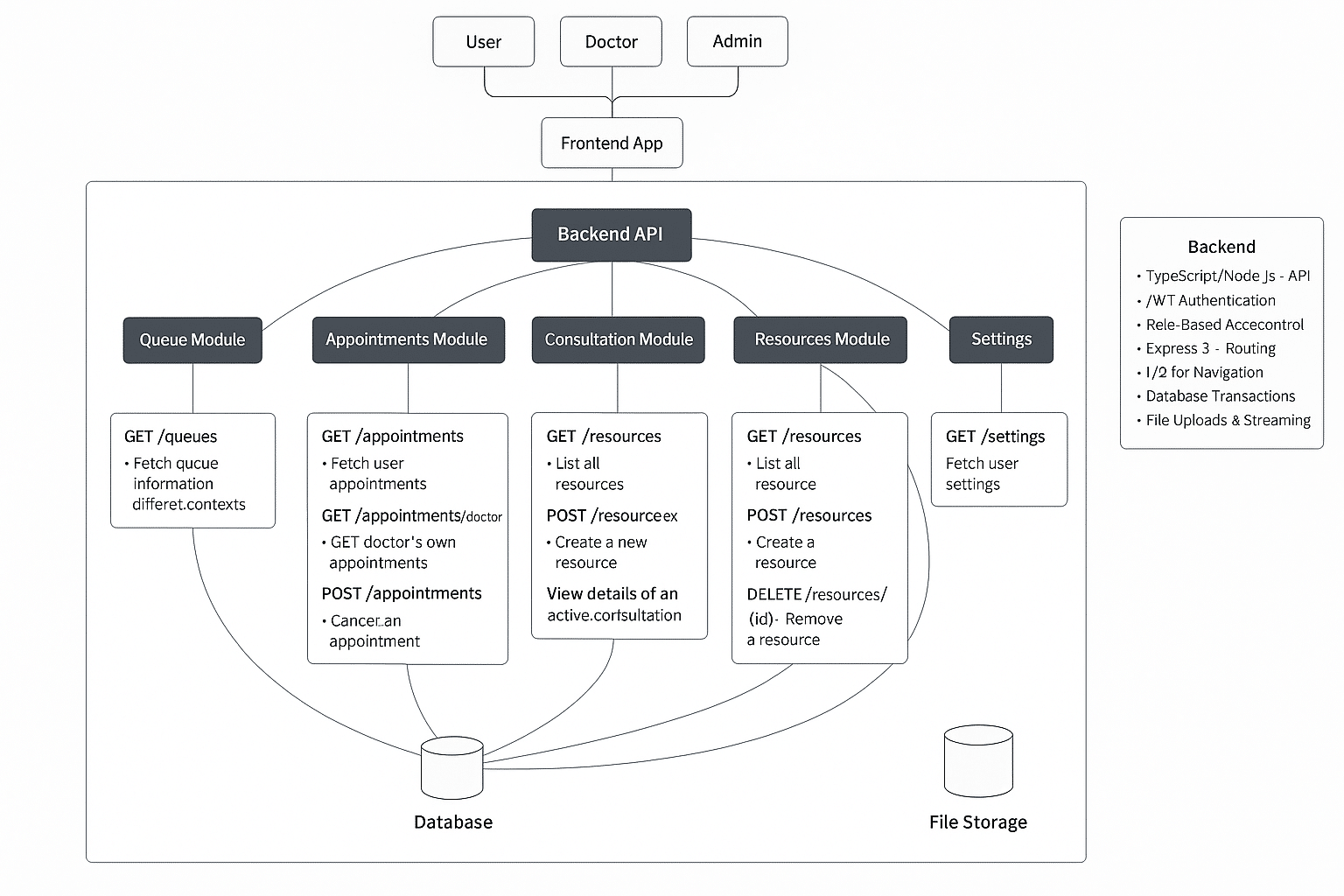
Figure 4 outlines how the frontend, API gateway, modular services, and database collections interact across both HTTP (REST) and WebSocket layers. This modular setup made debugging and feature updates much easier. For example, when we wanted to tweak the group chat logic, we didn’t have to touch the appointment code at all. Over time, we realised this architecture not only improved performance and security, but also helped onboard new contributors quickly since each service is like its own mini project.
Technology stack
SereneCare is built entirely using open source technologies that offer flexibility, performance, and scalability. The platform adopts a modern full-stack approach that ensures seamless communication between frontend and backend components while maintaining a strong focus on user experience and security.
One of the early decisions we made with SereneCare was to stick with tools we were already comfortable with — open source, battle-tested, and flexible enough to grow with the platform. Our aim wasn’t to experiment with flashy frameworks but to build something robust that we could deploy, debug, and maintain easily.
Here’s a breakdown of what we used and why.
Frontend stack
We chose React 18.3 for the frontend mainly because of its component-based architecture and active ecosystem. Combined with TypeScript, it gave us the ability to catch type-related bugs early, which was especially helpful once the project grew beyond a dozen components.
To handle styling, we used:
- Tailwind CSS: Its utility-first approach helped us build responsive UIs quickly without writing long CSS files.
- Lucide React: For icons that were light and scalable enough to handle both the patient-facing and admin-facing views.
Other important tools used are:
- React Router: For managing routes and protected paths across user roles.
- React Hot Toast: Provided simple, non-intrusive notifications to improve feedback for users (like success or error messages).
- React Context API: We used it to store shared state like the logged-in user’s role or current session without having to pull in a larger state manager like Redux.
Backend stack
The backend is built with Node.js and Express.js, which allows us to spin up services quickly with minimal boilerplate. We separated API routes into modules (e.g., auth, appointments, groups) and used middleware for token checks, request validation, and logging.
For real-time features, we added Socket.IO to manage WebSocket connections for updates like appointment status changes and support group activity.
Other utilities used are:
- Axios (used both frontend and backend): Helped standardise all HTTP calls.
- Multer: A reliable middleware for handling file uploads—important for the resource-sharing feature.
Database
We went with MongoDB largely because of its flexibility. Healthcare data can be unpredictable — patients might upload files, doctors might add notes, and admins might tag resources with metadata. A rigid SQL schema would have slowed us down, especially during iteration.
Our main collections:
- Users
- Appointments
- Groups
- Resources
MongoDB also worked well with Node.js thanks to the Mongoose ODM, which simplified validation and querying.
Security utilities
Security was baked into the stack using:
- JWT: For stateless authentication. Tokens are issued at login and validated on every API call.
- bcrypt: For password hashing before storing credentials in the database.
- Express Validator: For input validation to prevent injection or malformed data.
| Layer | Technologies used |
| Frontend | React 18.3, TypeScript, Tailwind CSS, Lucide React, React Router, React Context |
| Backend | Node.js, Express.js, Socket.IO, Axios, Multer |
| Database | MongoDB |
| Authentication | JWT, bcrypt, Express Validator |
Table 1: Overview of core technologies used in SereneCare
Choosing the right tools saved us from getting stuck in debugging rabbit holes and let us focus more on features. Almost everything we used has strong community support, which made troubleshooting much easier. Since SereneCare is open source, we also wanted it to be easy for others to pick up and contribute — and sticking with popular, well-documented libraries made that a lot more feasible.
Modular service design
As the feature list for SereneCare started expanding, we realised early on that trying to cram everything into a single backend file would quickly spiral into chaos. So instead of a monolithic structure, we broke the platform down into independent service modules, each one responsible for a specific domain like authentication, appointments, groups, or resource sharing.
This modular approach helped in two big ways:
- It kept the codebase manageable, especially when multiple people were working in parallel.
- It made debugging and scaling much easier, since each module could be developed, tested, or optimised on its own.
Role-based access and workflow mapping
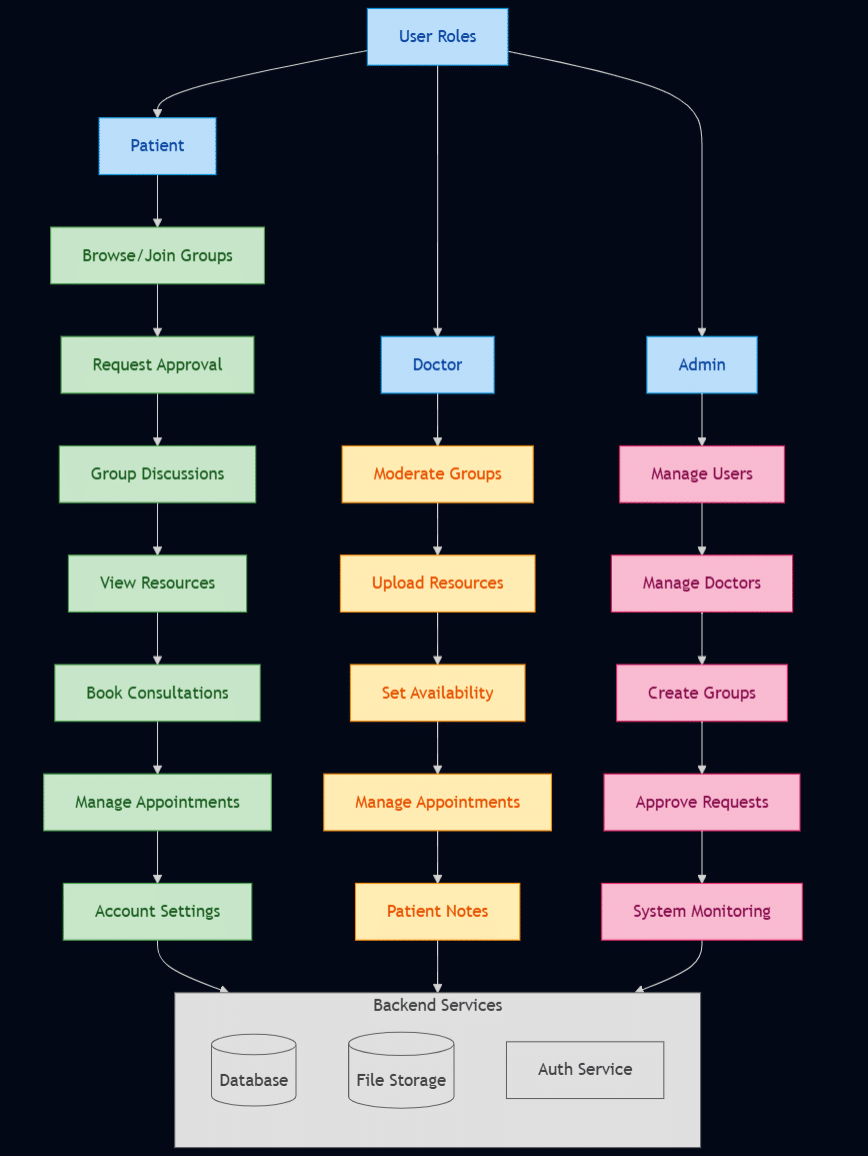
At the heart of our design is a role-based access system. Each user logs in with a specific role: patient, doctor, or admin, and sees a tailored dashboard. Here’s how we split the workflows.
- Patients: Can book appointments, join support groups, and browse shared resources.
- Doctors: Can manage consultations, publish resources, and moderate discussions.
- Admins: Can approve user accounts, monitor group activity, and oversee system-wide metrics.
We used JWT payloads to embed role information, so that every request could be easily verified against role-based permissions on the backend.
Figure 5 illustrates how different users access modules like appointments, groups, and resources, based on their assigned roles.
Core service modules
We divided our backend into the following functional modules.
Authentication service
Handles user registrations login, and secure session management. Every authenticated request runs through middleware that checks JWT validity and the user’s role. Passwords are hashed using Bcrypt before being stored.
Appointment service
This is where patients book sessions and doctors manage their availability. We added real-time updates here using WebSockets, so appointment status changes can be pushed instantly to both sides.
Group service
Support groups are a key part of SereneCare. This module allows doctors and admins to create groups, add members, and oversee discussions. We structured groups so that each has a unique access policy (public/private) and role-based permissions for posting or moderating.
Resource service
This module manages all the health content shared by doctors—whether it’s documents, guides, or links. We used Multer for file uploads, and stored metadata like file type, upload date, and category for easy retrieval.
One unexpected benefit of this setup was how much easier it became to test and update individual features. For example, when we needed to change how appointment rescheduling worked, we didn’t have to touch anything in the group or resource modules. This isolation of logic made code reviews simpler and allowed contributors to focus on specific services.
It also made it easier to simulate microservices later if we ever needed to deploy modules independently, say, if one service had to scale separately due to load.
SereneCare’s modular design wasn’t just an architectural decision — it was a development survival tactic. It allowed us to move fast without losing control of the codebase, and it set a foundation that can support future features like analytics or video consultations without needing a complete rewrite.
Data modelling
With a platform like SereneCare, choosing the right data structure was one of the first challenges we had to tackle. Unlike traditional CRUD apps, healthcare platforms deal with a mix of user roles, sensitive data, appointment metadata, and dynamic content like group discussions or resource uploads.
We chose MongoDB for our backend database, mostly because of its flexible document structure. It allowed us to make quick schema changes during development and model real-world relationships without being locked into rigid SQL schemas.
We kept our data models simple and focused on the actual workflows of the platform. Here are the main ones.
User model
Every user, whether a doctor, patient, or admin, shares the same core schema, with a role field that drives what they can see and do on the platform. We also included fields like:
- personalInfo (name, contact, etc)
- medicalSpecialization (for doctors)
- status (for account approval)
- permissions (derived from the role)
Appointment model
This model links patients and doctors together and stores scheduling details. It includes:
- patientId, doctorId
- schedule object with date and time
- status flags (requested, approved, completed)
- timestamps for tracking the appointment lifecycle
Group model
Support groups are central to the platform’s engagement model. Each group has:
- unique groupId
- name, description, category
- list of members
- admin/moderator role assignment
We modelled it so that group membership and moderation privileges could scale independently.
Resource model
When doctors upload content (PDFs, links, etc), it gets stored in the resource model, which holds:
- title, author, fileType
- URL to access the file
- tags and categories for filtering
- upload date and permission scope (public/private)
Design considerations
Here are a few things we learned and applied while modelling our data:
Embedded vs referenced
We embedded small fields like user roles inside the user document but used references (_id) for things like appointments and groups to keep the models lean and flexible.
Timestamps everywhere
For almost every model, we added createdAt and updatedAt. It came in handy during dashboard analytics and debugging.
Indexing
We indexed fields like email, status, and doctorId to keep queries fast, especially when the data started to grow.
Sensitive field protection
Passwords, tokens, and sensitive metadata were excluded from responses using Mongoose schema options like select: false.
Data modelling was one of those behind-the-scenes things that made a big difference later. Because our models were well-structured from the beginning, adding new features like audit trails or file tagging didn’t require rewrites. If we had gone with a more rigid schema, many of the iterations we did during testing would’ve been painful to implement.
Security and authentication
With SereneCare dealing directly with user data (some of it potentially sensitive), it was clear from the start that security couldn’t be an afterthought. We tried to bake in protection mechanisms across the full stack, keeping things lightweight without compromising on best practices.
JWT-based authentication
For login and session management, we used JSON Web Tokens (JWT). Every time a user logs in successfully, they receive a signed token that contains their user ID and role. This token is then sent with every request to protected routes. Why JWT?
- It allowed us to keep the backend stateless, which made scaling easier.
- We could encode role data directly into the token, avoiding extra DB lookups.
- Tokens expire after a set duration, so sessions are automatically invalidated over time.
We used middleware in Express to intercept and validate these tokens before passing requests along to protected endpoints.
Role-based access control (RBAC):
One of the most effective security patterns we implemented was RBAC. Each user in the system, whether patient, doctor, or admin, has permissions tied to their role, and this controls what APIs they can access and what actions they’re allowed to take.
Here’s how we enforced it:
- The user’s role was extracted from the JWT.
- Each route group had role-checking middleware to gate access.
- On the frontend, we also used this role information to render only relevant UI components.
This setup ensured that, for instance, a patient could never accidentally hit a doctor-only route or access group moderation features.
| Model | Key fields |
| User | id, name, contact, role, status, permissions |
| Appointment | patientId, doctorId, date, status, timestamps |
| Group | name, members, adminPrivileges, category |
| Resource | title, fileUrl, fileType, author, uploadDate, accessControl |
Table 2: Core collections used in the SereneCare backend
Password handling with Bcrypt
For user credentials, we took a straightforward approach: no plain-text passwords, ever.
- On signup, we used bcrypt.hash() to securely hash the password before storing it in the database.
- During login, bcrypt.compare() was used to validate the user’s input against the hashed version.
We also applied a reasonable salt round configuration to strike a balance between security and response time.
Input validation and sanitisation
Almost every route on the backend runs through input validation middleware using express-validator. This protects against:
- NoSQL injections
- Malformed input
- Unexpected data types
- XSS vectors in form fields
We also sanitised uploaded filenames and filtered file types to prevent users from uploading scripts disguised as documents.
Secure file uploads
File uploads are handled by Multer, with custom logic layered on top.
- Allowed extensions: .pdf, .jpg,.png, .docx
- Max file size: configurable per route
- Uploaded files are renamed using UUIDs and stored in a separate location from public assets.
While we haven’t integrated a malware scanner like ClamAV yet, we have kept that option open for production environments.
We focused on practical, real-world security strategies that would hold up under moderate load and risk. JWT + RBAC gave us a strong baseline, while additional protections like input sanitisation and password hashing covered the essentials. And because security is never “done,” we’ve kept the system modular enough to add more protections like rate limiting or two-factor auth, if and when the platform scales.
Frontend integration and real-time communication
Frontend development in SereneCare wasn’t just about building clean pages — it was about ensuring that everything connected smoothly and securely with the backend, while responding in real-time to events like appointment changes or group activity. We wanted the experience to feel live and responsive, especially for patients and doctors dealing with time-sensitive interactions.
Talking to the backend: Axios + interceptors
We used Axios across the frontend to handle all API communication. Instead of writing repetitive logic in every component, we created a shared instance that:
- Automatically attached the user’s JWT token to every request
- Redirected to the login page if the token expired or was invalid
- Logged or displayed errors using toast notifications
This setup kept our API calls clean and centralised, and made it much easier to manage auth across multiple views.
Role-aware UI with React Context
To make sure each user only saw what they were supposed to, we used React Context to store global session data like:
- Logged-in user’s role (patient, doctor, admin)
- Token status
- User profile info
This allowed us to dynamically load the correct dashboard on login without writing separate routes or pages for every role. It also helped us show/hide UI components like buttons or menus based on permissions.
Toasts, routing, and feedback loops
We integrated:
- React Hot Toast for clean, lightweight user notifications (e.g., ‘Appointment request sent’, ‘Session expired’)
- React Router for protected route handling, including role-based redirects
- UI loaders and disabled states to avoid double-submission issues on slower networks
These small details added up to a smoother experience for both patients and doctors using the app on a mobile or desktop.
Real-time features using WebSockets
One of the things we’re proud of is how we added real-time responsiveness without over-complicating things. We used Socket.IO to open a WebSocket connection as soon as the user logs in. This allowed us to push updates to the UI for things like:
- Appointment status changes (e.g., confirmed, rescheduled)
- Support group messages
- New health documents uploaded by doctors
Each major component subscribed to specific events using the WebSocket channel. For example, when a doctor updated an appointment, the patient dashboard would receive an update within a second and no polling was required.
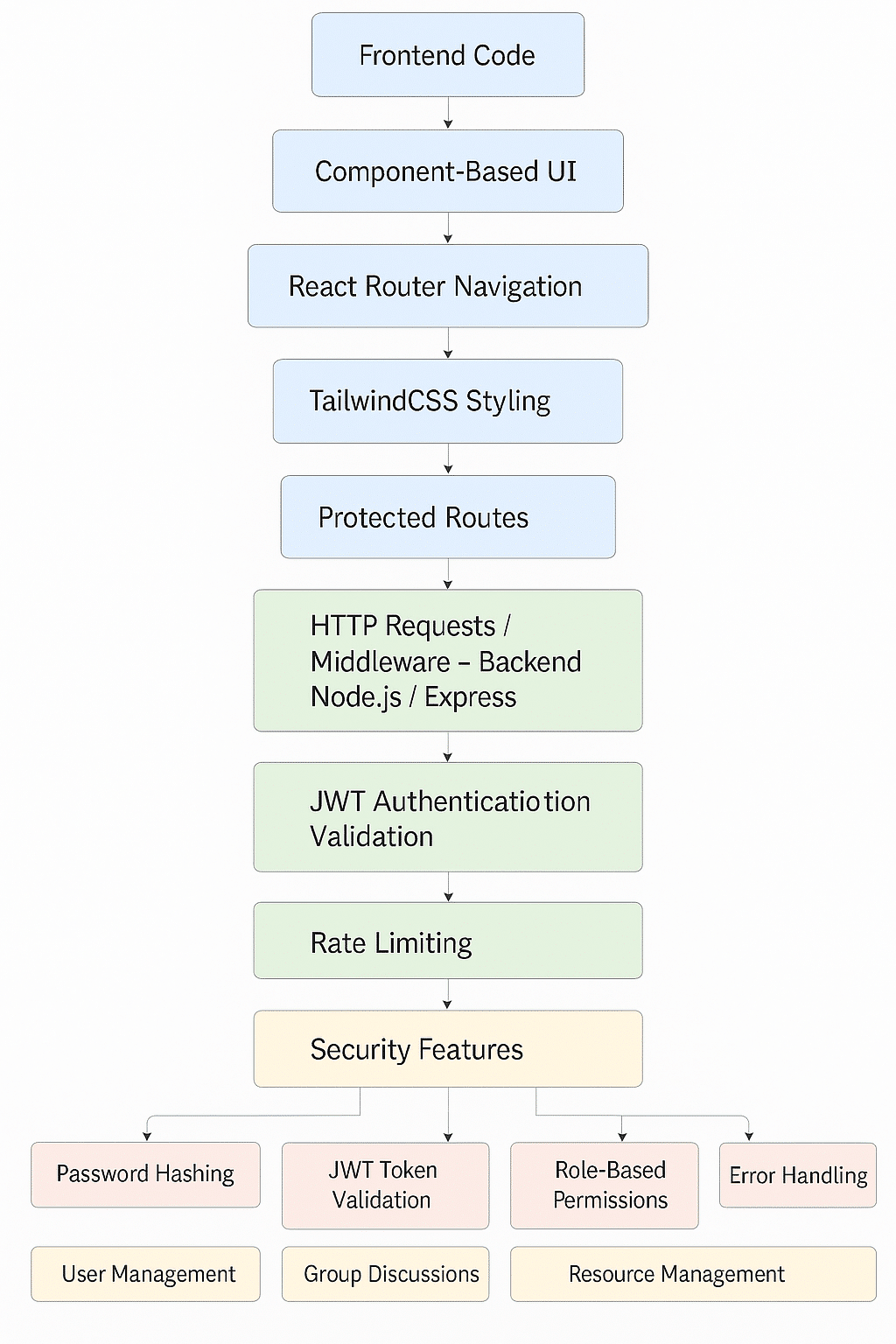
Figure 6 shows how the React frontend communicates with backend modules over HTTP (via Axios) and WebSockets for real-time interaction. React Context keeps global state consistent across views.
Initially, we considered using polling for live data, but it quickly became clear that it would strain both the client and server unnecessarily. WebSockets solved that elegantly. The combo of JWT for security, Axios for clean API calls, and React Context for session handling gave us a frontend that felt dynamic without being bloated.
Future enhancements
While SereneCare already covers the core features needed for remote healthcare management, we’ve mapped out several upgrades that we’d like to implement in the near future. These ideas came up naturally during testing and feedback, especially when we imagined the platform being used in more dynamic or real-world clinical settings.
Video consultations
Right now, all consultations happen through scheduling and messaging. One of our next big goals is to integrate video calling directly into the platform. We’re currently exploring options like WebRTC for peer-to-peer connections and potentially using third-party APIs that support encryption and compliance with healthcare data standards.
Smart health recommendations
We also want to experiment with machine learning models that can analyse patient interactions or uploaded documents to offer basic health tips or reminders. For example, a patient frequently browsing mental health resources might get a prompt suggesting nearby counselling services or articles written by professionals.
To do this responsibly, we’ll need to be careful about data handling, and transparency of any ML insights must remain explainable and optional.
Multi-language support
Accessibility is another area we’re focusing on. Right now, the UI is English-only, but we’re planning to add multilingual support using language files and client-side translation libraries. This would allow clinics or wellness programmes in different regions to adapt the interface for local use.
Analytics dashboards
For doctors and admins, we’d like to add analytics panels that give them insight into:
- Group participation trends
- Appointment volumes over time
- Resource engagement (e.g., which documents are most read)
These metrics could help users make data-driven decisions without needing external tools.
Better mobile experience
Although the current frontend is responsive, we want to fine-tune the mobile UI so that frequent tasks like joining a group or scheduling an appointment feel more native. We’re considering wrapping the app in a progressive web app (PWA) shell or using something like React Native if offline functionality becomes a requirement.
Building SereneCare has been more than just a coding exercise — it’s been a way for us to understand how technology can genuinely improve access to healthcare. From the start, our goal was to create a platform that didn’t just ‘work’, but felt intuitive and secure for patients, doctors, and administrators alike.
By using a modular architecture, role-based workflows, and a modern open source stack, we were able to build something flexible enough to adapt but structured enough to be maintained long-term. Features like real-time updates, resource sharing, and appointment scheduling were developed with real use cases in mind, often shaped by feedback from potential users.
We’ve also learned a lot about user experience, state management, security practices, and even the quirks of handling WebSocket connections in production. The project has grown beyond its original scope, and it continues to evolve as we explore new features like video consultations and ML-powered insights.
More importantly, SereneCare is open source. We hope that others will take this foundation and extend it in new directions, whether that’s localising it for a community health programme, adapting it for a campus wellness centre, or simply learning from the architecture to build something better.
| Source code The complete source code for the SereneCare platform is available as an open source project. Readers and developers are welcome to explore, fork, and contribute via the following GitHub repository: https://github.com/AryanNukala/healthcare/tree/main |