Polars and DuckDB form an excellent in-process analytics stack for 2026. They occupy the important middle ground between traditional DataFrame libraries and fully distributed systems, offering high performance without operational overhead.
Over the last decade, distributed data processing frameworks, such as Apache Spark, have been the default solution for analytics workloads that exceed the limits of traditional DataFrame tools. Many teams are now realising that a large share of their analytics jobs operate on tens of gigabytes, not terabytes, and run on machines that are far more capable than those of a decade ago.
In-process analytics is gaining traction because modern laptops and cloud VMs routinely offer 32-128 GB of RAM, fast NVMe storage, and many-core CPUs. For mid-scale ETL, feature engineering, and analytical reporting, the bottleneck is often not raw compute power but system complexity.
This has driven a shift away from heavyweight distributed systems towards lightweight, local analytics engines that start instantly, are easier to debug, and integrate naturally into application code. Polars and DuckDB exemplify this shift.
Overview of Polars and DuckDB
Polars is a high-performance DataFrame library written in Rust with bindings for Python and other languages. While often compared to Pandas, Polars is fundamentally different in its execution model. It is built on the Apache Arrow columnar format, uses multi-threaded execution by default, and emphasises lazy evaluation. Instead of executing operations eagerly, Polars can construct a full query plan and optimise it before touching data.
DuckDB is an embedded analytical database optimised for OLAP-style workloads. Often described as ‘SQLite for analytics’, DuckDB runs entirely in-process and requires no separate server. It provides a rich SQL dialect, vectorised execution, and efficient scanning of columnar data formats such as Parquet.
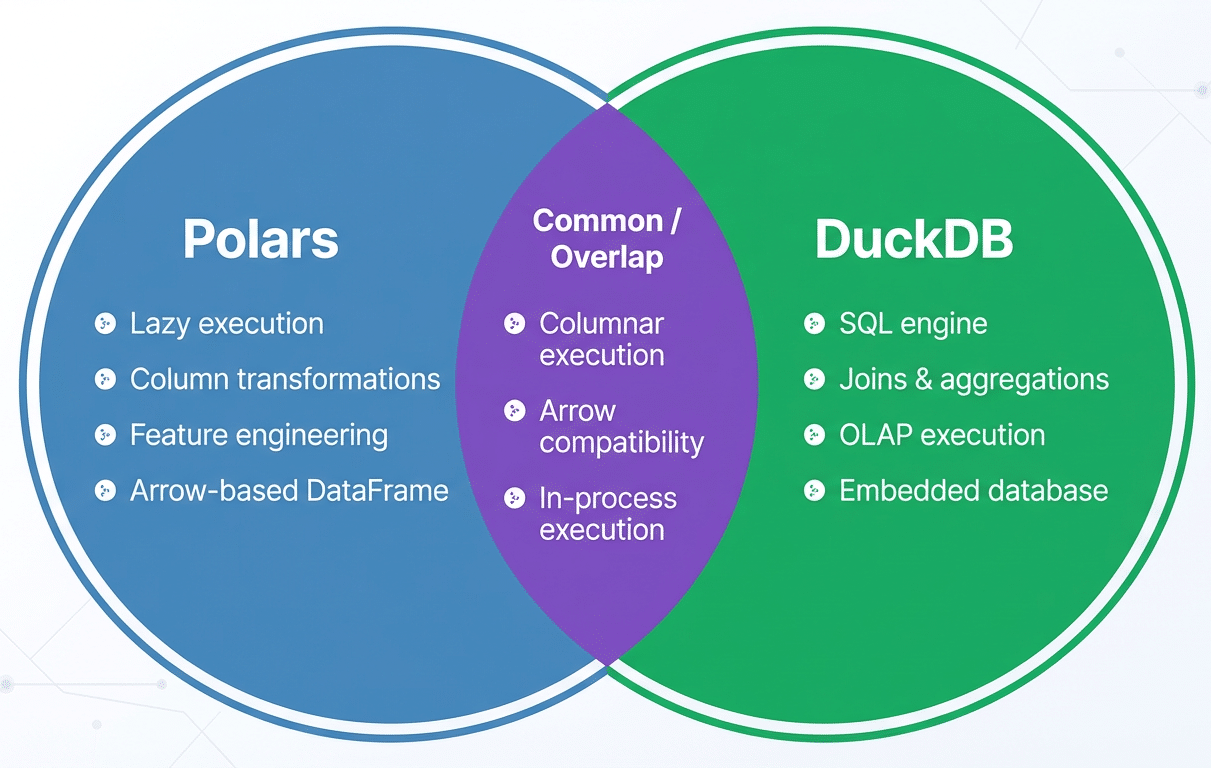
These two tools complement each other well. Polars excels at transformation-heavy, programmatic logic such as feature engineering and schema enforcement. DuckDB shines when expressing relational operations, such as joins, aggregations, and analytical queries, in SQL. Because both systems are designed around columnar data and integrate with Arrow-based memory, data can move between them efficiently without unnecessary serialisation.
Integrated workflow and architecture
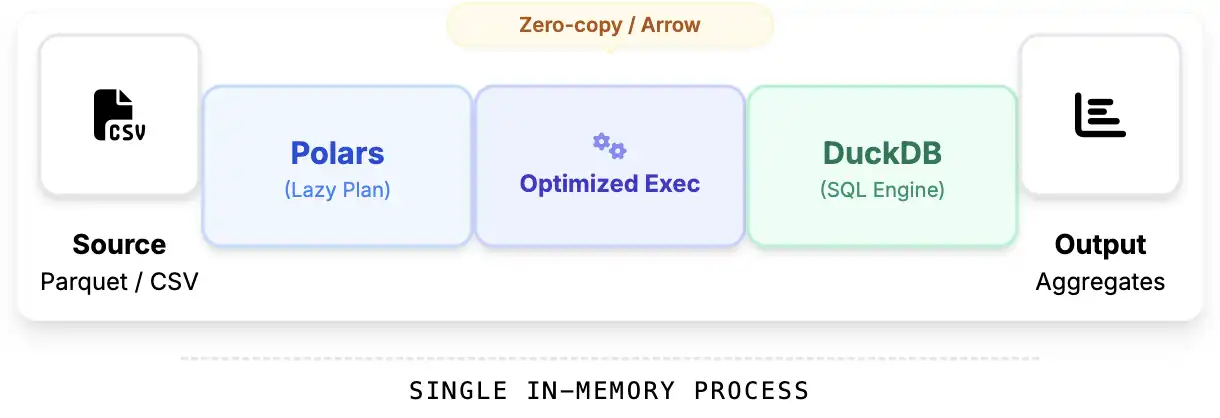
A common architecture uses Polars as the data preparation layer and DuckDB as the analytical query engine. Raw data is ingested and transformed using Polars’ lazy DataFrame API, then exposed to DuckDB for SQL-based analysis. Data exchange typically happens through Arrow-backed memory by registering Polars DataFrames or LazyFrames as DuckDB relations. Execution remains fully in-process, avoiding network overhead or intermediate file writes.
In practice, Polars is best suited for operations that are awkward or verbose in SQL, such as complex column logic, feature engineering, and data cleaning, while DuckDB is ideal for multi-table joins, aggregations, and reporting queries. A common anti-pattern is using DuckDB for row-by-row transformations, better expressed in Polars, or eagerly materialising Polars DataFrames too early. Both negate the benefits of lazy execution and increase memory pressure.
A hands-on example
In this section, we will build a complete analytical pipeline using Polars for fast, vectorised feature engineering and DuckDB for SQL-based analytics. All this runs in-process on a CSV file.
Load the CSV with Polars (Lazy)
We start by lazily scanning the CSV. This enables Polars to build an optimised query plan instead of loading the entire dataset immediately.
import polars as pl
students = (pl.scan_csv(“/content/StudentPerformance.csv”)
.select([
pl.col(“Hours Studied”).alias(“hours_studied”),
pl.col(“Previous Scores”).alias(“previous_score”),
pl.col(“Extracurricular Activities”).alias(“extracurricular”),
pl.col(“Sleep Hours”).alias(“sleep_hours”),
pl.col(“Sample Question Papers Practiced”).alias(“practice_papers”),
pl.col(“Performance Index”).alias(“performance”)]))
At this stage, no data has been loaded. Polars has only built a logical execution plan.
Feature engineering with Polars
Now we enrich the dataset with derived features:
- Convert Yes/No extracurriculars to 1/0
- Compute performance efficiency
- Compute total preparation effort
- Bucket students by sleep quality
features_lazy = (students
.with_columns([
pl.when(pl.col(“extracurricular”) == “Yes”)
.then(1)
.otherwise(0)
.alias(“has_extracurricular”),
(pl.col(“performance”) / pl.col(“hours_studied”))
.alias(“performance_per_hour”),
(pl.col(“hours_studied”) + pl.col(“practice_papers”) * 2)
.alias(“total_effort”),
pl.when(pl.col(“sleep_hours”) >= 8).then(pl.lit(“Well Rested”))
.when(pl.col(“sleep_hours”) >= 6).then(pl.lit(“Moderate Sleep”))
.otherwise(pl.lit(“Sleep Deprived”))
.alias(“sleep_category”)]))
This entire feature pipeline is still lazy. Polars will optimise it before execution.
Execute the Polars query
Now we materialise the dataset:
features = features_lazy.collect()
Polars executes the optimised query plan and produces a columnar DataFrame backed by Apache Arrow.
Register the DataFrame in DuckDB
DuckDB can query Polars DataFrames directly with zero-copy Arrow integration:
import duckdb
con = duckdb.connect()
con.register(“student_features”, features)
We now have an SQL table backed by Polars’ high-performance memory layout.
Run analytics with SQL
How does sleep affect performance?
sleep_stats = con.execute(“””SELECT
sleep_category,
COUNT(*) AS students,
ROUND(AVG(performance), 2) AS avg_performance,
ROUND(AVG(performance_per_hour), 2) AS efficiency
FROM student_features
GROUP BY sleep_category
ORDER BY avg_performance DESC
“””).fetchdf()
Sleep_stats
This provides a clear understanding of how sleep quality relates to academic performance and efficiency.
Best practices and pitfalls
Despite their efficiency, Polars and DuckDB are constrained by single-machine memory limits. Engineers should avoid eager materialisation of large intermediate results and rely on Polars’ lazy execution as long as possible. A common Polars pitfall is calling .collect() too early, which forces execution and materialises data unnecessarily. On the DuckDB side, large joins or aggregations can spill to disk if memory limits are exceeded, which may surprise users expecting purely in-memory execution.
Understanding execution boundaries, such as when Polars plans execute and when DuckDB runs eagerly, is essential for building predictable, efficient pipelines.
For teams adopting the Polars and DuckDB combination, a pragmatic approach is to replace local Spark jobs or Pandas-based pipelines incrementally, using Polars for transformations and DuckDB for analytical queries. Beyond performance, the real win is developer experience: faster iteration, simpler deployment, and analytics pipelines that fit naturally into modern application code.