Resolving SELinux errors
Once you have decoded the error from the log file, SELinux provides a plethora of tools to help solve the errors. Depending on the solutions and the security level desired by a systems administrator, the possible solutions can be applied to allow the action. The setroubleshoot RPM will be required for this.
The setroubleshoot RPM is an important tool in the SELinux systems administrator’s toolkit. If it is not installed in your system, please go ahead and install it. sealert is one of the utilities provided.
To understand sealert usage, issue the following command:
[root@vbg selinux]# sealert -h
-b --browser        Launch the browser
-h --help           Show this message
-s --service        Start sealert as a dbus service
-S --noservice      Start sealert without dbus service as stand alone app
-l --lookupid id    Lookup alert by id
-a --analyze file   Scan a log file, analyze it’s AVC’s
-H --html_output    Ouput in html
-v --verbose        Start in verbose mode
Let us first analyse the log file /var/log/audit/audit.log using sealert. To do so, enter the command that follows:
[root@vbg selinux]# sealert -a /var/log/audit/audit.log
Depending on the number of errors in the log file, an output containing the possible solutions to AVC denial errors in the log file will appear on the screen. To analyse these solutions, you can redirect the output to a file:
[root@vbg selinux]# sealert -a /var/log/audit/audit.log > /tmp/my-selinux-error-solutions.txt
Each error and possible solution is mentioned in the text file (/tmp/my-selinux-error-solutions.txt) separated by a line of dashes. The AVC error example discussed in the above section has been analysed by sealert as:
Summary
    SELinux is preventing the /usr/sbin/httpd from using potentially mislabeled
    files (/var/www/html/index.html).

Detailed Description
    SELinux has denied /usr/sbin/httpd access to potentially mislabeled file(s)
    (/var/www/html/index.html).  This means that SELinux will not allow
    /usr/sbin/httpd to use these files.  It is common for users to edit files in
    their home directory or tmp directories and then move (mv) them to system
    directories.  The problem is that the files end up with the wrong file
    context which confined applications are not allowed to access.

Allowing Access
    If you want /usr/sbin/httpd to access this files, you need to relabel them
    using restorecon -v /var/www/html/index.html.  You might want to relabel the
    entire directory using restorecon -R -v /var/www/html.

Additional Information

Source Context                user_u:system_r:httpd_t:s0
Target Context                system_u:object_r:tmp_t:s0
Target Objects                /var/www/html/index.html [ file ]
Affected RPM Packages
Policy RPM
Selinux Enabled
Policy Type
MLS Enabled
Enforcing Mode
Plugin Name                   plugins.home_tmp_bad_labels
Host Name
Platform
Alert Count                   2
Line Numbers                  8796,8797,8798
31755,0-1     70%

Raw Audit Messages

avc: denied { getattr } for comm=”httpd” dev=hda3 egid=48 euid=48
exe=”/usr/sbin/httpd” exit=0 fsgid=48 fsuid=48 gid=48 items=0 name=”index.html”
path=”/var/www/html/index.html” pid=3579 scontext=user_u:system_r:httpd_t:s0
sgid=48 subj=user_u:system_r:httpd_t:s0 suid=48 tclass=file
tcontext=system_u:object_r:tmp_t:s0 tty=(none) uid=48
The above output from sealert helps a systems administrator to:
- Look at the raw log message
- Understand why the AVC denial occurred (giving detailed description and summary)
- View possible solutions to avoid the AVC denial (by allowing access)
- View additional information
Executing the ‘Possible Solution’ would generally solve the AVC denial error.
If you execute the solution mentioned below:
[root@vbg selinux]# restorecon -v /var/www/html/index.html
…the security context of this file would change to system_u:object_r:httpd_sys_content_t:s0. This would remove the AVC denial and you would be able to browse your HTML page.
For those of us inclined to use the GUI, sealert can be initiated in the GUI mode, by giving the following command:
[root@vbg selinux]# sealert -b &
Please refer to Figure 2, which shows the output for the same error graphically in the browser.
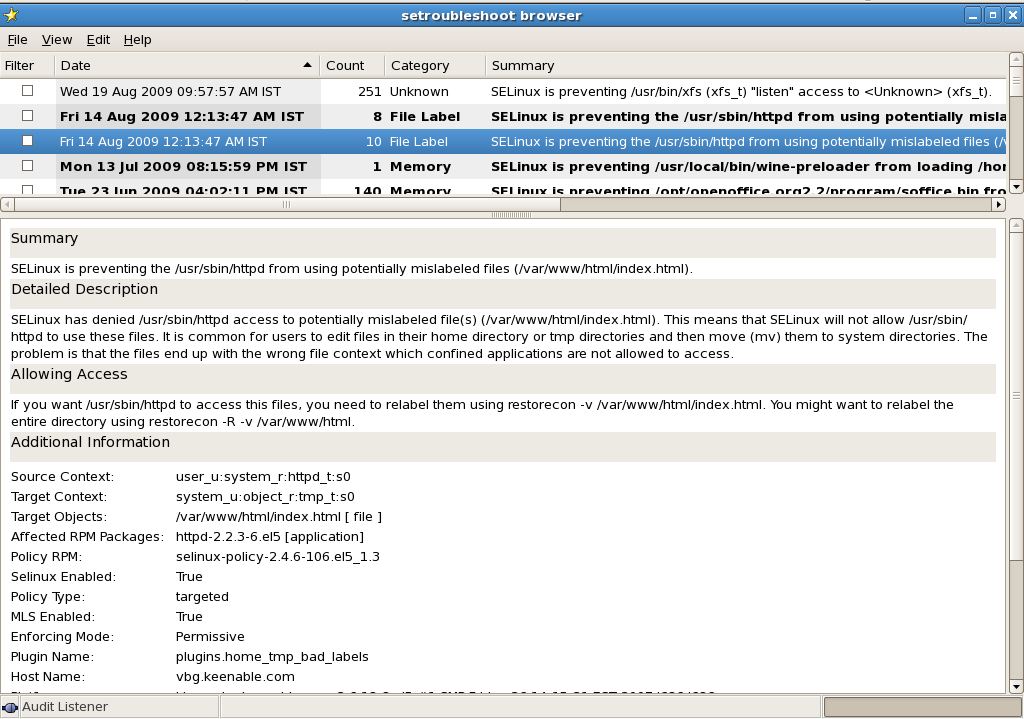
The setroubleshoot RPM also includes an init script called setroubleshoot. By enabling the setroubleshoot script on startup using the chkconfig utility, setroubleshoot runs as a daemon in the background. Every time an AVC denial occurs, a pop-up appears in the system tray (assuming you are working in the GUI mode). This helps systems administrators to troubleshoot SELinux errors on-the-fly.
At times, you might not be willing to choose the solution suggested by the sealert tool and would rather create your own allow rules in the SELinux policy. For example, I would want my Web server httpd to be able to read files of type tmp_t rather than restrict it to read only files of type httpd_sys_content_t.
In such situations, a new allow rule will have to be added to the Security Policy. This allow rule will permit a subject of httpd_t to read object files of type tmp_t.
The above would give you great flexibility in creating your own security environment and not just follow the standard policies that came with the system. At other times, you would require to create security policies for other applications that you may have installed on your system, for example, an Oracle database.
Do you need to build the entire SELinux policy for this? That would appear to be an uphill task for most systems administrators. Therefore, SELinux allows admins to create their own modules.
Instead of modifying the core policy, you can build modules of your own that can be loaded on top of the core policy. In these modules, you can declare your own types and rules.
In the next article in the series, we will look at creating SELinux modules, compiling them and loading them.
I would look forward to your feedback on the articles. Please feel free to drop me a mail for suggestions on improving the content and making it more useful.