






























































This comparison of WebAssembly with Docker uses both theory and hands-on tests. By running a simple program in both environments, we explore their performance, security, portability, and startup behaviour to understand how each fits into today’s software development landscape.
With modern software demanding faster launch times, smaller resource usage, and secure execution, two technologies stand out — Docker containers and WebAssembly (Wasm). Docker changed the way we build and ship applications by using lightweight, isolated environments called containers. On the other hand, WebAssembly — originally built for the web — has grown into a powerful, cross-platform technology that runs code quickly and securely.
Docker is a platform for developing, shipping, and running applications inside containers. These containers package an application and its dependencies together, providing consistency across environments. Containers use OS-level virtualisation and share the host OS kernel. Docker is widely used in DevOps, CI/CD pipelines, and cloud deployments for its ease of use and integration with orchestration tools like Kubernetes.
WebAssembly (Wasm) is a low-level binary instruction format designed for a stack-based virtual machine. It was initially developed to run code in web browsers with near-native performance, but it has since expanded far beyond that scope. With the introduction of standalone runtimes like Wasmtime, Wasmer, and support from Docker, Wasm is now a serious option for running lightweight, cross-platform workloads outside the browser.
Wasm allows developers to write code in high-level languages like C, C++, or Rust, and compile it into compact, fast, and secure .wasm binaries. These binaries can execute in a sandboxed environment — providing memory safety and system isolation by default — making them ideal for use in plugins, embedded systems, serverless functions, and edge computing.
Key differences between Docker and WebAssembly
|
Feature |
Docker container |
WebAssembly (Wasm) |
|
Startup time |
Slower (seconds) |
Fast (milliseconds) |
|
Binary size |
Large (MBs) |
Very small (KBs) |
|
Security model |
Namespace isolation |
Memory-safe sandbox |
|
Language support |
All languages |
Best for C, C++, Rust |
|
Portability |
OS-dependent |
Cross-platform bytecode |
Docker and Wasm: A comparison
Both Docker and Wasm offer mechanisms for packaging and running code, but they target different use cases. Docker is ideal for complex applications that need an OS environment, while Wasm excels in microservices, plugin systems, and edge computing where performance and security are critical. Comparing them helps developers make informed decisions on tool selection for specific tasks.
Use cases and limitations
Docker containers are suitable for backend APIs, databases, and full-stack services. Their rich ecosystem and support for all programming languages make them universal. However, they carry more overhead and startup latency. WebAssembly is ideal for running small, secure code snippets, such as in serverless functions, IoT devices, and embedded systems. Its current limitations include limited support for dynamic linking, multi-threading, and mature debugging tools.
Security considerations
Security is a critical factor in choosing between Docker and Wasm. Docker containers rely on OS-level isolation, using namespaces and control groups to sandbox applications. While effective, they still share the host kernel, making kernel-level vulnerabilities a concern. In contrast, WebAssembly runs in a strongly sandboxed environment with memory safety by design. Wasm restricts system access and prevents arbitrary memory reads/writes, making it inherently more secure for running untrusted code or small plug-ins.
Portability and deployment flexibility
Docker images are often tied to specific operating systems and processor architectures, which can complicate deployments across heterogeneous environments. Although multi-architecture Docker builds exist, they require additional configuration and image management. Wasm modules, however, compile into a platform-agnostic binary that runs identically on any Wasm runtime, regardless of OS or hardware. This makes Wasm an excellent choice for truly portable workloads in edge computing and browser-based applications.
Let us set up an environment to check which one performs better — Docker or Wasm.
Part A: Environment setup
Installing the required tools
To perform a fair and repeatable comparison, we need a common development environment with the following tools:
- Docker (with the ability to build and run containers)
- WASI SDK (to compile C programs to WebAssembly)
- Wasmtime (to execute .wasm binaries)
- Clang (or the Clang bundled with the WASI SDK)
- /usr/bin/time (to measure execution time)
After setting up these tools, verify that both the Docker version and Wasmtime version return valid outputs. This confirms your environment is ready.
Follow these steps to install the tools needed for this hands-on comparison.
Docker setup: Install Docker from the official site or use the command below (for Ubuntu):
$sudo apt update
$sudo apt install -y docker.io
$sudo usermod -aG docker $USER
Log out and log back in to apply the group change. Verify the setup by running:
$docker --version
WASI SDK setup: Download and extract the WASI SDK:
wget https://github.com/WebAssembly/wasi-sdk/releases/download/wasi-sdk-20/wasi-sdk-20.0-linux.tar.gz
mkdir -p $HOME/wasi-sdk
tar -xzf wasi-sdk-20.0-linux.tar.gz -C $HOME/wasi-sdk --strip-components=1
export WASI_SDK_PATH=$HOME/wasi-sdk
Add to .bashrc for persistence:
echo ‘export WASI_SDK_PATH=$HOME/wasi-sdk’ >> ~/.bashrc
Wasmtime setup: Install Wasmtime by following the steps below:
curl https://wasmtime.dev/install.sh -sSf | bash
export PATH=”$HOME/.wasmtime/bin:$PATH”
Make it permanent:
echo ‘export PATH=”$HOME/.wasmtime/bin:$PATH”’ >> ~/.bashrc
Time utility setup: Ensure you have /usr/bin/time:
sudo apt install -y time
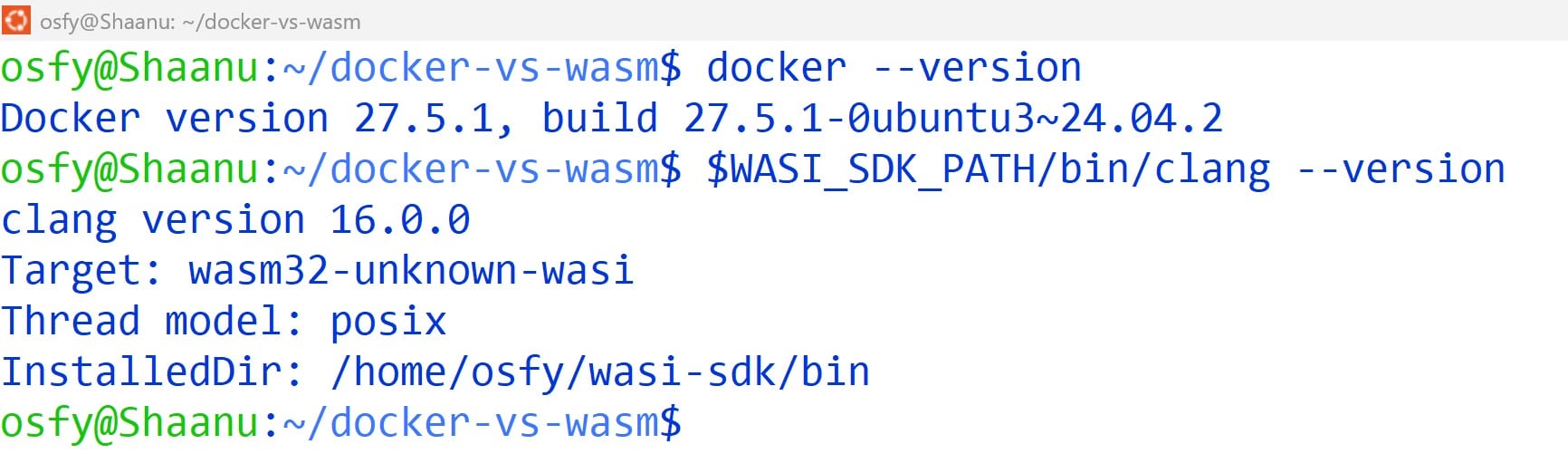
The installation was successfully verified with Docker version 27.5.1 and WASI SDK (Clang) version 16.0.0 on Ubuntu 24.04. as shown in Figure 1.
Part B: Sample application
For consistency, we use the same C source code to test both runtime environments. The program is a simple greeting message:
#include <stdio.h>
int main() {
printf(“Hello from Docker Container!\n”);
return 0;
}
This program is saved as hello-d.c and will be compiled into a Linux binary for Docker.
#include <stdio.h>
int main() {
printf(“Hello from Web Assembly !\n”);
return 0;
}
This program is saved as hello-w.c and will be compiled into a .wasm file for Wasmtime.
Part C: Running with Docker
Create a Dockerfile:
$nano Dockerfile
FROM gcc:latest
COPY hello-d.c /app/hello-d.c
RUN gcc /app/hello-d.c -o /app/hello
CMD [“/app/hello”]
Then build and run:
$ sudo docker build -t hello-container .

$sudo /usr/bin/time -f “Execution Time (Docker): %e seconds” docker run --rm hello-container
This produces the expected greeting and reports execution time.
Part D: Running with Wasm
Compile using the WASI SDK:
$WASI_SDK_PATH/bin/clang --target=wasm32-wasi -O2 -o hello.wasm hello-w.c
Run using Wasmtime:
/usr/bin/time -f “Execution Time (WASM): %e seconds” wasmtime hello.wasm
Part E: Comparative analysis
Refer to the following table and Figures 2 and 3 for the comparative analysis.
|
Metric |
Docker container |
WebAssembly (Wasm) |
|
Program output |
Hello from Docker Container! |
Hello from Web Assembly! |
|
Execution time |
0.84 seconds |
0.01 seconds |
|
Binary/Image size |
1.45GB (Docker image) |
4.4KB (hello.wasm file) |
|
Startup overhead |
High (container startup, GCC) |
Very low (Wasm runtime only) |
|
Command used |
docker run –rm hello-container |
wasmtime hello.wasm |
This hands-on comparison between Docker containers and WebAssembly (Wasm) illustrates the trade-offs and strengths of each technology. By using the same simple C program compiled and executed in both environments, we can assess measurable metrics such as execution time, binary size, and runtime behaviour.
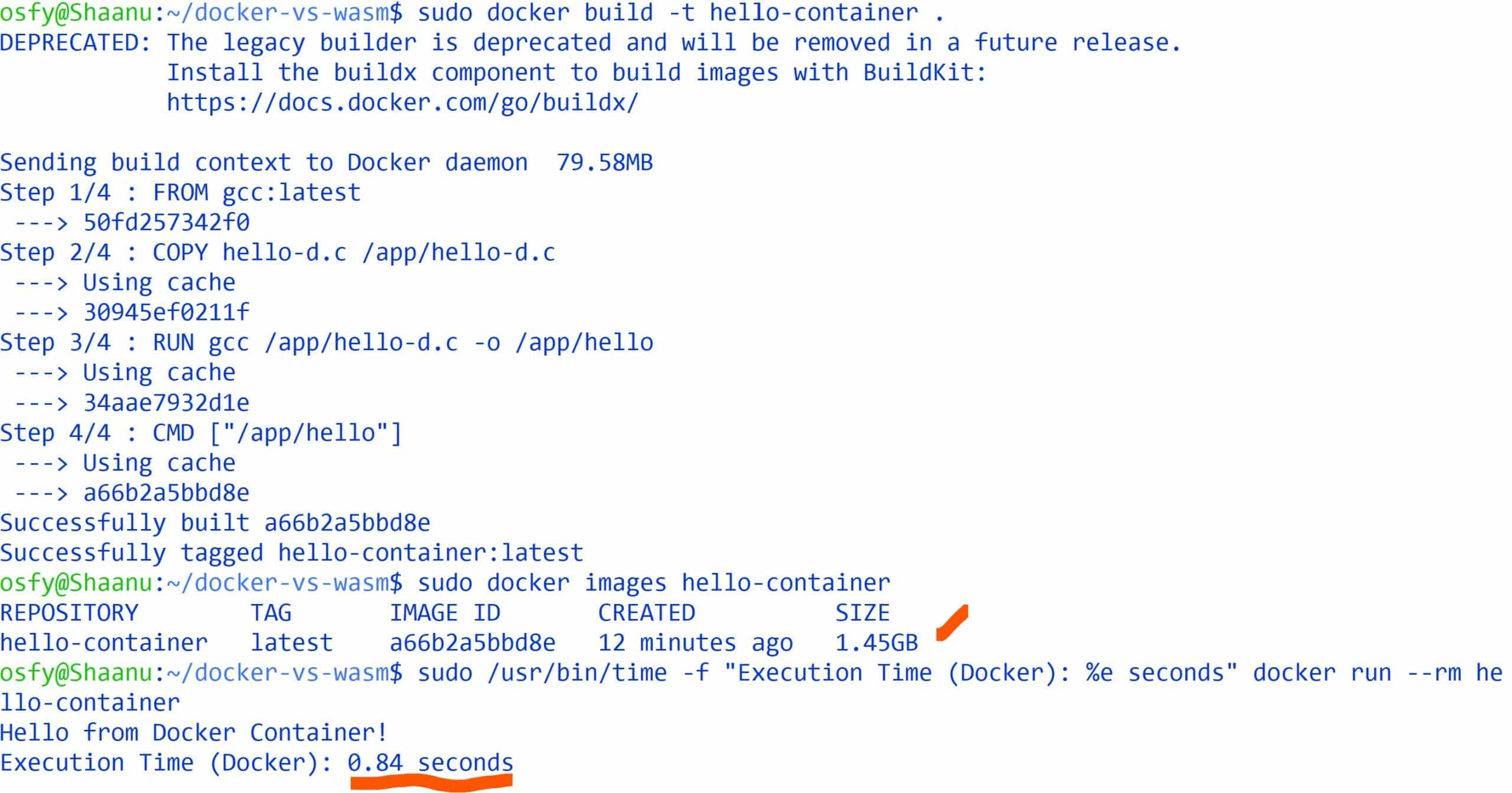
The Docker-based build, despite being straightforward to set up with a Dockerfile using the gcc base image, resulted in a significantly larger image (1.45GB) and a noticeably slower execution time (~0.84 seconds) as shown in Figure 2. This overhead stems primarily from the inclusion of a full Linux base image and the GCC toolchain — even for a lightweight program.
In contrast, the WebAssembly version, compiled with the WASI SDK and run using Wasmtime, produced a compact .wasm binary of just 4.4KB and an execution time of 0.01 seconds as shown in Figure 3. This demonstrates the enormous efficiency gains that Wasm offers for small, fast-starting, and isolated workloads. The result also reflects Wasm’s core design goals — low overhead, secure sandboxing, and cross-platform portability.

Looking forward, WebAssembly is expected to gain even more traction as the ecosystem matures. The addition of features such as multi-threading, garbage collection, and native support for more programming languages will enable developers to use Wasm for increasingly complex applications. With cloud platforms and edge environments embracing Wasm, we may soon see it integrated seamlessly into CI/CD pipelines and microservice architectures. Meanwhile, Docker will continue to evolve, possibly integrating Wasm runtimes and expanding its support for lightweight execution models. The future lies in hybrid solutions that combine the full-stack capabilities of containers with the speed and portability of Wasm.