





























































This new immutable Linux distribution eliminates system update anxiety and promises to make Linux desktop maintenance stress-free.
Picture this: You’re working on an important project when a system update notification appears. Do you install it immediately and risk breaking something, or postpone it indefinitely? For most Linux users, system updates remain a persistent source of anxiety. ShaniOS, a new Arch-based distribution, aims to transform this experience by making updates as safe and predictable as flipping a light switch.
The problem with traditional updates
Traditional Linux distributions rely on package managers like APT, DNF, or Pacman that modify the running system in place. While this approach works most of the time, it occasionally leaves systems in broken states—particularly when power outages occur during updates or conflicting packages are installed.
“I’ve witnessed too many systems break during updates, causing hours of downtime for users,” explains Shrinivas Vishnu Kumbhar, creator of ShaniOS and co-founder of Garuda Linux. “The solution isn’t to avoid updates—it’s to make them bulletproof.”
Enter blue-green deployment for desktops.
ShaniOS adopts a battle-tested DevOps technique called ‘blue-green deployment’ for desktop use. Rather than modifying your current system, it maintains two identical copies of your operating system on separate Btrfs sub-volumes labelled @blue and @green. During updates, changes are applied to the inactive copy, tested, and then you switch to the updated version on your next reboot.
If something goes wrong, you just switch back—the entire process takes less than a minute.
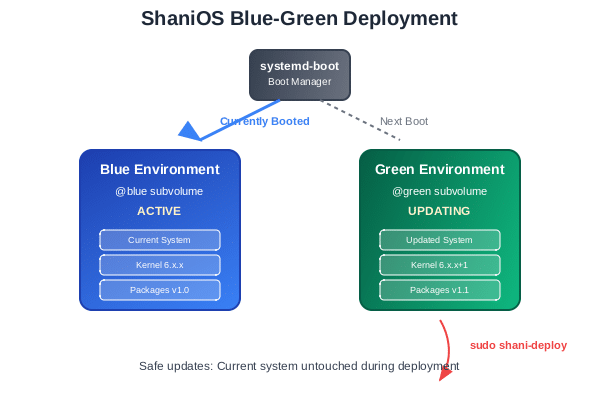
How it works
In ShaniOS, system updates are managed through a single command:
sudo shani-deploy
This command:
- Downloads updates to the inactive system copy.
- Apply them safely without affecting your running system.
- Configures the bootloader to use the updated copy.
- Provides instant rollback capability if the update doesn’t work properly.
Your applications, documents, and personal settings remain completely untouched throughout the process.
Applications: Isolated but integrated
Since the core system is immutable (read-only), applications require a different approach. ShaniOS employs two complementary strategies. These are:
Flatpak for desktop applications
Popular applications like Firefox, LibreOffice, and Visual Studio Code are installed via Flatpak, which sandboxes them from the system while maintaining full functionality.
flatpak install firefox
flatpak install libreoffice
Containers for development
For developers and power users, ShaniOS includes Distrobox, creating containerised environments that feel like native Linux installations. You can run multiple Linux distributions simultaneously—Ubuntu for one project, Fedora for another—without conflicts.
# Create an Ubuntu development environment
distrobox create --image ubuntu:22.04 --name dev-env

# Install development tools inside the container

distrobox enter dev-env
sudo apt install nodejs npm python3
Real-world benefits
For students and educators
Computer labs can update fearlessly without risking mid-semester disruptions. When updates cause issues, rolling back takes minutes instead of hours of reinstallation.
For developers
Different projects can utilise separate environments without interference. Your Python 2.7 legacy project won’t conflict with your Python 3.11 development work.
For home users
Eliminates pre-update backup anxiety. Your system either updates successfully or remains exactly as it was—no intermediate broken states exist.
Security by design
ShaniOS incorporates enterprise-grade security features like:
- Full disk encryption with LUKS2
- Secure boot support with signed UKIs
- Immutable system files that malware cannot modify
- Application sandboxing through Flatpak containers
- AppArmor security profiles for enhanced access control
- Firewalld integration for comprehensive network security management
It joins an expanding family of ‘immutable’ Linux distributions, including Fedora Silverblue and openSUSE MicroOS. Its Arch Linux foundation provides access to cutting-edge software while maintaining rock-solid reliability—a combination previously considered impossible.
As one of the notable new distributions emerging in 2025, ShaniOS represents active innovation in the immutable desktop space, with ongoing development and regular updates to its core components.

Getting started
ShaniOS is actively developed and available for download, with installation images ready for testing. The distribution is designed for straightforward installation on modern hardware.
The project welcomes contributors, particularly those interested in improving documentation, testing hardware compatibility, and developing container integration features.
System requirements are:
- Modern PC with UEFI support
- Minimum 32GB storage (64GB recommended)
- 4GB RAM minimum (8GB for development work)
As users increasingly demand reliability without sacrificing functionality, immutable distributions like ShaniOS represent the future of desktop Linux. By applying proven server technologies to desktop computing, they eliminate the traditional trade-off between stability and staying current.
Whether you’re a student, developer, or home user tired of update anxiety, ShaniOS offers a glimpse into a future where Linux desktop maintenance is finally stress-free.
| Project links Website and download: https://shani.dev Development: https://github.com/shani8dev Community: https://t.me/shani8dev Documentation: https://wiki.shani.dev |