




























































With the help of generative AI, Python libraries like SchemDraw, ngpsice and pandapower are simplifying the design and simulation of electrical and electronic circuits for research.
Generative AI is the buzzword today, with most companies trying to adopt it to automate their work, bring in a higher degree of accuracy in operations, and increase their productivity.
According to GrandViewResearch, the global market size of generative AI was US$ 16.8 billion in 2024 and is projected to reach US$ 109.4 billion by 2030. A report from MarketsAndMarkets.com forecasts the generative AI market to exceed US$ 890 billion by 2032.

The key application areas of generative AI are:
|
Using generative AI with Python for design and simulation of circuits
Generative AI is no longer limited to chatbots and content writing. It can now be used for circuit design, as well as the modelling and simulation of high-performance engineering applications.
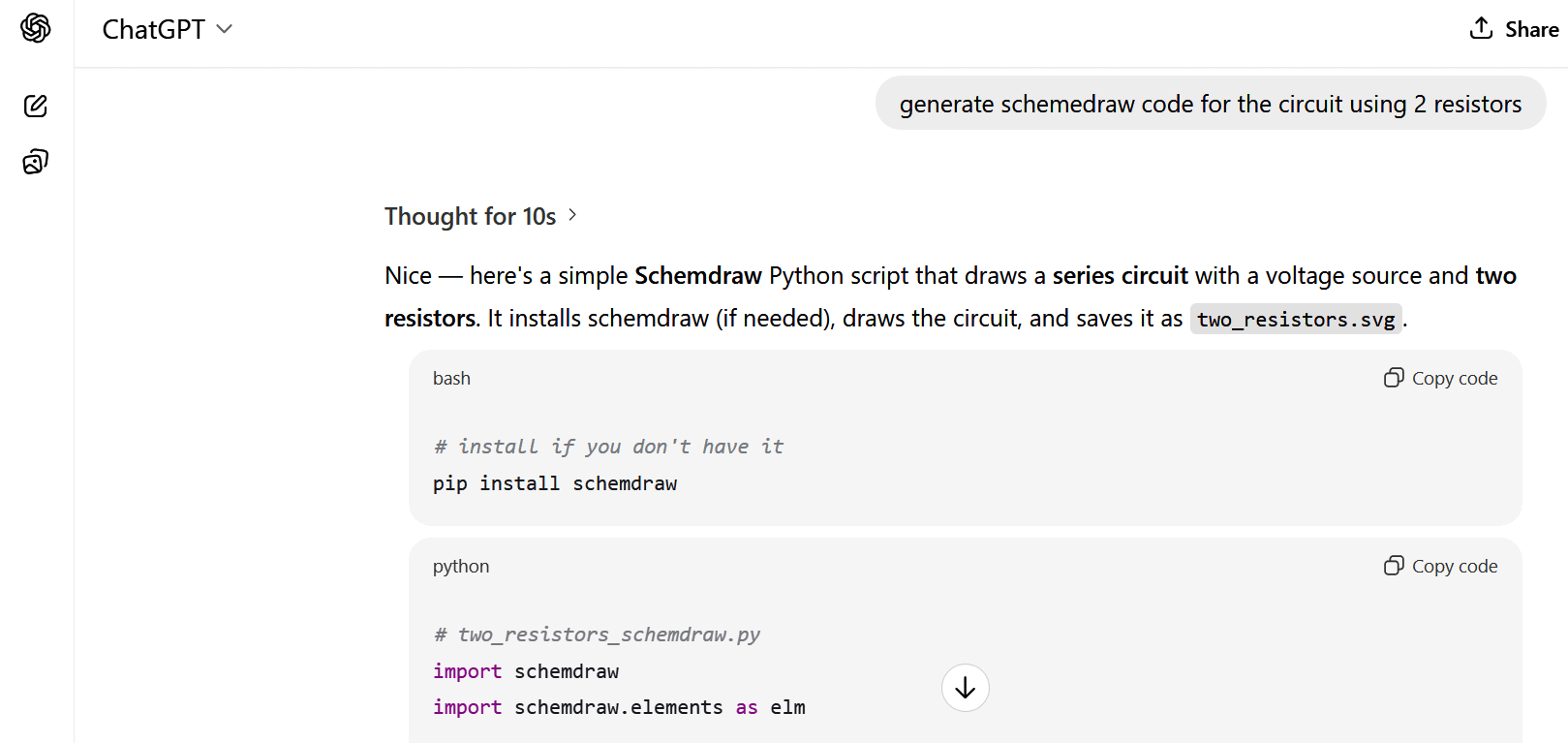
Python integrates a number of libraries that can be used to design and simulate circuits to help researchers as well as engineers predict their outcomes.
Table 1: How generative AI helps key Python libraries in circuit design
| Area | Python tools/ Libraries | How generative AI helps | Outcomes |
| Component selection | pandas, numpy, AI models | Suggests optimal components based on specs | BOM lists, alternatives, parametric choices |
| SPICE netlist generation | PySpice, skidl | Converts natural language to SPICE code | .cir netlists for simulation |
| Digital circuit design | nmigen, hdlparse | Creates combinational/sequential logic | Verilog/VHDL snippets, FSM diagrams |
| Circuit schematic generation | schemdraw, skidl | Auto-creates circuit diagrams from text prompts | Resistor networks, amplifiers, filters |
| Analog circuit design | PySpice, scipy.optimize | Generates topologies and optimises parameters | Op-amp designs, filters, oscillators |
| PCB layout suggestions | kicad_python, svgwrite | Provides placement/routing strategies | Suggested routing files, PCB scripts |
| Simulation automation | PySpice, matplotlib | Auto-runs multi-case simulations | Bode plots, time-domain results |
| Fault detection | sklearn, tensorflow | AI analyses signals to detect issues | Fault labels, warnings, insights |
| Optimisation of circuits | scipy, deap | Finds best values for components | Optimised RC, RLC, filter parameters |
| Power analysis | numpy, AI models | Predicts power issues, proposes fixes | Power curves, reduction suggestions |
| Thermal analysis | matplotlib, ML models | Estimates heat and suggests cooling | Heat maps, design tweaks |
| Signal processing support | scipy.signal, AI | Auto-designs filters and processing blocks | FIR/IIR designs, plots |
| EMI/EMC analysis | AI pattern models | Predicts noise sources, mitigation | Shielding suggestions, noise heatmaps |
| Embedded code generation | AI code models | Generates microcontroller code | Arduino, STM32 code |
| Testbench creation | pytest, AI models | Auto-generates tests for circuits | Test vectors, waveforms |
| Documentation creation | AI text generation | Creates design docs, reports | Circuit descriptions, manuals |
| Design validation | Custom Python validators | AI checks rule violations | DRC errors, corrections |
| Educational simulations | Python and AI chatbots | Generates learning simulations | Interactive circuit demos |
Generating circuits using SchemDraw
The SchemDraw (https://schemdraw.readthedocs.io/) script can be generated with a prompt using ChatGPT or any other AI-based tool. This script is executed on Google Colab or any online Python-based notebook for generating the circuit.
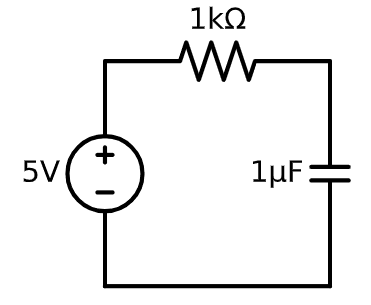
!pip install PySpice schemdraw matplotlib

import schemdraw

import schemdraw.elements as el

with schemdraw.Drawing() as d:

    d += el.SourceV().up().label(‘5V’)

    d += el.Resistor().right().label(‘1kΩ’)

    d += el.Capacitor().down().label(‘1μF’)

    # Connect back to source

    d += el.Line().left().tox(d.elements[0].start)

    d.draw()
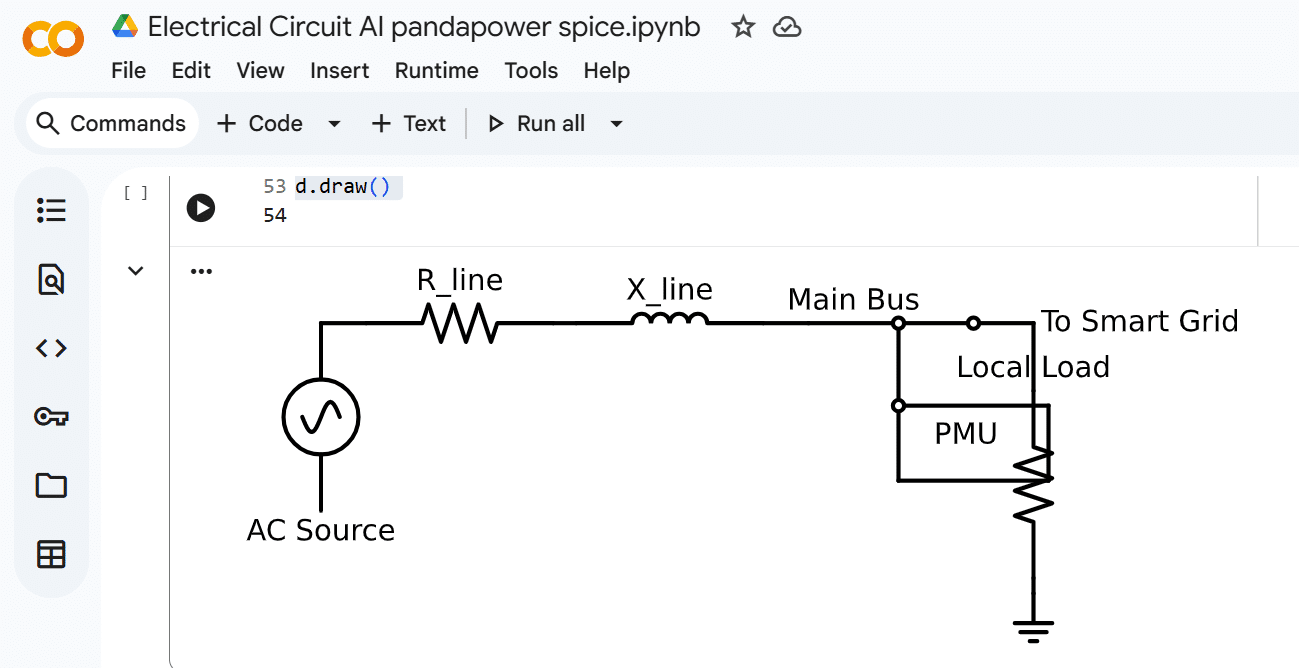
The code for the phase measurement unit (PMU) with smart grid is:
import schemdraw

import schemdraw.elements as els

dr = schemdraw.Drawing()

dr.config(unit=2.5)

# Source (AC supply)

dr += els.SourceSin().label(‘AC Source’, loc=’left’)

dr += els.Line().right().length(0.6)

# Transmission line impedance

dr += els.Resistor().right().label(‘R_line’)

dr += els.Line().right().length(0.3)

dr += els.Inductor().right().label(‘X_line’)

dr += els.Line().right().length(0.6)

# Bus

dr += els.Line().right().length(1.2).label(‘Main Bus’, loc=’top’)

dr += els.Dot(open=True) # Bus node

# Branch for PMU

d.push()

dr += els.Line().down().length(1.1)

dr += els.Dot(open=True)

# --- PMU drawn as a rectangle with lines ---

x, y = d.here # current position

w, h = 2.0, 1.0

# Draw rectangle

dr += els.Line().right().at((x, y)).length(w)

dr += els.Line().down().length(h)

dr += els.Line().left().length(w)

dr += els.Line().up().length(h)

# Add text label inside the rectangle

dr += els.Label().at((x + w/2, y - h/2)).label(‘PMU’, halign=’center’, valign=’center’)

dr.pop()

# Continue bus to Smart Grid

dr += els.Line().right().length(1.0)

dr += els.Dot(open=True)

dr += els.Line().right().length(0.8).label(‘To Smart Grid’, loc=’right’)

# Load connected at grid side

dr += els.Line().down().length(0.9)

dr += els.Resistor().label(‘Local Load’, loc=’right’)

dr += els.Line().down().length(0.2)

dr += els.Ground()

dr.draw()
Generating circuits using ngspice
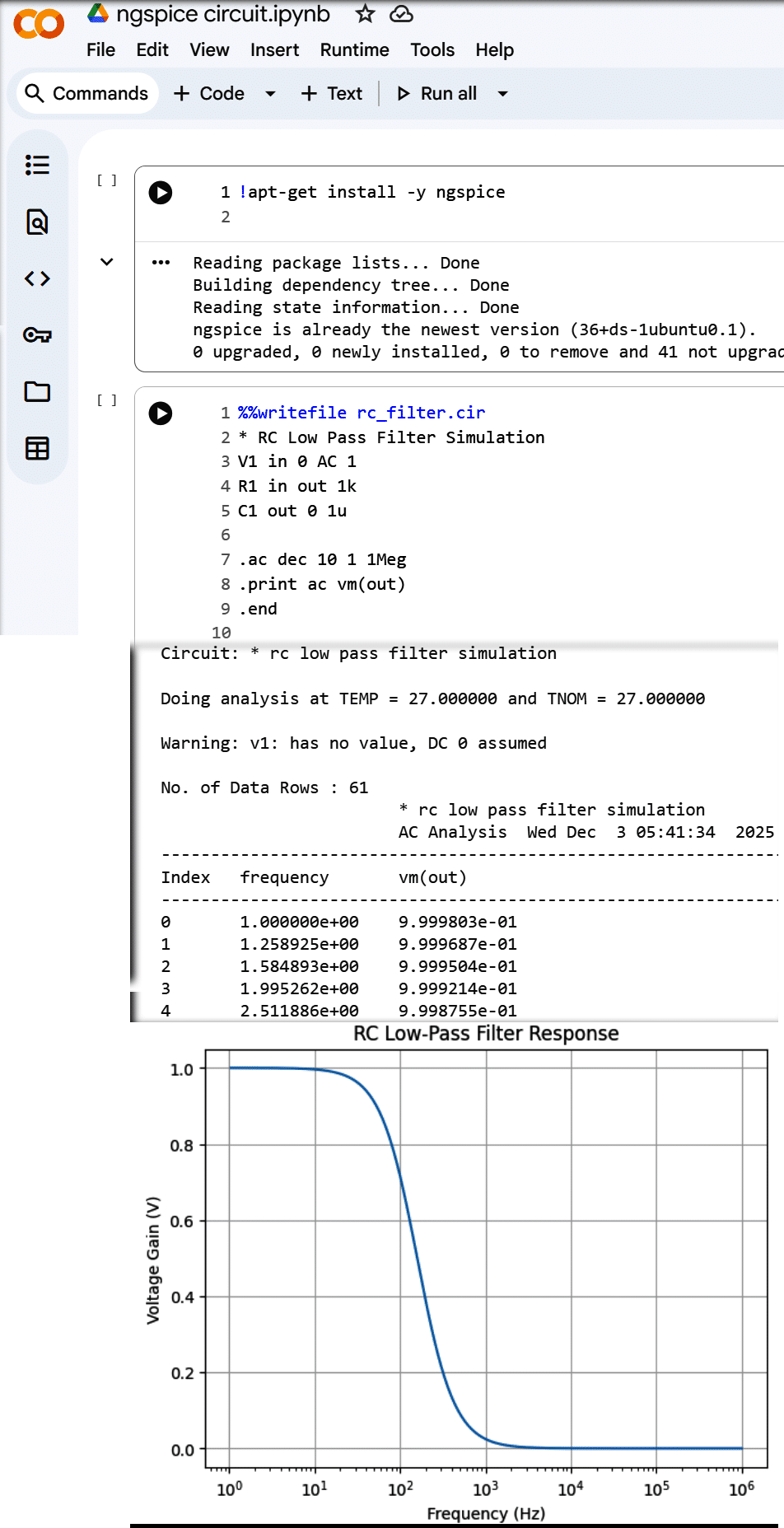
Ngspice (https://ngspice.sourceforge.io/) is a prominent library for the generation of a range of electrical and electronic circuits for carrying out research. Ngspice scripts can be generated using AI chatbots and executed on Google Colab (Figure 5).
Simulation of circuits using pandapower
Another free and open source library called pandapower (https://www.pandapower.org/) can be used for power system modelling and optimisation for better automation and performance. Just like ngspice and SchemDraw, it can be used to program any kind of complex circuit or model for research.
These script-based Python libraries can be used freely for modelling and simulating circuits for research without the need for any physical device. The resulting outcomes can be applied to make real-world projects truly efficient and productive.