






























































Let’s start with the ar utility, which is used to create, extract and modify archives. Its main use is in building static libraries, which we will examine with an example. We will create two .c files, with a function defined in each. The first is foo.c:
void foo(int *i){
	*i=*i+5;
}
The second is bar.c:
void bar(int *i){
	*i=*i*5;
}
Now, let’s compile these two files, using the -c GCC option to only create object files and not link them. After compilation, we have the object files, as shown:
$ gcc -c foo.c && gcc -c bar.c
$ ls *.o
bar.o  foo.o
Most of the time, we do not write code for a program from scratch, but use already available source or compiled code. For example, in C, we use the printf() function, from a library of pre-compiled functions.
Libraries are of two types, static and dynamic. Dynamic libraries need to be linked to at run-time; if one is missing, the application won’t run. In cases where we want a program to be “independent” and not require any other libraries to be installed on the system before it can run, we need to resolve external functions and variables at compile time, and copy them into the program binary. This removes the runtime dependency on the library. For this purpose, we create static libraries — archive files of one or more object files.
The ar tool can archive binary files, and is used to create such static libraries — actually, to create, modify and extract archive files. You may ask, what is the difference from the tar (tape archive) tool, which also can archive binary and other types of files, and that too, with compression? The answer is, ar creates a symbol table inside the output file, whereas tar doesn’t; ar yields a collection of symbols, and tar a collection of files. You can get more details from the ar man page.
So let’s create our static library. Its name should be in the format liblibraryname.a. The lib prefix is necessary, and the extension must be .a as per UNIX standards (.so is used for shared libraries):
$ ar -cvq libfoobar.a foo.o bar.o
a - foo.o
a – bar.o
$ file libfoobar.a
libfoobar.a: current ar archive
That’s it! Now, let’s use this library in a sample program. It’s better to create a header file declaring the functions defined in the library — foobar.h:
#ifndef _FOO_BAR_
#define _FOO_BAR_
void foo(int *);
void bar(int *);
#endif
Here is a sample program (test.c) that uses the static library:
#include<stdio.h>
#include"foobar.h"
int main(int argc, char **argv){
        int i=5;
        int j=10;
        foo(&i);
        bar(&j);
        printf("i = %d\n",i);
        printf("j = %d\n",j);
        return 0;
}
Let’s compile the sample program with gcc test.c -L./ -lfoobar; the -L option is for the library path, and -l for the library name.
GCC does not require the complete name of the library file; we can omit the prefix lib and the extension .a or .so (in case of a shared library), so let’s use -lfoobar. This command yields the output file a.out, which will have the contents of the static library compiled into the binary. You can even delete the libfoobar.a file now, and you can still run the output file:
$ ./a.out
i = 10
j = 50
So we have now built a static library with ar, and used it, statically compiled into a program.
The ld tool is important
Linking is the process of combining various pieces of code and data together to form a single executable image (that can be loaded) in memory. Linking can be done at compile time or runtime. GCC performs linking in the background; compile with the -v option, and you will see many background details, including the linking.
To understand what happened during compilation, you must know how to use a linker manually — so let’s compile a simple “Hello World” C program without linking it (as before, -c) with gcc -c hello.c. Let’s manually do linking of the resultant object file hello.o.
First, you must know that main() is the starting point of the program. Now, to make an executable, add some more object code, and the “C” library, into the final executable, with the following command:
$ ld -o hello -dynamic-linker /lib/ld-linux.so.2 /usr/lib/crt*.o hello.o -lc
Here, -o names the output file hello; -dynamic-linker will include the shared library symbols from ld-linux.so.2 in the executable; we will include hello.o and the other object files required, and finally include the C static library with -lc.
In the output executable hello, /usr/lib/crt*.o, hello.o, and the C library (-lc) are statically linked to (copied into) hello, and /lib/ld-linux.so.2 are linked dynamically.
How are ar and ld different?
The ar tool can only archive binary files statically, whereas ld links both shared and static libraries. Also, ld resolves symbols, which ar doesn’t. We don’t need to use ld manually, since GCC handles this — but to learn about what is in the background, we tried the above steps.
nm
The following diagram represents the memory segments of a C program (heap, data, code and stack), which C programmers must consider.
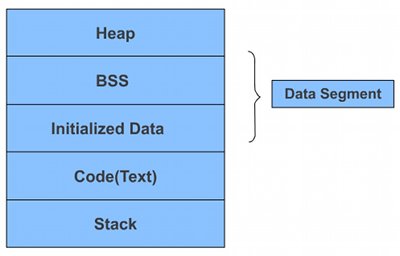
Different variables and symbols make their entry into different sections: dynamically allocated memory in heap, static and global variables in the data section; code and constants in the text part; and local variables in the stack section.
It’s hard to investigate which symbol goes to which section — so, many thanks to open source developers, for the amazing tool nm, which can dissect a.out and detail the symbols present in it.
Let’s try this with a sample program, test.c:
#include<stdio.h>
#include<stdlib.h>
#include<string.h>
/* Declare some global variables*/
int global_int1;
int global_int2=10;
char global_string[10];
const int const_int = 10;
void test1(void){
        global_int1 = 20;
        printf("[test1] global_int2 = %d\n",global_int2);
}
void test2(void){
        strcpy(global_string,"Hello");
        printf("[test2] global_int1 = %d\n",global_int1);
}
void test3(void){
        printf("[test3] global_string = %s\n",global_string);
}
int main(int argc, char **argv){
        test1();
        test2();
        test3();
        return 0;
}
Let’s compile the program with gcc test.c -o test and use nm to dissect it:
$ nm ./test
08049674 d _DYNAMIC
08049740 d _GLOBAL_OFFSET_TABLE_
0804855c R _IO_stdin_used
         w _Jv_RegisterClasses
08049664 d __CTOR_END__
08049660 d __CTOR_LIST__
0804966c D __DTOR_END__
08049668 d __DTOR_LIST__
0804865c r __FRAME_END__
08049670 d __JCR_END__
08049670 d __JCR_LIST__
08049764 A __bss_start
0804975c D __data_start
08048510 t __do_global_ctors_aux
08048370 t __do_global_dtors_aux
08048560 R __dso_handle
         w __gmon_start__
0804850a T __i686.get_pc_thunk.bx
08049660 d __init_array_end
08049660 d __init_array_start
080484a0 T __libc_csu_fini
080484b0 T __libc_csu_init
         U __libc_start_main@@GLIBC_2.0
08049764 A _edata
0804977c A _end
0804853c T _fini
08048558 R _fp_hw
080482b4 T _init
08048340 T _start
08049764 b completed.5963
08048564 R const_int
0804975c W data_start
08049768 b dtor_idx.5965
080483d0 t frame_dummy
08049778 B global_int1
08049760 D global_int2
0804976c B global_string
08048476 T main
         U memcpy@@GLIBC_2.0
         U printf@@GLIBC_2.0
080483f4 T test1
0804841d T test2
08048459 T test3
Let’s examine the output. First, where do the program functions go? Near the end of the output, you see the names main, test1, test2 and test3 with a T preceding them; T stands for the text section, in which all these functions are.
Next, the global and static variables: global_string and global_int1 are preceded with B, while we have R const_int and D global_int2. This is because the data section is divided into two further sections: Uninitialised Data or BSS (Block Start by Symbol), and Initialised Data. Both global_string and global_int1 are declared but not initialised, so they are in BSS (B); global_int2 has been initialised, and is in D, the Initialised Data section.
The storage of const_int is interesting. We declared it as a const variable, whose value won’t change throughout the program — a read-only variable. Thus, it is stored in R, the read-only data section.
There are options for nm — see the man page, and experiment, to understand object files. For example, -S will show the size of each symbol in hexadecimal form, as follows (a snippet of the output):
$ nm -S ./test
08049778 00000004 B global_int1
0804976c 0000000a B global_string
08048476 0000001e T main

















Quite interesting topic. nice explanations :)
pretty nice