





























































Find out how to use Kafka Connect and the pre-built connectors that come with it to connect Kafka to the external systems that businesses use, including databases and cloud storage. There are some best practices for using these connectors too.
These days, it’s hard to imagine any serious business not needing real-time data. Whether it’s live metrics from devices, syncing updates from databases, or tracking users as they click around an app, moving and handling data instantly has become non-negotiable.
Apache Kafka plays a major role here as it powers countless real-time systems. It’s fast, fault-tolerant, and handles crazy amounts of data. But while Kafka does a great job moving data, it doesn’t automatically connect to all the tools businesses use like databases, cloud storage, or search platforms.
That’s where Kafka Connect comes in as it acts like a bridge. With it, you can hook Kafka up to all sorts of external systems and don’t need to write a bunch of glue code to do it. You can just use pre-built connectors and get your data flowing in and out quickly.
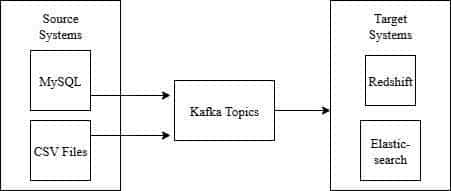
Kafka connectors are pluggable components of the Kafka Connect system that facilitate effortless data integration between Kafka and other systems. There are two types: source connectors, which extract data from systems such as databases or message queues and put it into Kafka topics, and sink connectors, which send data from Kafka to targets such as data warehouses, search indexes, or file systems. By removing the requirement for custom ingestion code, Kafka connectors make it easier to implement scalable, fault-tolerant pipelines in real-time and batch processing pipelines.
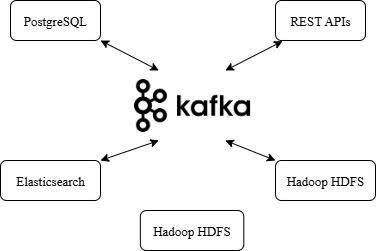
Anatomy of the Kafka data pipeline
Key components of the Kafka-driven pipeline
In a Kafka data pipeline, several important components work together to handle real-time streaming of data. The Kafka broker is an important component of the system that helps make it scalable and fault-tolerant by receiving and processing messages based on topics and partitions. Producers write Kafka, and consumers read it. To integrate Kafka with external systems, Kafka Connect is used to deploy connectors on workers (either distributed or standalone). Source connectors push data into Kafka, while sink connectors create a bridge-like configuration that sends data out to other systems. With this configuration, creating end-to-end data pipelines is easy and requires minimal custom code.
How Kafka Connect fits into a modern pipeline
Kafka Connect is a crucial component of contemporary data pipelines since it provides a simple and trustworthy bridge between Kafka and other systems, including databases, cloud storage, or analytics software. Kafka Connect handles data into and out of Kafka via source connectors to pull data in and sink connectors to push data out. In addition, it is compatible with real-time data processing engines such as Apache Flink, Spark, and ksqlDB, and accommodates both ETL and ELT setups. Kafka Connect’s flexibility, fault tolerance, and simplicity make it substantially easier to build high-performing, open source data pipelines with minimal custom code.
Best practices for using Kafka connectors
Deployment and configuration
For production workloads, Kafka Connect must be run in distributed mode to provide redundancy and horizontal scalability. Keep all connector configurations in version-controlled files for consistency and auditing purposes. When processing structured data formats such as Avro or JSON, integrate with a Schema Registry to enforce schemas and avoid data corruption. Optimise performance parameters such as batch.size, poll.interval.ms, and max.task for optimal throughput. Implement Dead Letter Queues (DLQs) to catch and examine records that do not process. Deploy automatically using Helm, Docker, or Kubernetes to make operations easier.
Selecting the right connector
Selecting the appropriate Kafka connector depends on the source or sink system, data format, and scalability requirement. Use open source, well-supported connectors such as Debezium for CDC, JDBC for relational databases, and FileStream for file-based integration. Analyse throughput, schema format compatibility, and fault-tolerance. Assess community support, update frequency, and documentation quality. Custom connectors may be required for complex or domain-specific requirements. Before being used in production, connectors should always be tested in a staging environment.
Table 1: Connector selection matrix
| Connector | Use case | Throughput | Compatibility | Schema support | Fault tolerance |
Community support |
| Debezium | Change data capture (CDC) | High | PostgreSQL, MySQL, MongoDB, etc |
Avro, JSON, Protobuf | Strong | Very active |
| JDBC | Relational DB ingestion | Medium | Any JDBC-compliant DB | Avro, JSON | Moderate | Active |
| FileStream | Local file system integration | Low | Plaintext, JSON, CSV | Minimal | Basic | Limited |
| MQTT | IoT sensor stream ingestion | Medium | MQTT brokers | JSON | Moderate | Niche |
Observability, error handling, and scaling
Monitoring pipelines
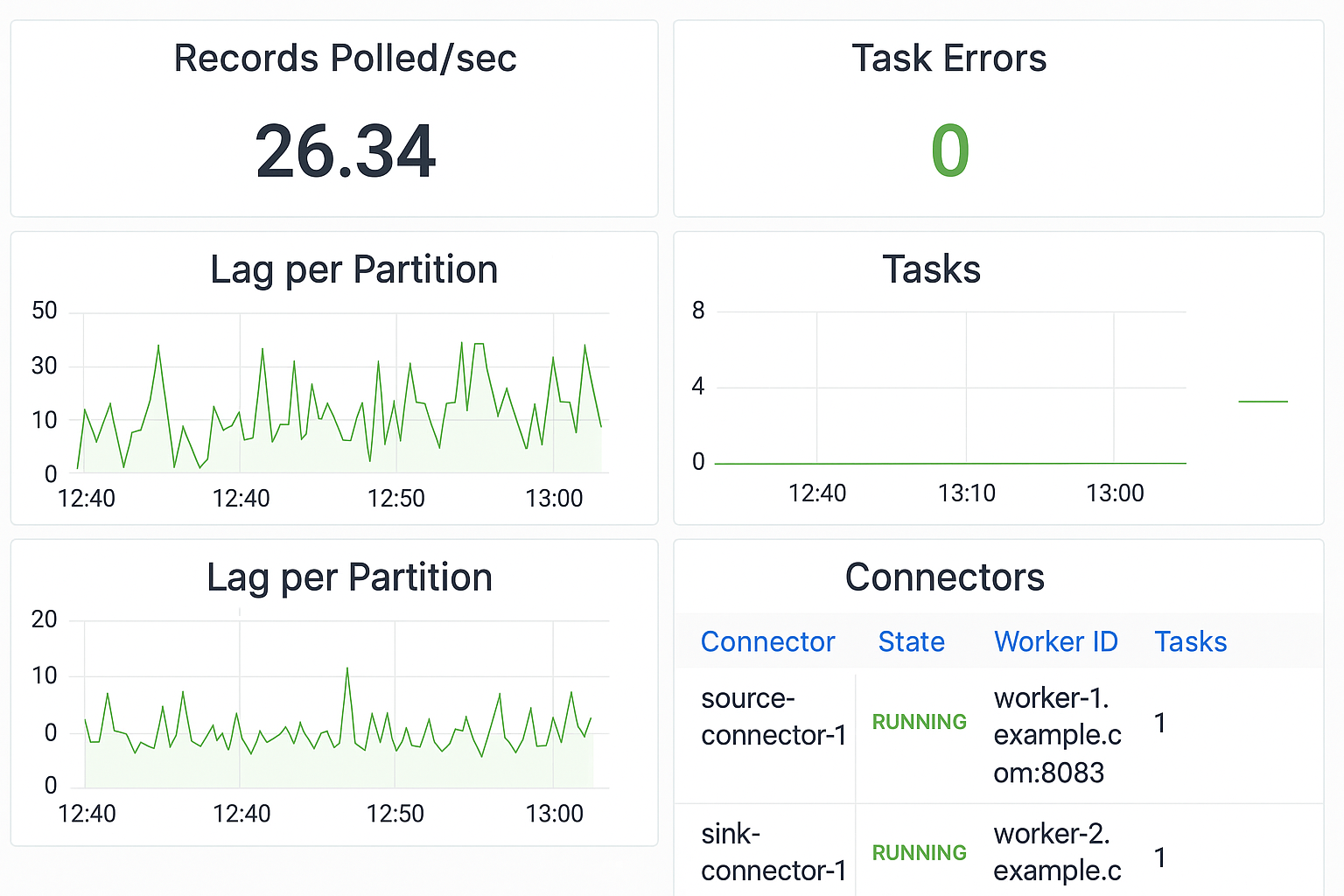
Monitoring ensures data pipelines remain healthy and performant. Tools like Prometheus and Grafana can be used to track critical metrics such as:
- Connector health
- Task performance
- Throughput rates
- Failure counts
By setting up DLQs, problematic records can be safely isolated and inspected without stopping the pipeline. Additionally, Kafka Connect provides a REST API for examining logs and connector status.
Handling failures and rebalancing
Fault tolerance is built into Kafka Connect. If a connector task fails, it can automatically retry or restart based on the error policy. DLQs help ensure faulty records don’t pollute downstream systems. The distributed nature of Kafka Connect allows automatic task redistribution across available workers during scaling events or outages, maintaining high availability.
Future of Kafka Connect
To meet the demands of cloud-native architectures, Kafka Connect is changing. Trends include:
- GitOps and Kubernetes: Managing connectors via Git workflows and container orchestration.
- Stream-native storage and serverless Kafka models.
- Pre-built managed connectors from platforms like Confluent and Redpanda to reduce operational overhead.
- Schema evolution support, better error diagnostics, and growing community involvement.
These trends point to a future where data integration is easier, more flexible, and deeply embedded in modern data infrastructure.
Kafka Connect serves as a cornerstone in building modern, real-time data systems. It makes integration easier, allows for scalability, and accommodates both streaming and batch data streams. Having a large ecosystem of connectors and established best practices means teams can build solid pipelines with confidence that underpin real-time analytics and operational insights.