





























































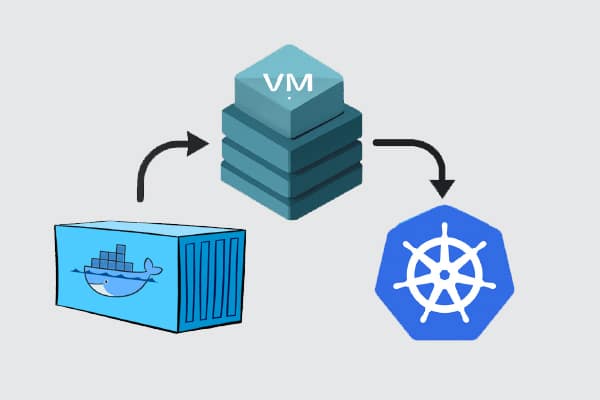
Let’s walk through the journey from traditional VMs to containers and, finally, to Kubernetes. We’ll keep things simple, explain the key concepts along the way, and share practical insights that can help you whether you’re new to DevOps or just curious about what’s powering today’s cloud-native apps.
Over the past decade, the way we build and deploy software has changed dramatically. Not long ago, developers and IT teams relied heavily on traditional servers and virtual machines (VMs) to run applications. While those tools served us well, they often came with challenges—like high resource usage, complicated scaling, and slow deployment cycles.
Containers have become one of the most exciting shifts in modern software development. They offer a lightweight, flexible, and efficient way to package and run applications. Whether you’re a solo developer working on side projects or part of a large team managing enterprise apps, containers help you move faster and more reliably.
But the story doesn’t stop with containers. As applications grow and become more complex, we need ways to manage them at scale—and that’s where Kubernetes steps in. Together, Docker and Kubernetes are helping developers rethink how software is built, shipped, and operated.
Virtual machines vs containers: Understanding the shift
Before we dive deeper into containers, let’s take a moment to understand where we came from—virtual machines (VMs).
A virtual machine is like having a computer inside your computer. You can run an entire operating system (like Linux or Windows) inside a VM, even if your actual computer is running something else. VMs are great for isolation—they allow you to run different apps without them interfering with each other.
But there’s a downside: they’re heavy. Every VM needs its own full operating system, which means more memory, more disk space, and slower boot times. Running just a few VMs on a laptop or server can quickly eat up resources.
Containers solve many of the problems VMs introduce. Think of a container like a lightweight box that holds your app and everything it needs to run—but without the baggage of an entire operating system. It shares the host system’s OS kernel, making it faster and more efficient.
Containers start up in seconds, take up less space, and are much easier to move between environments. For example, you can build a container on your laptop, push it to a cloud service, and be confident it will run the same way everywhere.
|
Feature |
Virtual |
Containers |
|
OS requirement |
Full guest OS per VM |
Share host OS kernel |
|
Startup time |
Minutes |
Seconds |
|
Resource usage |
Heavy |
Lightweight |
|
Portability |
Moderate |
Very high |
|
Use case fit |
Legacy apps, OS-level |
Modern app deployment, microservices |
Table 1: The differences between containers and VMs
So how does one choose between VMs and containers? Well, you can use VMs when you need to run different operating systems or need strong isolation (e.g., for security or regulatory reasons), and use containers when you want speed, simplicity, and portability—especially for modern applications that need to scale.
In short, containers don’t replace VMs completely, but for many use cases they offer a smarter, faster, and more developer-friendly way to run applications.
Getting started with Docker: Core concepts and workflow
So now that we understand why containers are such a big deal, the next question is: how do you actually use them? That’s where Docker comes in.
Docker is the most popular platform for building, running, and managing containers. It takes all the complexity of container technology and wraps it in a clean, developer-friendly toolset. Whether you’re working on a small web app or a large microservices project, Docker helps you package your application and run it anywhere with ease.
Key concepts in Docker
Let’s break down a few basic but important terms you’ll see when using Docker.
Image: Think of an image as a recipe. It defines everything your app needs—like the code, system libraries, dependencies, and runtime.
Container: A container is a running instance of an image. If the image is the recipe, the container is the actual dish made from it.
Dockerfile: This is a text file that contains instructions for building a Docker image. It might say: “Use Python 3.10, install these libraries, copy this code.”
Docker Hub: This is a public registry where you can find pre-made images (like Node.js, PostgreSQL, or Ubuntu) or upload your own.
Volumes: These allow you to store data outside your container so that it’s not lost when the container shuts down.
Containerising a simple app
Let’s say you have a basic Python app that prints “Hello, world.” With Docker, you could:
- Write a Dockerfile that tells Docker to use Python and run your script.
- Build an image using the command docker build -t hello-world.
- Run the container with docker run hello-world.
Boom! Your app is now running in an isolated, portable container that you could ship to another computer or deploy to the cloud.
What is Docker Compose?
Most real-world applications need more than one service. For example, your web app may need:
- A backend server
- A frontend UI
- A database
Docker Compose is a tool that lets you define and run multi-container apps using a simple docker-compose.yml file. It’s perfect for local development and testing complex setups without needing a full cloud environment.
Docker has made it incredibly easy to move from “it works on my machine” to “it works everywhere.”
By now, you’re probably excited about how easy Docker makes working with containers. But as with any powerful tool, it’s important to talk about security, and also recognise that Docker isn’t the only player in town.
How secure are containers?
Containers are generally more secure than running everything directly on your host machine, but they’re not foolproof. Here are a few key things to keep in mind.
Isolation isn’t absolute: Unlike virtual machines, containers share the host’s operating system kernel. If a container breaks out, it could potentially affect the host or other containers.
Images may contain vulnerabilities: If you’re pulling public images from Docker Hub, you may be using outdated libraries with known security issues.
Misconfigured containers can be risky: Running containers with root privileges or open ports can expose your system.
Here are some friendly tips to keep your containers safe.
Use trusted base images: Start with official or verified images whenever possible.
Scan images for vulnerabilities: Tools like Docker Scout, Trivy, and Snyk can analyse your image and flag known risks.
Avoid running as root: Use Docker’s rootless mode or configure your container to run as a non-root user.
Keep Docker and dependencies updated: Just like your phone or computer, Docker gets security updates too—don’t skip them!
Use minimal images: Smaller images like Alpine Linux reduce the surface area for attacks.
Exploring alternatives: Podman and containerd
While Docker is incredibly popular, there are other tools gaining traction, especially in enterprise and cloud-native environments.
Podman is a drop-in replacement for Docker (you can even use the same commands). It runs containers without a central daemon (which means fewer risks). Designed with rootless containers in mind from the start, it works well on Linux and now supports Windows and macOS too.
Containerd is a lightweight container runtime originally built by Docker but is now a core part of Kubernetes. It doesn’t have a full developer-facing CLI like Docker, but it’s used under the hood in many systems. It’s great for production systems where performance and control matter more than convenience. Here’s how to choose between Docker, Podman and containerd.
- Use Docker when you’re getting started, developing apps, or building locally.
- Use Podman if you need rootless security or a Docker replacement in restricted environments.
- Use containerd when building scalable, production-grade platforms (especially in Kubernetes clusters).
There’s no “one size fits all,” but the good news is: all these tools speak the same container language. Learning Docker gives you a strong foundation for working with any of them.
Scaling up with Kubernetes: Container orchestration demystified
So far, we’ve explored how containers help you package and run apps more efficiently—and how Docker makes it easy to work with them. But what happens when you go from running one container to running hundreds or even thousands? That’s where Kubernetes comes in.
Kubernetes (often shortened to K8s) is a powerful system for orchestrating containers. In simple terms, it helps you manage, scale, and automate the deployment of containerised applications. Think of it like a traffic controller, ensuring all your containers are running smoothly, restarting them if they crash, and balancing the load across your infrastructure. Originally developed by Google, Kubernetes is now maintained by the Cloud Native Computing Foundation (CNCF) and is used by companies of all sizes.
Core concepts (without the jargon)
Let’s break down some of the essential building blocks of Kubernetes.
Pod: The smallest unit in Kubernetes. A pod usually runs a single container, but it can run multiple if needed (they share resources).
Deployment: Tells Kubernetes how many copies (or ‘replicas’) of your app to run and how to update them safely.
Service: A stable way to access your pods. Even if the pods change, the service keeps the app reachable.
Ingress: Manages external access to your services, like routing traffic from a browser to your backend.
These concepts may sound a bit abstract at first, but they give Kubernetes the flexibility to manage apps of any size.
A simple real-world example
Let’s say you’re deploying a basic website with a backend and a database. In Kubernetes, you could:
- Create a deployment for your web server.
- Create another deployment for your database.
- Expose the web server using a service.
- Route external traffic using an ingress.
All of this is described in simple YAML configuration files. For example, a tiny snippet to deploy a container may look like:
apiVersion: apps/v1
kind: Deployment
metadata:
name: my-app
spec:
replicas: 3

selector:

matchLabels:

app: my-app

template:

metadata:

labels:

app: my-app

spec:

containers:

-name: web

image: my-image:latest

ports:

containerPort: 80
This tells Kubernetes: ‘Run 3 copies of my app using this image, and expose port 80’.
Docker + Kubernetes = Cloud-native power
Kubernetes doesn’t replace Docker—it builds on top of it. You still use Docker (or an alternative like containerd) to create and run containers, but Kubernetes helps you manage them at scale, across clusters, in cloud or on-premises environments.
Whether you’re deploying to AWS, Azure, Google Cloud, or your own servers, Kubernetes helps ensure your app stays up, available, and adaptable.
Modern DevOps and GitOps with containers
Now that we’ve covered how containers and Kubernetes work together, let’s look at how they fit into the bigger picture of software delivery. In today’s fast-moving tech world, developers need ways to ship code quickly, safely, and repeatedly. That’s where DevOps and GitOps come in.
DevOps is more than just a buzzword—it’s a mindset and a set of practices that bring developers and operations teams together. The goal? Deliver software faster and with fewer bugs.
With containers, DevOps becomes even smoother because your app and its environment are bundled into a portable unit that behaves the same everywhere.
Containers in the CI/CD pipeline
CI/CD stands for continuous integration and continuous deployment. Here’s how containers fit into that flow:
- The developer writes code and pushes it to GitHub.
- A tool like GitHub Actions, Jenkins, or GitLab CI kicks off a pipeline.
- The app is built into a Docker image.
- The image is tested, scanned for vulnerabilities, and pushed to a Docker registry.
- Kubernetes pulls the latest image and updates the app automatically.
With this setup, you can go from code change to live update in production in minutes, with full automation and traceability.
If DevOps is the foundation, GitOps is the next level. Instead of manually configuring your servers or clusters, GitOps treats your infrastructure as code. Here’s how it works:
- All your app configuration and Kubernetes deployment files are stored in Git.
- A tool like ArgoCD or Flux watches your Git repo.
- When changes are committed (e.g., a new version of your app), the tool automatically syncs those changes to your Kubernetes cluster.
In other words, Git becomes the source of truth, and your cluster always reflects what’s in your Git repo.
A simple example workflow
Let’s say you’re working on a web app. Here’s what your modern DevOps + GitOps workflow may look like:
- You push an update to GitHub.
- GitHub Actions builds and tests your Docker image, then pushes it to Docker Hub.
- Your deployment YAML file in Git is updated with the new image tag.
- ArgoCD sees the change and updates your Kubernetes deployment.
- A few seconds later, your app is live with the new changes—no manual steps needed!
This kind of automation is incredibly powerful, especially for teams working with microservices or multiple environments (like dev, staging, and production).
With containers, Kubernetes, and GitOps practices, teams can ship features faster, recover from failures quickly, track every change, and scale with confidence. It’s a big part of why container-native DevOps is becoming the new normal across industries.
Over the past few years, the way we build and run software has changed dramatically—and containers have been at the heart of that shift. What started with virtual machines has now evolved into something faster, lighter, and far more adaptable. Containers, with tools like Docker, have made it easier than ever to develop, test, and ship applications across different environments. And with Kubernetes, managing those containers at scale has become not only possible but manageable.
Whether you’re a developer just starting out, a student exploring infrastructure, or a seasoned engineer looking to modernise workflows, containers offer an exciting path forward. Start small—try Docker on your laptop, deploy a test app, and write your first Kubernetes YAML file. The tools are open, the communities are helpful, and the opportunities are endless.
So go ahead—pull an image, spin up a container, and take your first step into the world of modern infrastructure.