


























































Here’s a comprehensive guide to how you can use OpenVAS to fix potential security issues before they crop up.
In an era where organisations gravitate towards new technologies, finding and fixing security weaknesses is mandatory. The process of identifying potential problems before these can be exploited by attackers is known as vulnerability analysis.
One of the most common open source tools used for this is OpenVAS (Open Vulnerability Assessment System), which is part of the Greenbone Vulnerability Management (GVM) framework. Let’s see how we can use this tool effectively.
Installing and accessing OpenVAS
First, we must have Docker on our system. If it’s not already installed, let’s open a terminal and run the necessary commands to set it up.
$ sudo apt install docker.io
We can now use a single command to download the OpenVAS image and start it as a container.
$ sudo docker run -d -p 443:443 --name openvas mikesplain/openvas
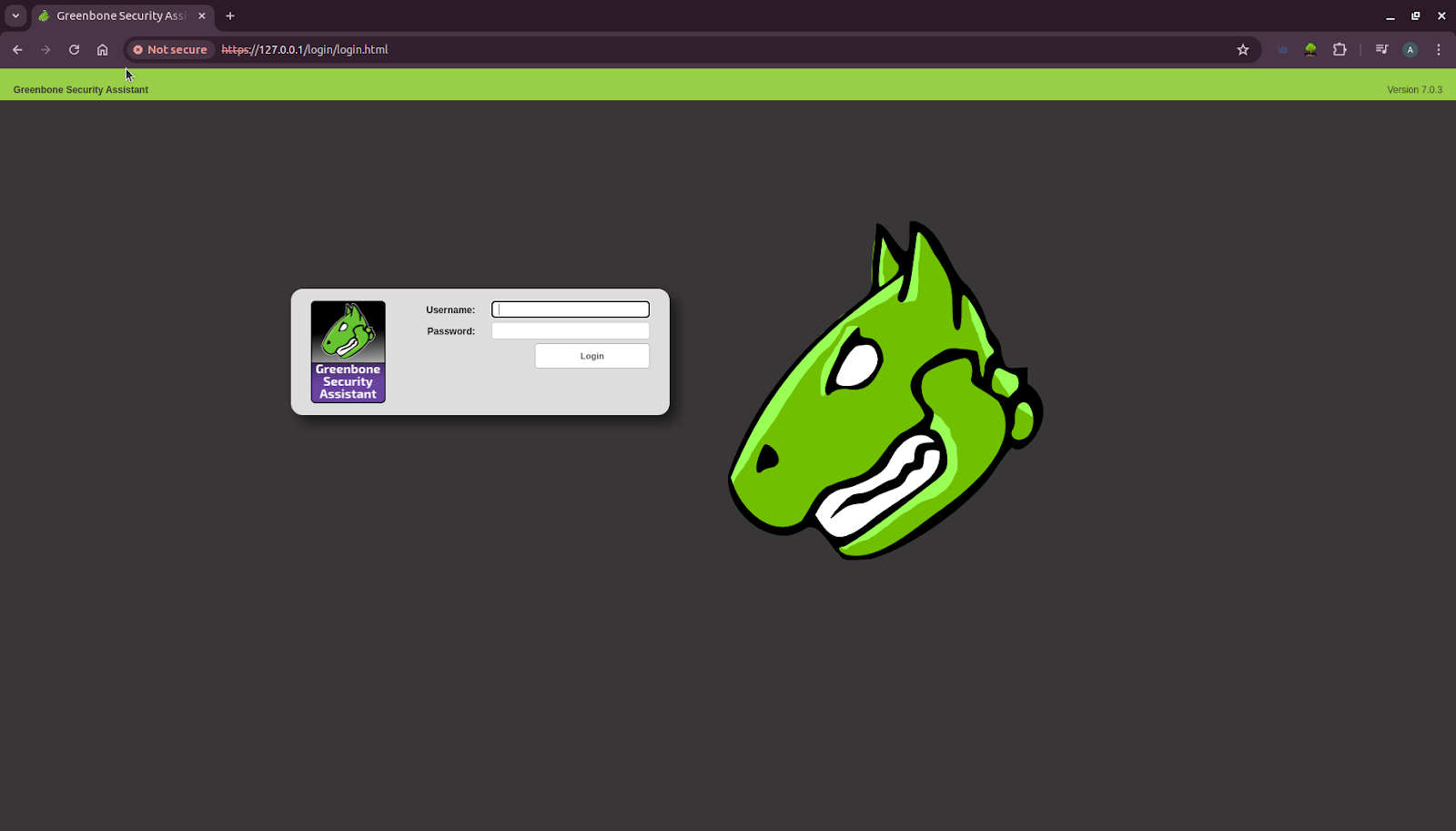
Open a browser window and type https://127.0.0.1 for the login page (as shown in Figure 1). Enter the username as admin and password also as admin. The interface looks like what’s shown in Figure 1. We can change the username and password later.
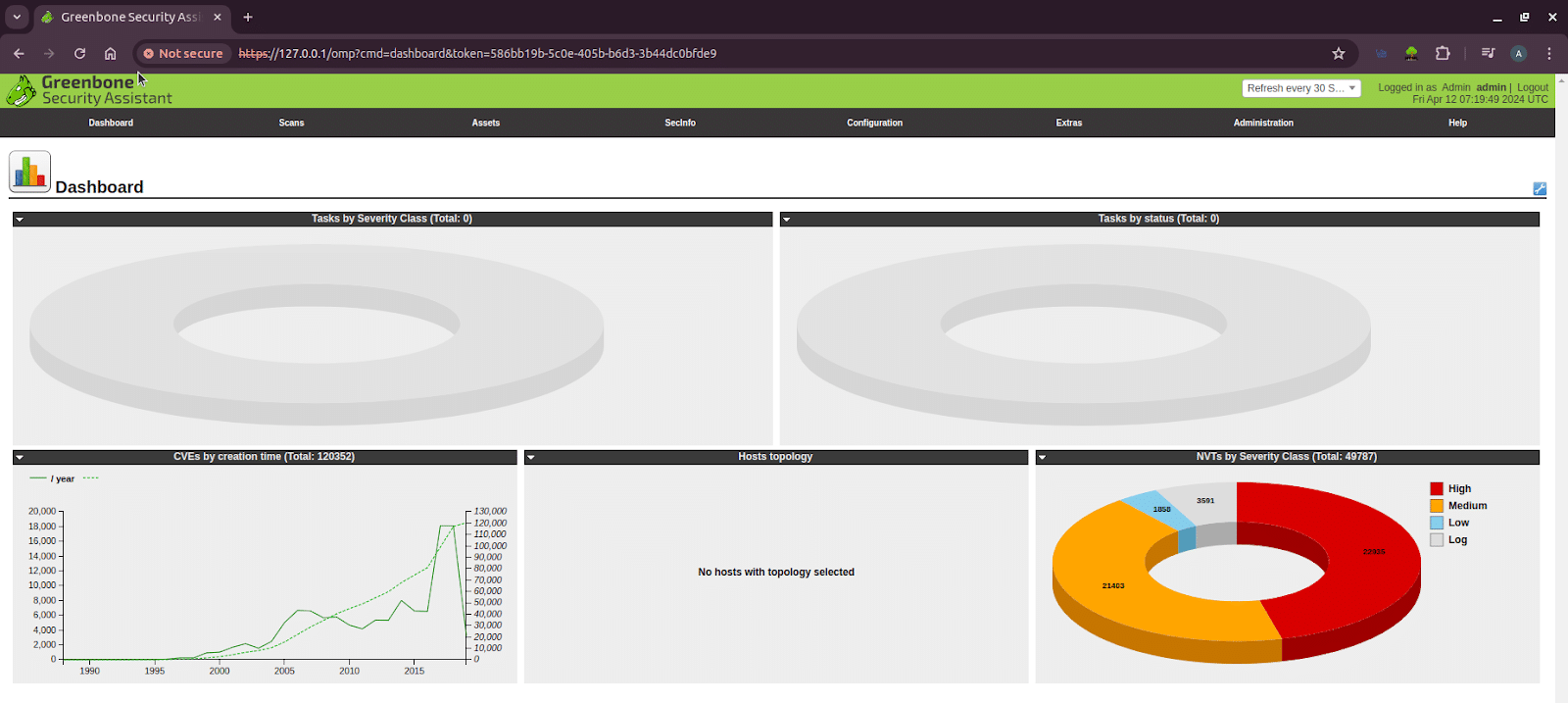
After logging in, the interface looks like what is shown in Figure 2.
Performing a vulnerability scan
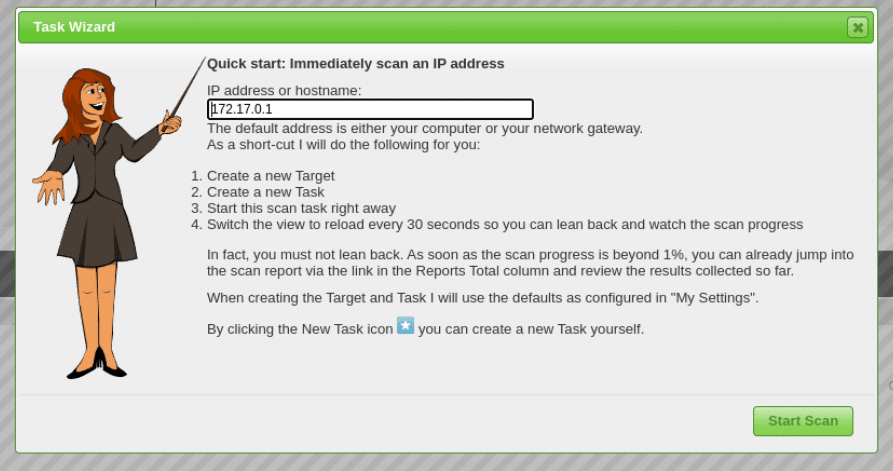
To perform a vulnerability scan on a target system to identify potential security vulnerabilities, click on the magic wand icon on the top left. We get the task wizard working as shown in Figure 3. Then we can enter the IP address in the text box. In this demo, I tested for vulnerabilities with two IP addresses — 172.17.0.1 and a vulnerable public IP address 45.33.32.156. Now click on the Start scan button.
Analysing scan results
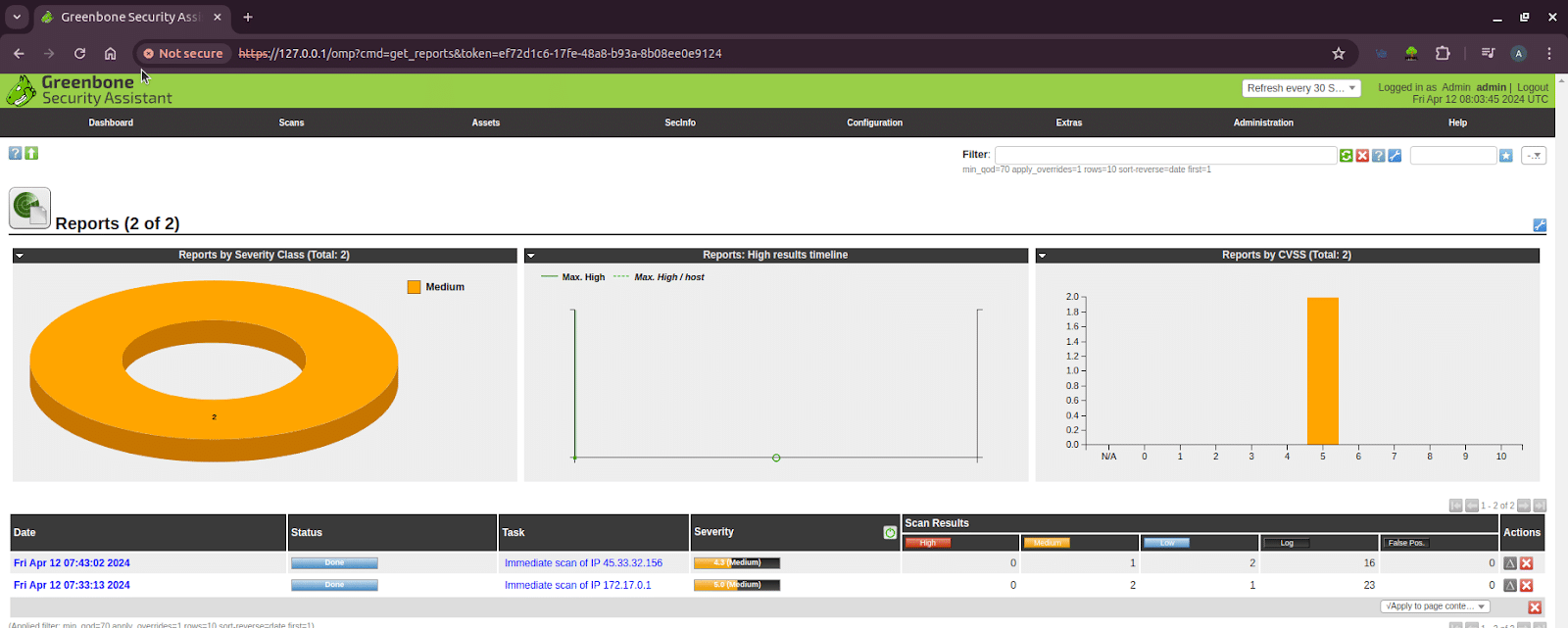
After the scans are complete, the dashboard provides a high-level overview. The results are prioritised by severity (e.g., High, Medium, Low), allowing you to focus on the most critical issues first. As seen in Figure 4, the scan on the public IP address revealed several medium and low-severity vulnerabilities. Let’s drill down into the specifics to understand their potential impact.
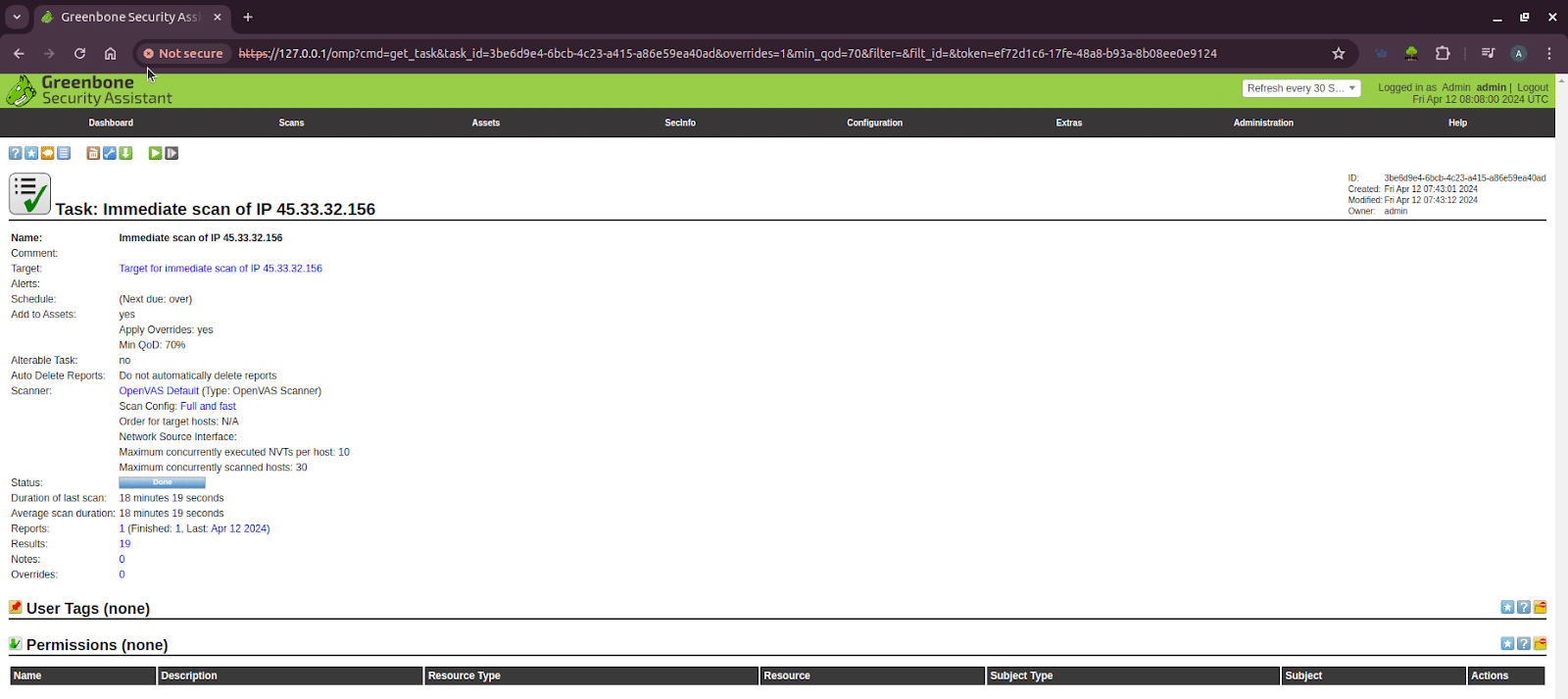
A sample task detail for the IP address 45.33.32.156 is shown in Figure 5. This detail can be obtained by clicking on the name of the task. The most important result is that the scan identified 19 potential security findings, which are now ready to be analysed to assess their risk and determine the necessary fixes.
First, let us prioritise the vulnerabilities based on the levels of severity. Click on the number of vulnerabilities (here, 19) to get the page as shown in Figure 6. This page can also be reached by clicking the main ‘Scans’ tab and selecting ‘Results’ from the dropdown menu, which typically shows an aggregated list of all the findings from all scans.
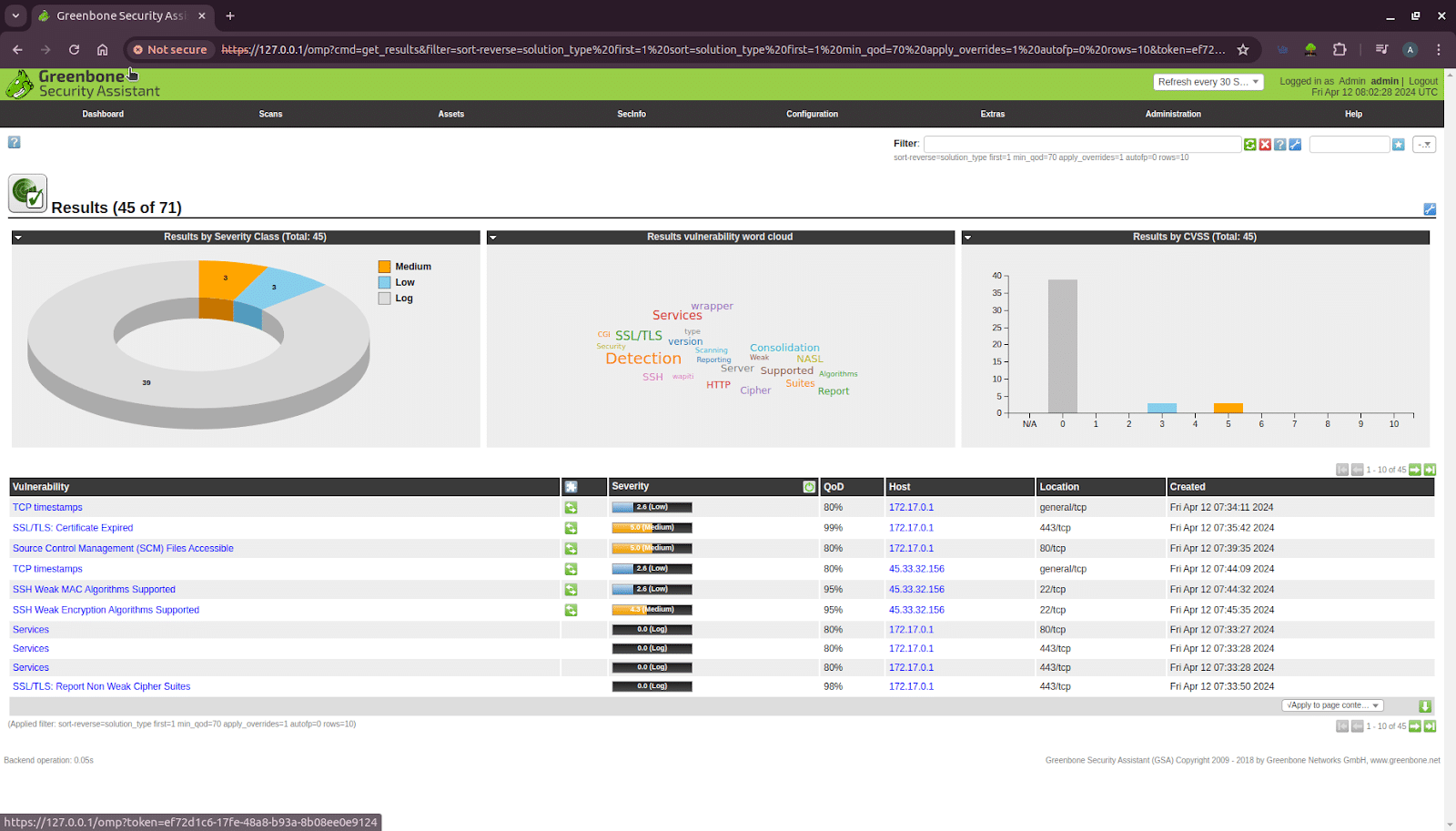
This results page (as shown in Figure 6) provides a dashboard that visually summarises all detected vulnerabilities, immediately highlighting that the majority are of Medium and Low severity with no critical threats. The problems are mostly caused by wrong settings for things like SSL/TLS and SSH (for example, using old certificates). Below the dashboard, a detailed list specifies each vulnerability, its severity score, and the affected host. The clear action plan is to use this information to prioritise and remediate the Medium-severity issues first, addressing the most significant risks before moving on to hardening the system against lower-level findings.
Common vulnerabilities and their impact
The vulnerabilities found during the scan that have an impact on the host are shown in Figure 7.
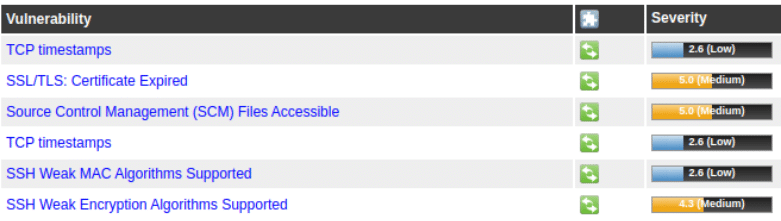
The impact of these vulnerabilities is as follows.
TCP timestamps
Exposure of TCP timestamps can lead to fingerprinting attacks, where an attacker can determine the operating system of a target system based on its TCP timestamp behaviour. This information can be used to launch more targeted attacks against systems, potentially exploiting known vulnerabilities in specific operating systems.
SSL/TLS certificate expired
Expired SSL/TLS certificates can result in insecure connections between clients and servers. Users may encounter warning messages in their browsers, potentially leading to distrust of the website. Attackers could exploit this vulnerability to intercept or manipulate communication between the client and server, leading to data breaches or other malicious activities.
SCM files accessible
Exposing source code management (SCM) files can lead to the disclosure of sensitive information such as credentials, API keys, or intellectual property. Attackers can use this information to gain unauthorised access to systems, escalate privileges, or conduct further attacks against the organisation.
SSH weak MAC algorithms supported
Weak message authentication code (MAC) algorithms can be exploited by attackers to tamper with SSH traffic, leading to data integrity violations. Attackers can potentially execute man-in-the-middle attacks, intercepting and modifying SSH communications without detection. This can lead to unauthorised access to sensitive systems and data.
SSH weak encryption algorithms supported
Weak encryption algorithms in SSH can be exploited by attackers to decrypt intercepted SSH traffic. This can lead to the exposure of sensitive information, including authentication credentials, session data, and potentially confidential business information. Attackers could use this information to gain unauthorised access to systems or conduct further attacks within the network.
Mitigation strategies
TCP timestamps:
- Disable TCP timestamps if these are not required for specific applications or services.
- Implement network filtering to block external access to TCP timestamps where possible.
- Regularly update and patch systems to mitigate known vulnerabilities associated with TCP timestamps.
SSL/TLS certificate expired:
- Implement a robust certificate management process to ensure certificates are renewed before expiration.
- Use monitoring tools to alert administrators about upcoming certificate expirations.
- Employ certificate transparency logs to detect unauthorised issuance of certificates for your domain.
- Utilise technologies such as HTTP Strict Transport Security (HSTS) to enforce secure connections and mitigate the impact of expired certificates.
SCM files accessible:
- Implement access controls and permissions on SCM repositories to restrict access to authorised personnel only.
- Regularly audit and review access logs for SCM repositories to detect unauthorised access attempts.
- Encrypt sensitive information stored in SCM files to protect it from unauthorised disclosure.
- Utilise tools and services that automatically scan repositories for sensitive information and potential vulnerabilities.
SSH weak MAC algorithms supported:
- Disable weak MAC algorithms in SSH configurations and only allow the use of strong, cryptographically secure MAC algorithms.
- Regularly review and update SSH configurations to ensure they adhere to security best practices.
- Implement network segmentation and access controls to limit SSH access to authorised users and devices.
- Monitor SSH traffic for signs of malicious activity, such as unauthorised access attempts or unusual authentication patterns.
SSH weak encryption algorithms supported:
- Disable weak encryption algorithms in SSH configurations and only allow the use of strong, modern encryption algorithms.
- Regularly update SSH server software to ensure it supports the latest encryption standards and security patches.
- Utilise tools and services that automatically audit SSH configurations for compliance with security best practices.
- Implement multi-factor authentication (MFA) for SSH access to add an extra layer of security beyond password-based authentication.
Best practices for organisations
To build an effective vulnerability management programme, an organisation must establish formal policies with clear responsibilities, supported by a continuously updated inventory of all IT assets classified by their importance. This framework should guide a cycle of regular, automated vulnerability scans, with a structured remediation process that assigns clear ownership and timelines. Patching and remediation efforts must be prioritised to focus on the vulnerabilities that pose the greatest risk and impact critical systems. This entire technical process should be reinforced by providing ongoing security training to all employees, fostering collaboration between stakeholders and having a well-tested incident response plan ready. Finally, the programme’s effectiveness must be continuously monitored and evaluated to drive constant improvement.
Overall, a proactive approach to security that includes regular updates, strong access controls, encryption, and monitoring is essential to effectively mitigate these vulnerabilities and reduce the risk of exploitation. Vulnerability analysis plays a crucial role in maintaining the security posture of an organisation’s IT infrastructure by identifying and addressing weaknesses that could be exploited by malicious actors.
The importance of vulnerability analysis is multifaceted: it helps prevent costly data breaches, thereby saving money and protecting the company’s reputation, while also ensuring compliance with legal and regulatory requirements. By treating it as a continuous process rather than a one-time check, organisations can constantly improve their defences, building a resilient security posture that defends against ever-evolving cyber threats.