Explore the end-to-end process of setting up a continuous deployment workflow using Docker Hub and GitHub Actions—two powerful tools that, when combined, enable seamless automation from code commit to deployment.
Continuous deployment (CD) is a pillar of modern software engineering. By automating the journey from code commit to production, CD ensures faster delivery, reduced human error, and a streamlined development workflow. It empowers teams to ship small, reliable updates frequently, respond swiftly to feedback, and maintain a high standard of software quality.
Beyond just speed, CD fosters a culture of accountability, collaboration, and continuous improvement. Developers gain confidence through immediate validation, businesses gain agility in meeting market demands, and users enjoy faster access to new features and fixes.
When paired with continuous integration (CI) and continuous delivery, CD completes the trio that forms the backbone of DevOps and agile practices. It encourages test-driven development, infrastructure as code, and a mindset focused on automation and innovation.
Adopting CD isn’t just a technical shift—it’s a cultural evolution that brings your teams closer to building software that truly delivers.
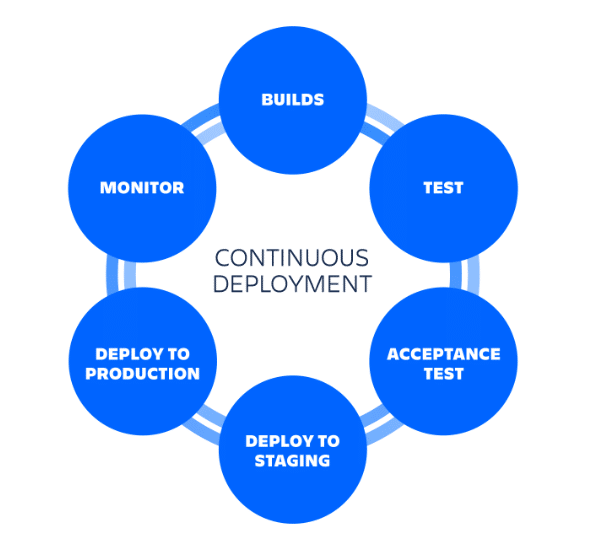
The role of Docker Hub and GitHub Actions in CD
Docker Hub: Container registry for images: To understand Docker Hub’s role in continuous deployment, it’s essential to grasp the fundamentals of Docker itself. Docker is a powerful platform that enables developers to build, ship, and run applications inside containers—lightweight, portable environments that bundle everything an application needs to run. At the core of Docker are two key concepts: Docker Images and Docker Containers. A Docker Image is a standalone, executable package that includes the application code, runtime, libraries, environment variables, and configuration files. Think of it as a blueprint—a static snapshot of your application and its dependencies. On the other hand, a Docker Container is a running instance of that image. It is an isolated environment where the application executes, leveraging the host system’s OS kernel while maintaining its own separate runtime space. This isolation ensures consistent behaviour across different environments—whether it’s development, testing, or production—making applications highly portable and scalable.
This is where Docker Hub plays a vital role. Docker Hub is a cloud-based registry service provided by Docker Inc., serving as a central hub for storing and sharing container images. Just like GitHub is to code, Docker Hub is to Docker Images. Developers and teams can push their custom images to Docker Hub and pull ready-made images from it, enabling seamless collaboration and reuse. Docker Hub supports both public repositories—which are open to the community—and private repositories, allowing teams to manage proprietary images securely.
Using Docker Hub within a CD pipeline offers several key benefits. First, it enables version control for images, allowing developers to tag and track different builds of their applications. This makes it easier to roll back to a previous version in case of bugs or regressions. Second, it provides a centralised, always-available storage solution, ensuring that the latest builds are accessible from any environment, whether it’s a developer’s local machine or a production cluster. Third, it facilitates easy image pulling, meaning any server or CI/CD agent can quickly retrieve the latest version of an application image to deploy or test. Most importantly, Docker Hub acts as the artifact repository for modern DevOps workflows: CI/CD pipelines can build new images from source code, push them to Docker Hub, and then pull them for deployment—closing the loop for fully automated, reliable continuous deployment.
GitHub Actions: Automation for software workflows: In the realm of continuous deployment, automation is the heartbeat of a streamlined and error-free delivery pipeline. This is where GitHub Actions comes into play—a powerful workflow automation tool built right into GitHub that enables developers to define and run CI/CD pipelines directly within their repositories. GitHub Actions allows you to write workflows using YAML configuration files, where each workflow is made up of one or more jobs that run a sequence of steps, including commands, scripts, or third-party actions. These workflows can be triggered automatically based on a variety of events—such as a push to the repository, a pull request, or even a scheduled cron job—making it a flexible solution for continuous integration, testing, building, and deployment.
With GitHub Actions, developers can automate the entire software lifecycle. For example, when code is pushed to the repository, a workflow can automatically run tests, build a Docker image, push it to Docker Hub, and then deploy it to a cloud server—all without any manual intervention. This aligns perfectly with the principles of continuous deployment, where the goal is to minimise human involvement and maximise reliability and speed. GitHub Actions also provides a marketplace of reusable actions, such as pre-built steps for logging into Docker Hub, setting up programming environments, or deploying to services like AWS, Azure, and Kubernetes—making complex workflows much simpler to implement.
The tight integration between GitHub Actions and GitHub repositories enhances transparency and traceability. Every workflow run is logged and can be inspected directly from the GitHub interface, making debugging and auditing easy. Teams can collaborate better by reviewing workflow outcomes as part of the pull request process. Moreover, GitHub Actions supports matrix builds, allowing simultaneous testing across multiple versions of dependencies or environments, improving software robustness. For teams adopting continuous deployment, GitHub Actions serves as the automation engine that connects every step—from commit to deployment—ensuring that only thoroughly tested, production-ready code makes it into the hands of users.
Setting up the foundation: Dockerizing your application
The first critical step in enabling continuous deployment is to containerise your application — a process known as Dockerizing. This begins with writing a Dockerfile, a simple text file that contains a series of instructions Docker uses to build an image. For a basic Python Flask web application, the Dockerfile typically starts with a lightweight base image like python:3.10-slim, sets a working directory (commonly /app), copies the project files from the host to the container, installs the required dependencies using pip, exposes a relevant port (such as 5000 for Flask), and finally defines the default command to run the application. Each of these steps ensures the application runs consistently in any environment, eliminating the “it works on my machine” problem. Once the Dockerfile is complete, the next step is building the Docker image locally using the command:
docker build -t <username>/<image-name>:<tag>
This command reads the Dockerfile and bundles the entire application, dependencies, and runtime environment into a single, reusable image. The image is tagged with a name and version to make it easier to track and manage. After a successful build, it’s essential to verify that the image runs correctly. This is done by executing:
docker run -p <host-port>:<container-port> <image-name>
This launches a container based on the image and maps the internal port to a local machine port. Opening a browser and navigating to localhost:<port> confirms the app is running properly within the container. Once validated, the Docker image is ready to be shared. By logging into Docker Hub using the Docker login and then pushing the image with:
docker push <username>/<image-name>:<tag>
…the image is uploaded to a central registry. Docker Hub acts as a version-controlled storage for images, making them accessible to deployment pipelines, cloud environments, or team members. This step not only simplifies the distribution of applications but also integrates seamlessly with CI/CD pipelines that can pull the image and deploy it automatically. Dockerizing your app, testing it locally, and publishing it to Docker Hub sets the foundation for scalable, consistent, and automated deployment — turning your app into a ready-to-ship unit that can move smoothly across the development, staging, and production stages with minimal friction.
Automating deployment with GitHub Actions
Automating deployment with GitHub Actions is a powerful way to streamline and standardise the continuous deployment (CD) process for your applications. It begins with creating a GitHub repository to host your application’s source code. Within this repository, GitHub Actions uses workflow files defined in the .github/workflows/ directory, typically with a .yml extension. The structure of a workflow starts with the name: field to assign a recognisable title, followed by the on: field which specifies the triggering events like push to the main branch. The jobs: section outlines the stages of the workflow, where each job contains multiple steps: that define individual actions such as checking out code or logging into Docker. Within steps, uses: allows integration with pre-built community actions, env: sets environment variables, and secrets: is used to securely reference sensitive credentials such as Docker Hub login or SSH keys. A complete GitHub Actions workflow for CD may include checking out the code using actions/checkout@v3, logging into Docker Hub using secrets as follows:
docker login -u ${{ secrets.DOCKERHUB_USERNAME }} -p ${{ secrets.DOCKERHUB_TOKEN }})
…pulling the latest image, and deploying it by connecting to a remote server via SSH to stop the old container, remove it, and run the updated container using Docker Run.
To ensure these secrets are securely used during deployment, GitHub provides a ‘Secrets’ feature within each repository’s settings. To configure secrets like DOCKERHUB_USERNAME and DOCKERHUB_TOKEN, go to your GitHub repository, click on Settings→Secrets and variables→Actions, and then click ‘New repository secret’, where you can add your Docker Hub credentials securely. This ensures that sensitive information does not appear in your workflow code and is protected during execution
Implementing the continuous deployment workflow
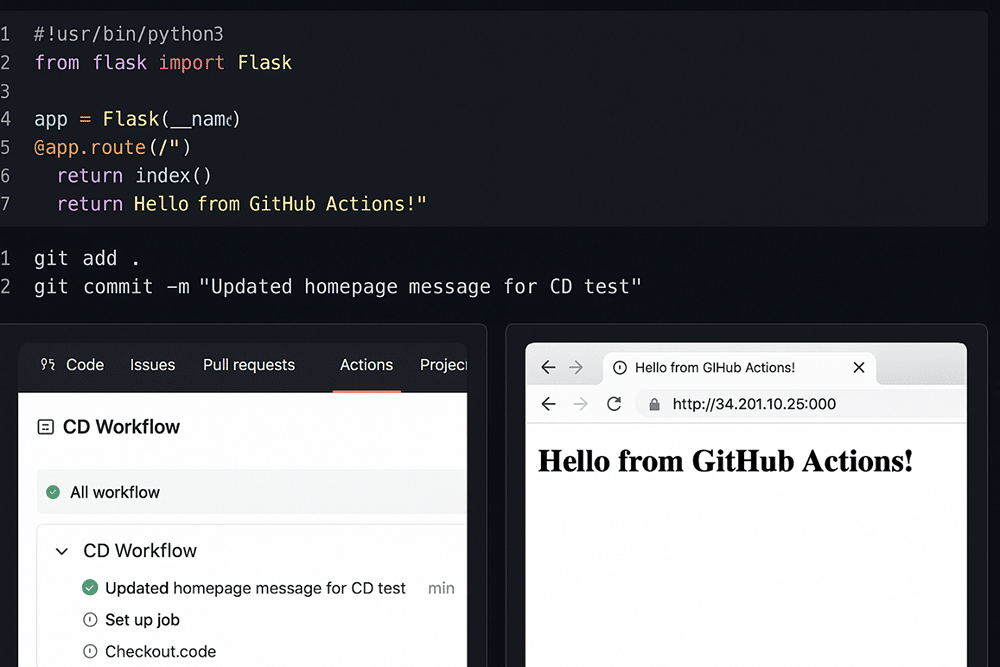
To implement the CD workflow, start by making a small change to your application code. Open your project in a text editor or IDE such as VS Code and modify a visible element—for example, change the homepage message in app.py from ‘Hello, World!’ to ‘Hello from GitHub Actions!’. Once the change is made, save the file, and use the terminal to stage and commit the update with commands like git add . followed by git commit -m “Updated homepage message for CD test”. Push the committed change to the main branch using git push origin main. This push will automatically trigger your GitHub Actions workflow if it has been configured correctly.
After pushing, navigate to your repository on GitHub and click the ‘Actions’ tab at the top. This section displays a list of workflow runs triggered by repository events. You should see a new workflow initiated by your recent push to the main branch. Click on the latest run to observe the workflow in progress. Inside, GitHub will display the sequence of jobs and steps defined in your .yml file—such as checking out the code, building and pushing the Docker image, and deploying it to the server. Each step will have a status icon indicating success, failure, or if it’s currently in progress.
Once the workflow has completed successfully, verify that your application is deployed with the new changes. Open a browser and visit the server’s public IP address and application port (e.g., http://<your-server-ip>:5000). You should see your updated message—like ‘Hello from GitHub Actions!’—confirming the CD pipeline has deployed your changes (refer Figure 2). This step proves that every code push to main automatically triggers a build and deploy process, making your deployment seamless and consistent.
Enhancements and best practices for your CD workflow
Using environment variables for configuration
Environment variables play a crucial role in managing configuration data across different deployment environments such as development, staging, and production. Instead of hardcoding sensitive values like database credentials, API keys, or secret tokens into the source code, it is best practice to externalise them into environment variables. GitHub Actions supports this through encrypted secrets, which can be securely stored in your repository’s Settings > Secrets section. These secrets can then be referenced in your workflow files using the ${{ secrets.SECRET_NAME }} syntax. This not only prevents accidental leakage of sensitive information but also enables seamless transitions between environments by updating only the environment-specific values without altering the codebase. Using tools like .env files in combination with Docker and dotenv libraries also makes it easy to load and manage configurations during both local development and production deployments.
Implementing health checks and rollbacks
To ensure that deployments are reliable and do not break production, implementing health checks is vital. Health checks are automated tests that verify if the application is running correctly after deployment. These can be simple HTTP GET requests to the root or /health endpoint of your application, checking for a successful status code (e.g., 200 OK). Many CD tools and orchestration platforms like Docker, Kubernetes, or GitHub Actions can integrate such checks into the pipeline. If a health check fails, an automatic rollback mechanism should be triggered. Rollbacks revert the application to the last known stable state, minimising downtime and user disruption. Implementing rollbacks often involves keeping older Docker images or deployment configurations versioned and accessible, allowing quick recovery. This proactive approach to verifying and correcting deployments builds confidence in your CD pipeline and safeguards against critical failures in production.
Security considerations for your CD pipeline
Security is a top priority when designing and maintaining a CD pipeline. The pipeline must handle sensitive data like SSH keys, Docker Hub credentials, and deployment tokens—hence, it’s essential to store these securely using GitHub Actions secrets or a dedicated secrets manager like HashiCorp Vault. Always follow the principle of least privilege, granting each tool or script access only to the permissions it needs. Avoid running unnecessary scripts or installing untrusted packages in your workflow, and always validate inputs and dependencies to prevent supply chain attacks. Furthermore, it is good practice to regularly audit your CI/CD configuration for vulnerabilities, keep all dependencies up to date, and enable security scanning tools like Dependabot. Encrypting network communication, using HTTPS and secure shell protocols (SSH), and limiting IP address access to deployment servers further hardens your pipeline from potential breaches.
Monitoring and logging deployed applications
Monitoring and logging are essential components for observing the health and performance of deployed applications. After your application is live, you need visibility into how it’s performing and whether it’s experiencing issues. Tools like Prometheus, Grafana, and Datadog can be integrated to monitor real-time metrics such as CPU usage, memory consumption, error rates, and request times. For logging, services like ELK Stack (Elasticsearch, Logstash, Kibana), Fluentd, or Loki allow centralised log collection and analysis. By monitoring logs and metrics, you can quickly detect anomalies, debug issues, and optimise application performance. Additionally, setting up alerts for critical events—such as server downtime or high error rates—helps respond to problems proactively before they affect end users. In short, combining robust monitoring with effective logging transforms your CD workflow from just a deployment tool into a full-fledged operational backbone.
Setting up a CD workflow using Docker Hub and GitHub Actions provides a robust pipeline where every code change is automatically built, tested, and deployed—eliminating manual steps and reducing the risk of deployment errors. Docker Hub ensures a consistent and versioned environment, while GitHub Actions adds flexibility to define custom workflows for a wide range of deployment scenarios. Together, they form a modern, efficient, and scalable CI/CD solution that benefits both individual developers and large teams.
The benefits of this approach are substantial: accelerated development cycles, improved software quality, fewer manual errors, simplified collaboration, and reliable delivery pipelines. For teams looking to evolve further, this foundational workflow can be enhanced by introducing advanced practices such as multi-stage Docker builds, secret management, automated testing suites, health checks, rollback mechanisms, and deployments to orchestration platforms like Kubernetes.