


























































This step-by-step implementation of a genAI-based enterprise chatbot uses various open source frameworks and Python packages.
With significant advancements in natural language processing (NLP) techniques, large language models (LLMs) can today understand, interpret, and generate human language with remarkable accuracy. This has led to organisations leveraging the power of generative AI (genAI) in areas like answering user queries, chatbots for internal tech support, handling customer interactions, etc. GenAI has helped make these interactions seamless, with precise and helpful answers significantly improving the user experience.
Regular genAI models are typically trained on extensive public data for general-purpose tasks and possess general knowledge. In contrast, enterprise data is often private, stored in internal data sources, and cannot be made public. When organisations integrate standard knowledge models into their internal support applications such as enterprise search or QA chatbots, the responses are generic. This may not adequately assist users who need to access private enterprise data to perform their tasks. For instance, consider a support engineer at a company using a standard knowledge LLM to address a user query about the company’s product or to gain more insight into the product’s features. A regular LLM trained solely on public data may not provide the necessary information. Its responses could potentially include data about similar products from competitors. It might even generate inaccurate information, often referred to as ‘hallucination’, which is a prevalent concern with the use of LLMs.
Organisations need solutions that enable the integration of genAI with enterprise data. These must enhance the capabilities of search engines and Q&A chatbots, providing more precise and insightful answers to user queries and reducing the risk of misinformation. Let’s look at solutions that address this requirement.
Retrieval augmented generation (RAG)
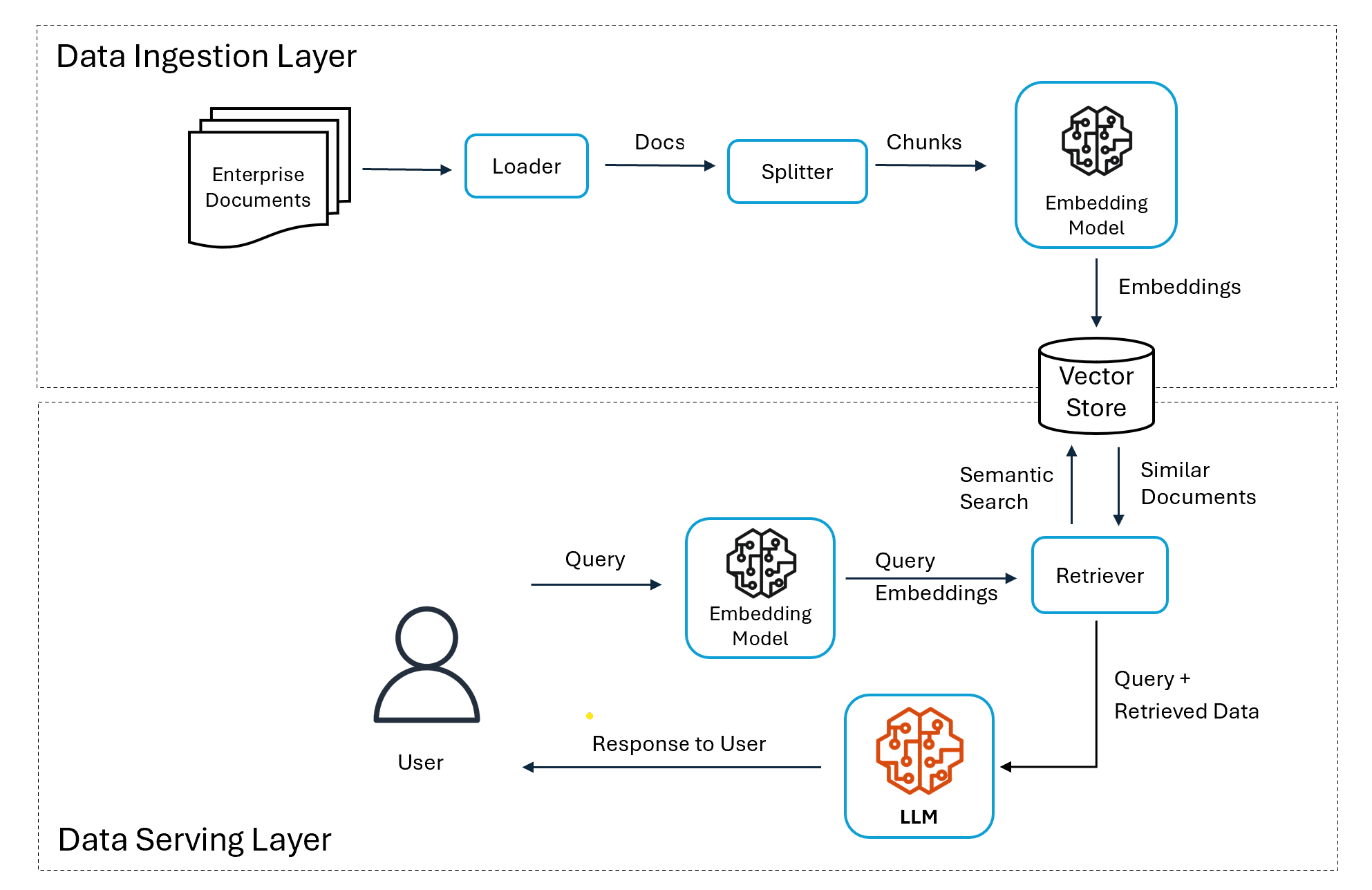
Retrieval augmented generation (RAG) represents an innovative approach that combines generative AI with enterprise data. RAG effectively bridges the gap between general knowledge models and specific organisational requirements by incorporating additional internal data. The RAG solution is popular today as it can integrate models with proprietary enterprise data. At a high level, RAG involves the following steps:
- Vector embeddings are created for enterprise data present in private data stores and stored in vector stores for querying.
- When a user sends a prompt to the model, an embedding is generated for the query.
- This embedding is matched against the vector store, and data that semantically matches the query embedding is retrieved.
- The user prompt is supplemented with the retrieved data, and both are sent to the model within the context.
- The model processes the prompt and generates the final response using additional contextual data.
The key benefit of the RAG approach is that the model is provided with knowledge of enterprise private data. It can generate responses based on enterprise data without needing any fine tuning or additional training. Since data is private and safe, this addresses one of the major concerns of enterprises. RAG also addresses the issue of hallucinations where models can generate fake output in the absence of actual data for the user query. Since the data is retrieved from existing sources and the prompt is augmented, hallucinations can be avoided. Open source frameworks like LangChain and LlamaIndex have made building RAG-based applications easier. This has led to enterprises adopting this approach for building enterprise search and Q&A conversational applications that leverage private data.
Implementing a chatbot for enterprise data search
Here’s a step-by-step implementation of the enterprise search application built using Python and Google’s GCP Vertex AI platform. The LangChain framework is used to simplify building the RAG system, which can be classified into two layers – a data ingestion layer and a data serving layer.
Data ingestion layer
The responsibility of the data ingestion layer is to load the data and make it available in a format that can be used by the data serving layer.
Loading the documents from GCS
The first step is to make the private enterprise data available to the application. In this sample application, we use Google Cloud Storage (GCS) bucket as the data store. Two financial documents in PDF format – one related to Uber and one of Alphabet (Google) — are used for the demo. LangChain provides multiple utility classes to connect and load documents from various data sources. Here, GCSDirectoryLoader from langchain_google_community is used to load the documents from the GCS bucket.
loader = GCSDirectoryLoader(project_name=PROJECT_ID, bucket=”rag-langchain-demo”)

documents = loader.load()
Splitting documents into chunks
Documents are usually split into chunks due to factors like efficiency and cost. Various chunking strategies are possible – character count based, sentence based, page level chunking, etc. Here we will use character chunking with a chunk size of 10000 characters and overlap of 100.
text_splitter = RecursiveCharacterTextSplitter(chunk_size=10000, chunk_overlap=100)

doc_chunks = text_splitter.split_documents(documents)
Creating a vector store
The document chunks need to be converted into embeddings to be stored in a vector store. We use one of Google’s text embeddings model “text-embedding-005” as the vector embedding engine.
embeddings_model = VertexAIEmbeddings(model_name=”text-embedding-005”)
The latest version of Redis has introduced support for vector search and is used as the vector database for our application. Populating Redis involves multiple steps – creating the Redis client, initialising the index for vector search, and creating the vector database instance by passing the required details.
client = redis.Redis.from_url(REDIS_URL)

index_config = HNSWConfig(

    name=»rag_demo”, distance_strategy=DistanceStrategy.COSINE, vector_size=768)

RedisVectorStore.init_index(client=client, index_config=index_config)

For creating a vector store, we use the RedisVectorStore class from langchain_google_memorystore_redis.

redis_vector_db = RedisVectorStore(

    index_name=”rag_demo”,

    embeddings=embeddings_model,

    client=client)
Storing document embeddings in Redis
The final step in data preparation is adding the document chunks to the vector database. When the chunks are being added, for each chunk, Redis will create embeddings using the specified embedding model. The generated embeddings are stored in the index and ready for querying using vector search.
redis_vector_db.add_documents(doc_chunks)
Data serving layer
Once the data is prepared and made available in the vector store, the next step is to consume it in the data serving layer for providing responses to the user’s queries.
Creating the retriever
From the Redis vector database, a retriever is created to perform similarity search within the vector store and return the top-k document chunks that have the lowest vectoral distance with the incoming user query.
retriever = redis_vector_db.as_retriever(search_type=”similarity”,search_kwargs={“k”: 3})
Querying the LLM: The next step is to initialise the actual LLM that will do the final processing to generate the response for the user. In this application, we use Google’s gemini-2.0-flash model and initialise the LLM using VertexAI class from langchain_google_vertexai.
llm = VertexAI(project=PROJECT_ID, location=LOCATION,

    model_name=”gemini-2.0-flash”,

    max_output_tokens=1000, temperature=0.05, top_p=0.8, top_k=40, verbose=True )
The final step is to create a query engine. For this, we use RetrievalQA chain from LangChain.
qa = RetrievalQA.from_chain_type( llm=llm, chain_type=”stuff”, retriever=retriever )
This QA chain can now be used to answer questions from users by retrieving context from the private enterprise data chunks that are stored in the vector database.
query = “What is the revenue of Alphabet in 2024? What is the increase compared to 2023”

results = qa({“query”: query})

print(“Query:”, query)

print(“Response:\n”, results[‘result’])


Query: What is the revenue of Alphabet in 2024? What is the increase compared to 2023

Response:

The revenue of Alphabet in 2024 was $350.018 billion. The increase compared to 2023 was $42.624 billion.
Providing a UI front-end using Gradio
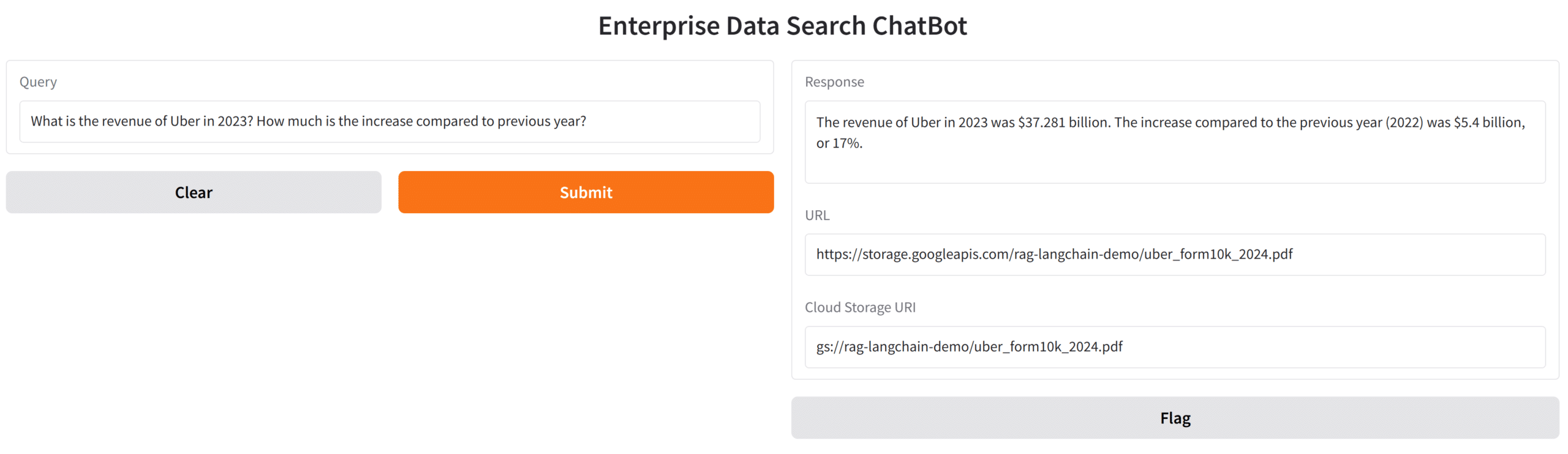
The Gradio framework has gained popularity due to its ability to support complex UI functions with a few lines of code. For our current application, a simple front end can be provided using Gradio. Users can query against documents and obtain answers from the LLM with information that references the enterprise documents that were provided via the data sources.
The complete Python notebook for this sample application is available at https://github.com/lokeshchenta/genai-google-gcp/tree/main/rag-chatbot.
Implementing an RAG-based genAI chatbot for private enterprise data has become simpler with frameworks like LangChain and supporting platforms like Vertex AI. Cloud platforms like Google have even started providing managed services like Dialogflow and Vertex AI Agent Builder. These provide low-code, no-code mechanisms for simple RAG applications. This has further simplified the efforts needed to build an enterprise chatbot. Development teams now have a variety of options to choose from, including no-code solutions and custom implementations. The decision will depend on several factors such as the complexity of the requirements, the degree of customisation needed, the resources available for development and maintenance of custom solutions, and the cost comparison between managed services and proprietary solutions.
Regardless of the choice of implementation, the integration of RAG and LLMs along with the power of genAI is significantly transforming the enterprise search and question-answering (QA) systems and is seeing widespread adoption in enterprises.