






























































The latest Kdenlive releases bring improved stability, refined editing workflows, and advanced features, making the open source video editor an increasingly capable alternative for creators seeking a subscription-free editing platform.
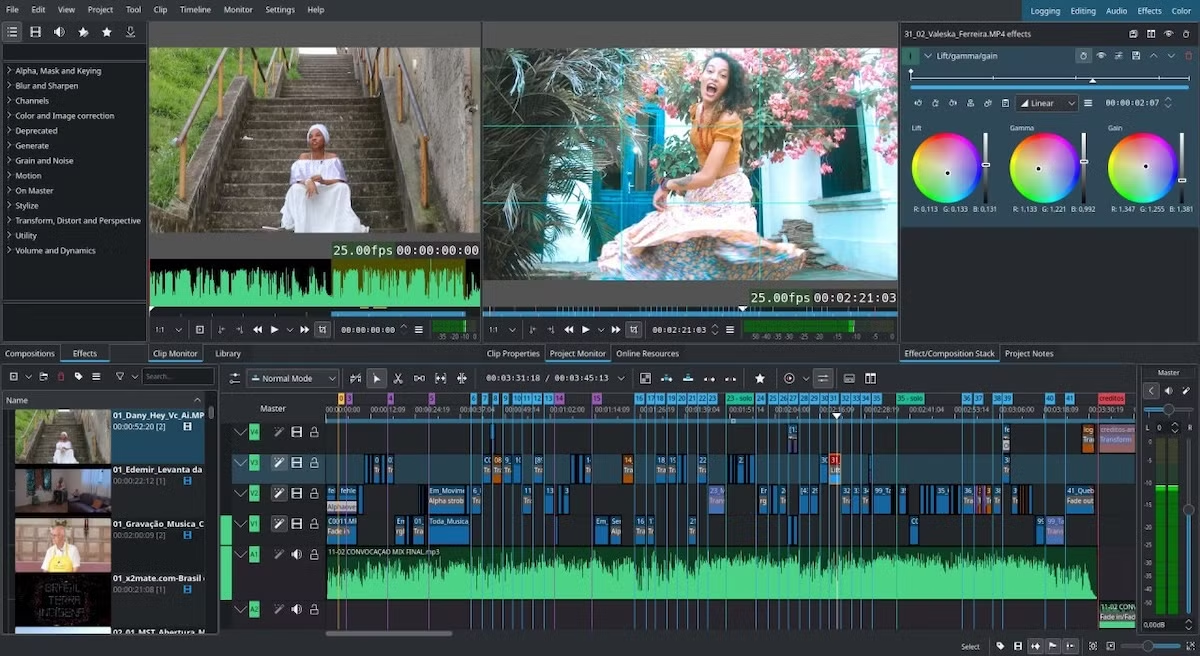
Kdenlive (KDE Non-Linear Video Editor) is an open source, cross-platform video editing application available for Linux, Windows, and macOS. Designed for non-linear editing, it provides a comprehensive set of tools for content creators, hobbyists, and professionals without requiring a subscription or proprietary licensing. Recent development has focused on improving stability, usability, and workflow efficiency while maintaining feature parity with many commercial editors.
The editor includes features such as multi-track timeline editing, proxy editing for high-resolution videos, motion tracking, keyframe animations, audio mixing, subtitle editing, title templates, and various video effects and transitions. Built on the MLT multimedia framework and FFmpeg, Kdenlive is capable of supporting many types of audio and video formats and can support editing 4K video on less powerful computers using proxy editing.
Recent development has introduced interface improvements as well as the stability and reliability of the software by adding monitor mirroring, improved transition controls, and several bug fixes. Additionally, open-source standards have been improved by supporting OpenTimelineIO (OTIO), which enables easy exchange of projects with other compatible editing software.
In contrast with most other commercial video editors, Kdenlive performs editing locally without cloud services and subscription-based features. Though it is currently missing generative AI abilities offered by some proprietary software, it provides enough editing, color correction, motion tracking, and audio features to cover most content creation tasks. The consistent interface of Kdenlive for different operating systems lets users easily switch operating systems without having to learn the software again.
With professional video editing features combined with the open source software development approach, Kdenlive continues its evolution into a capable alternative to proprietary video editing software. The steady progress in terms of performance, stability and usability proves the benefits of community-driven development.