























































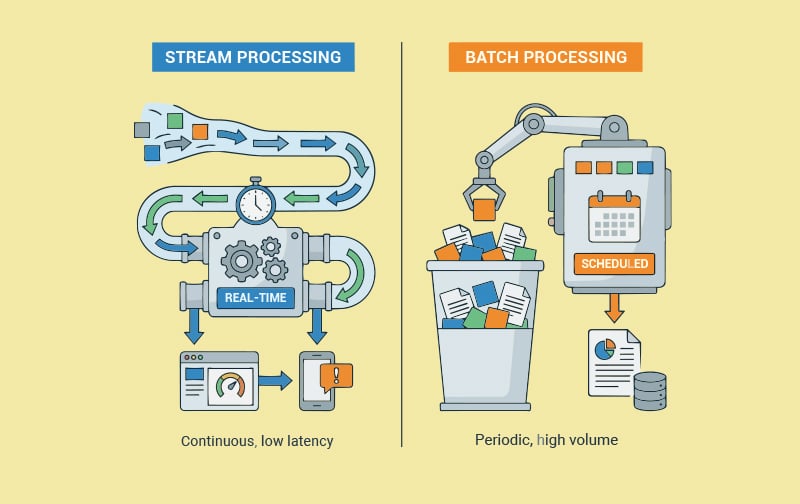

Batch and streaming are two different ways of processing data, and both are relevant in today’s world. Pick the approach that’s right for you without falling for the hype that you must always do everything in real time.
A few years back I was running point on a data project that, in hindsight, should have been a lot simpler than it ended up being. We had a marketing team that wanted to see customer activity in their dashboard. Pretty standard stuff. Show me how many people signed up today. Show me which campaigns are converting right now. Show me when somebody high-value lands on the pricing page so I can email them while they’re still warm.
We built it as a nightly batch job. Every night at 2 a.m., a Python script would pull data from a dozen sources, transform it, dump it into the warehouse, and refresh the dashboard. It worked great. For about six weeks.
Then the marketing director walked over to my desk one morning, slightly grumpy, holding her phone. “Why am I seeing yesterday’s numbers? It’s almost lunchtime.” I tried to explain that the dashboard refreshed once a day. She didn’t really care about the explanation. She wanted to see customers landing on the pricing page now, not tomorrow morning. That was the whole point of the dashboard.
That conversation kicked off a six-month migration from a batch pipeline to a streaming one. We made a lot of mistakes along the way. We over-engineered some things. We under-engineered others. By the end of it, I had a pretty strong opinion about when streaming makes sense and when it doesn’t, and which open source tools were genuinely worth the learning curve.
What does batch mean in practice?
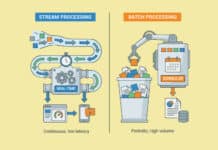
Batch processing is one of the oldest and most widely used data processing methods because it remains highly effective. Data is collected over a fixed period—such as an hour, day, or week—and then processed in a single run. The job reads, transforms, writes the data, and finishes before the next scheduled execution.
It’s like doing laundry: instead of washing each item immediately, you wait for a full load, making the process more efficient. The trade-off is that new data isn’t processed until the next batch.
Batch jobs are typically scheduled using tools like Cron, orchestrated with Airflow, and processed by platforms such as Spark or dbt. Since the system processes the entire dataset at once, it can optimise execution efficiently.
Batch processing is ideal for financial reporting, machine learning model training, ETL pipelines, and analytics where real-time updates aren’t required. When yesterday’s data is sufficient, batch processing is usually the most cost-effective, reliable, and easy-to-maintain approach.
What streaming means in practice
Streaming takes the opposite approach to batch processing by handling each event as it occurs instead of waiting to process data in bulk. Every click, transaction, or update is processed within milliseconds, enabling immediate responses.
A good analogy is a busy restaurant kitchen, where orders are prepared as they arrive rather than waiting for a large batch. Streaming systems continuously process an endless flow of events, requiring a different architecture and mindset than batch processing.
The biggest advantage is low latency. Dashboards can display near real-time data, fraud detection can stop suspicious transactions instantly, and inventory updates can sync across locations without delay.
However, streaming is more complex. It must manage event ordering, late-arriving data, exactly-once processing, state management, and failure recovery. While it delivers realtime
insights, it is more difficult and costly to build, operate, and maintain than batch processing.
Where the line actually sits
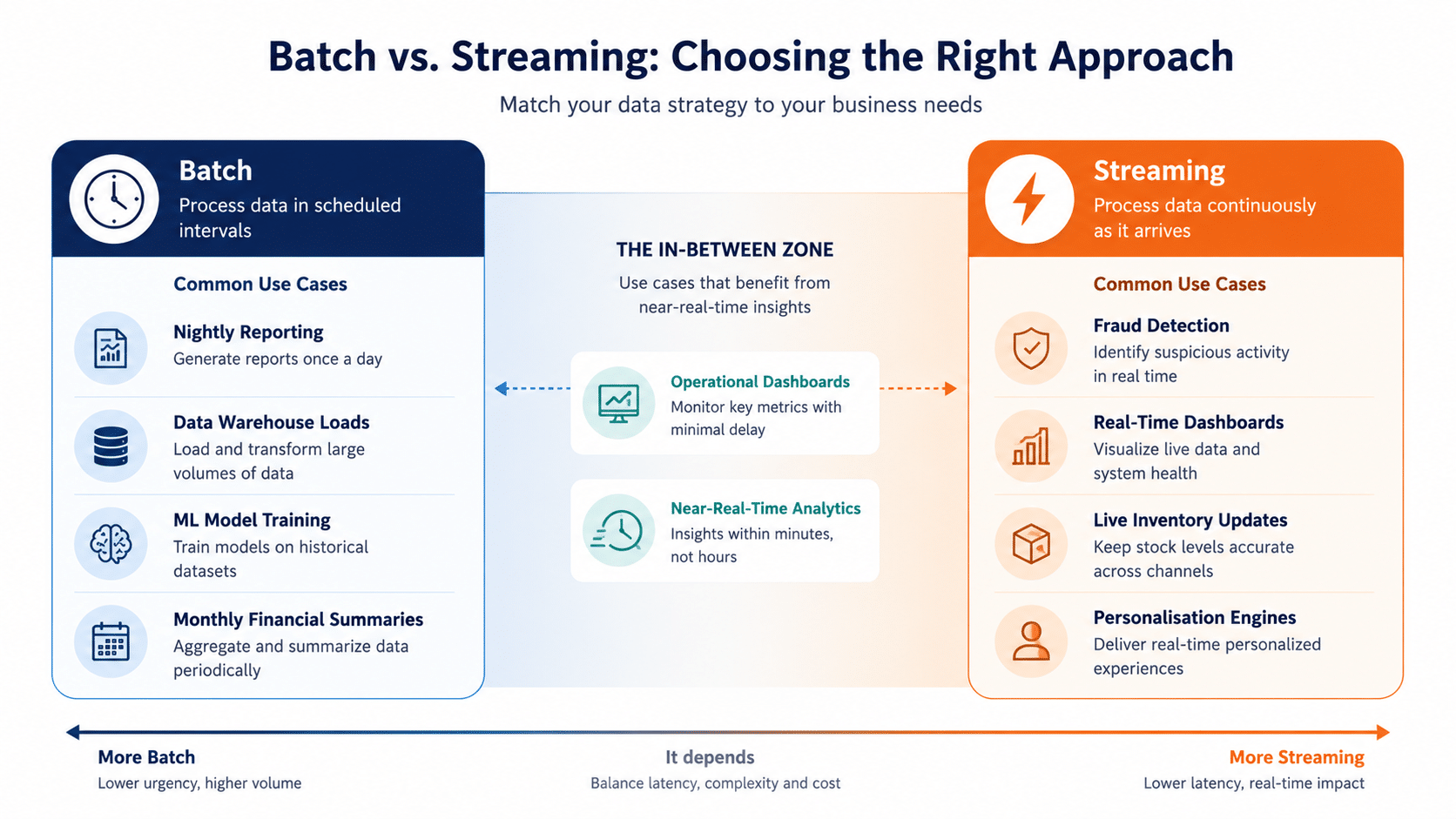
Here’s the question I always ask first when somebody is debating between batch and streaming. How fresh does the data need to be?
If the answer is “within a few hours is fine,” batch is your friend. Build the pipeline once, schedule it, walk away. You’ll thank yourself later.
If the answer is “within a few minutes,” you’re in the middle ground. Micro-batching, where you run small batch jobs every few minutes, often works well here. It gets you most of the freshness benefits of streaming with most of the operational simplicity of batch.
If the answer is “within seconds,” you genuinely need streaming. There’s no shortcut. Use a real stream processing system and pay the complexity tax.
The mistake I see most often is teams jumping to streaming because it sounds modern and impressive, when their actual business need was perfectly served by an hourly batch job. Streaming introduces real engineering overhead. Make sure you need it before you take that on.
The flip side, which I’ve also seen, is teams clinging to batch when their use case has clearly outgrown it. If your marketing team is asking the same “why is this data so old” question every week, you might be in this camp. Sometimes the right answer is to bite the bullet and rebuild.
Apache Kafka, the spine of most streaming systems
If you’re going to learn one tool in this space, learn Kafka. It’s the underlying transport layer for most streaming architectures out there, and understanding it makes everything else click into place.
Kafka isn’t really a stream processor in itself. It’s more like a distributed log. Producers write events to topics. Consumers read events from topics. Kafka handles the storage, ordering, partitioning, and replication so that events flow reliably between systems even at huge volumes.
Setting up Kafka used to be painful. These days, with Confluent Cloud or Redpanda or even just the official Docker images, it’s manageable. For a quick local setup to play with, this works.
docker run -p 9092:9092 -e KAFKA_PROCESS_
ROLES=broker,controller \
-e KAFKA_NODE_ID=1 \
-e KAFKA_CONTROLLER_QUORUM_VOTERS=1@localhost:9093 \
-e KAFKA_LISTENERS=PLAINTEXT://:9092,CONTROLLER://:9093 \
-e KAFKA_ADVERTISED_LISTENERS=PLAINTEXT://localhost:9092 \
-e KAFKA_CONTROLLER_LISTENER_NAMES=CONTROLLER \
apache/kafka: latest
Once Kafka is running, you can produce and consume events from any language with a client library. The Python equivalent of ‘hello world’ looks something like this.
from kafka import KafkaProducer, KafkaConsumer
import json
producer = KafkaProducer(
bootstrap_servers=’localhost:9092’,
value_serializer=lambda v: json.dumps(v).encode()
)
producer.send(‘user_events’, {
‘user_id’: 7421,
‘event’: ‘page_view’,
‘page’: ‘/pricing’
})
producer.flush()
That’s a single event going onto the user_events topic. A consumer somewhere else can read it the moment it lands. From here, anything is possible. You can build dashboards, alerts, machine learning pipelines, audit logs, anything that needs to react to events.
Apache Flink, the heavyweight processor
If Kafka is the spine, Flink is the brain that lives on top of it for serious stream processing work.
Flink lets you write programs that operate on streams. You define transformations, aggregations, joins, windows, and state, and Flink runs your code at scale, handling all the unpleasant details of distributed processing, fault tolerance, and exactly once semantics. It’s been around since the early 2010s, and at this point it’s used by Netflix, Uber, Alibaba, ING, and pretty much every other company that does serious streaming.
The learning curve isn’t trivial. Flink is a serious piece of software with a real API surface. But once you get the hang of it, you can express remarkably sophisticated logic in not very much code. Here’s roughly what a Flink job for counting events per minute looks like.
DataStream<UserEvent> events = env.addSource(new
FlinkKafkaConsumer<>(
“user_events”,
new UserEventSchema(),
properties
));
DataStream<EventCount> counts = events
.keyBy(event -> event.getEventType())
.window(TumblingEventTimeWindows.of(Time.minutes(1)))
.aggregate(new CountAggregator());
counts.addSink(new FlinkKafkaProducer<>(
“event_counts”,
new EventCountSchema(),
properties
));
Read from Kafka, group by event type, window into one-minute buckets, count, write back to Kafka. Five lines of business logic. Everything else is Flink handling distributed state, checkpoints, and recovery for you.
The catch with Flink is that it’s a heavyweight piece of infrastructure. You’re running a cluster. You’re managing checkpoints. You’re tuning memory. For massive scale or genuinely complex processing, it’s worth the operational cost. For small to medium use cases, it might be overkill.
Apache Spark Structured Streaming, the familiar option
Spark is mostly known as a batch processing engine, but its Structured Streaming module has become one of the most popular ways to do streaming, especially in shops that already use Spark for batch.
A streaming aggregation in Spark looks like this.
from pyspark.sql import SparkSession
from pyspark.sql.functions import window, count
spark = SparkSession.builder.appName(“EventCounts”).
getOrCreate()
events = spark.readStream \
.format(“kafka”) \
.option(“kafka.bootstrap.servers”, “localhost:9092”) \
.option(“subscribe”, “user_events”) \
.load()
counts = events \
.groupBy(window(“timestamp”, “1 minute”), “event_type”) \
.agg(count(“*”).alias(“count”))
query = counts.writeStream \
.format(“console”) \
.outputMode(“update”) \
.start()
That’s a streaming job. Read from Kafka, group by minute and event type, count, write somewhere. If you’ve used Spark before, this looks instantly familiar. If you haven’t, the API is well documented and consistent with the batch version.
Spark Structured Streaming uses a micro-batch model by default, which means it’s not strictly real-time. There’s a small delay, typically a few seconds, between an event happening and it being processed. For most use cases, this is totally fine. If you need true sub-second latency, Flink is a better choice. For ‘near real time’ applications, Spark is excellent.
Debezium, the change data capture star
Most data engineering work involves moving data from operational databases to analytical systems, or between operational systems. Historically, this was done with periodic batch dumps. Take a snapshot of the database, copy it to the warehouse, repeat tomorrow.
Debezium changed the game by making change data capture, or CDC, easy. The idea is to tap into the database’s transaction log and stream every change as it happens. Insert, update, delete, all of them become events flowing into Kafka in near real time. You can build downstream systems that react to these events without ever putting load on the source database.
Setting up Debezium connects to your database’s replication slot and starts publishing changes to Kafka topics. Each topic corresponds to a table. Each event corresponds to a row change. The schema includes the before and after state, the operation type, and a bunch of metadata.
For teams trying to bridge the gap between operational and analytical workloads without rewriting their applications, Debezium is often the cleanest answer. It works with PostgreSQL, MySQL, MongoDB, SQL Server, Oracle, and others. The setup is genuinely not bad. The Debezium documentation has reasonable Docker Compose examples that get you a working pipeline in an hour.
Apache Airflow, still the orchestrator most teams reach for
When you’re firmly in batch territory, Airflow is the workflow orchestrator that most data teams end up using. It’s been around since 2014, came out of Airbnb, and is now an Apache project with a huge community.
The core idea is that you write your workflows as Python code. You define directed acyclic graphs of tasks. Airflow schedules them, runs them, retries them on failure, and gives you a web UI to monitor everything. It’s not glamorous, but it’s solid, and it’s saved an enormous amount of homegrown scheduler code over the years.
A simple Airflow DAG looks like this.
from airflow import DAG
from airflow. operators. python import PythonOperator
from datetime import datetime, timedelta
def extract_data():
pass
def transform_data():
pass
def load_data():
pass
dag = DAG(
‘daily_etl’,
start_date=datetime(2026, 1, 1),
schedule_interval=’@daily’,
catchup=False
)
extract = PythonOperator(task_id=’extract’, python_
callable=extract_data, dag=dag)
transform = PythonOperator(task_id=’transform’, python_
callable=transform_data, dag=dag)
load = PythonOperator(task_id=’load’, python_callable=load_
data, dag=dag)
extract >> transform >> load
That’s it. A daily ETL job with three stages and clear dependencies. Airflow handles the scheduling, the retries, the failure notifications. You write the business logic.
For pure streaming workloads, Airflow isn’t the right tool. It’s built around the idea of jobs that start and end. But for hybrid pipelines where streaming feeds into batch jobs for heavy aggregation, Airflow is often part of the picture.
There are newer alternatives worth knowing about. Dagster has a more modern Python API and a great UI. Prefect has interesting features around dynamic workflows. Both are worth looking at if you’re starting fresh. For most existing teams, Airflow’s ecosystem and community make it hard to beat.
The micro-batching middle ground
I want to spend a moment on micro-batching because it’s where a lot of real-world systems live, and it’s underrated.
The idea is simple. Instead of true streaming with subsecond latency, you run small batch jobs every few seconds or minutes. You get most of the freshness benefits of streaming. You get most of the simplicity of the batch. You skip a lot of the hardest parts of true streaming.
Spark Structured Streaming also leans heavily on microbatching by default. So does much of dbt’s streaming work. The pattern is common enough that I’d say it’s the default approach unless you specifically need sub-second latency.
Don’t dismiss micro-batching as “not real streaming.” For most business use cases, it’s the right answer. Reserve true streaming for the cases where you really, genuinely cannot wait sixty seconds.
A real-world example, end-to-end
Let me walk through what a hybrid batch and streaming pipeline might look like in practice. Imagine you run an e-commerce site. You want a few things. You want a real-time dashboard for the marketing team showing live conversion rates. You want operational alerts when something is going wrong. And you want a nightly data warehouse refresh for proper analytics.
For the real-time dashboard, you set up Debezium to stream changes from your orders database into Kafka. A Flink job reads those events, calculates rolling conversion rates by traffic source, and writes the results to a Redis cache that the dashboard reads from. End-to-end latency in a few seconds.
For the operational alerts, the same Kafka events feed a separate Flink job that watches for anomalies. Sudden drops in successful orders. Spikes in error rates. The job pushes alerts to Slack and PagerDuty.
For the nightly warehouse, an Airflow DAG runs at 2 a.m. It reads the previous day’s data from your operational database, runs heavy transformations in dbt or Spark, and loads it into Snowflake or BigQuery. This is the source of truth for proper analytics, finance reports, and ML model training.
Notice that all three pipelines coexist. Streaming for things that need to be fresh. Batch for things that need to be thorough. Each one is the right tool for its job. The streaming pipeline doesn’t try to do everything. The batch pipeline doesn’t get stretched into territory it isn’t suited for.
This kind of mixed architecture is what most mature data platforms look like in practice. Pure-streaming and pure-batch are the extremes. The middle is where real systems live.
Things that bite people
A few patterns I’ve seen catch teams out repeatedly.
Underestimating the operational cost of streaming: Streaming infrastructure has more moving parts than batch. There’s more to monitor. There’s more to debug at odd hours. There’s more state to manage. Teams that jump into streaming without planning for the operational burden often end up regretting it.
Forgetting about ordering and exactly-once semantics: Events can arrive out of order. They can be duplicated. They can be lost. Different stream processors handle these issues with different guarantees. Understand what your system promises before you depend on it for anything critical.
Ignoring backpressure: When downstream systems can’t keep up with the rate of events flowing in, something has to give. Either you slow down the producers, buffer the events, or drop them. Designing for backpressure from day one is much easier than retrofitting it.
Not budgeting for state size: Stateful stream processing accumulates data. Sessions, aggregations, joins, all of these eat memory and disk. Watch the state size in your monitoring and plan capacity accordingly. Many Flink jobs crashed because nobody noticed the state had grown to fifty gigabytes.
Trying to do everything with one tool: There’s a temptation to pick a single streaming platform and make it solve every data problem you have. Resist this. Use the right tool for each job. Kafka for transport. Flink or Spark for heavy processing. Debezium for CDC. Airflow for orchestration. The boundaries between these tools exist for good reasons.
What you can do to begin
If you’re new to streaming and want to try it, here’s a path I’d suggest.
This weekend, spin up Kafka with Docker and play with it. Write a producer that generates fake events. Write a consumer that reads them. Feel how the basic primitives work. An hour of this teaches you more than any tutorial.
Next week, pick one real use case in your work and ask whether it could benefit from streaming. Not whether it could be done with streaming. Whether the business value of fresher data is worth the engineering cost.
If the answer is yes, build the smallest possible proof of concept. Don’t try to migrate your whole pipeline. Take one feed of events, process them with Flink or Spark Structured Streaming, and write the results somewhere. See what the latency looks like. See what the operational experience is like.
Where things are heading
A few trends worth watching in the data integration space.
The line between streaming and batch keeps fading. Apache Beam was an early attempt at unifying the two APIs. dbt is moving in this direction. Spark Structured Streaming and Flink are converging in interesting ways. The future probably looks like one API that lets you choose latency vs cost as a configuration option rather than a fundamental architectural choice.
CDC is becoming the default for syncing data between systems. Tools like Debezium, Fivetran, and Airbyte are making it routine. The era of nightly database dumps is winding down for any team that cares about freshness.
Stream processing in the warehouse is starting to be a real thing. Snowflake Streams, BigQuery continuous queries, ClickHouse materialised views — all let you do streaming-like
work without standing up a separate stream processor. For many use cases, this may be enough.
WebAssembly and edge computing are pushing stream processing to new locations. Tools like InfinyOn are doing event processing closer to where events originate. This will matter more over the next few years.
And, finally, the cost of streaming infrastructure keeps falling. Confluent Cloud, Redpanda Cloud, AWS MSK, all these managed offerings mean teams don’t have to operate Kafka themselves to use it. This is genuinely lowering the bar for adoption.
The quiet decisions that shape a platform
The choices between batch and streaming, sub-second latency and end-of-day freshness, heavyweight processors and lightweight schedulers, and between exotic stream platforms and a well-tuned cron job don’t make headlines. They don’t get blog posts written about them by the people who made them. But they shape, more than almost anything else, how a data platform behaves under pressure, how much it costs to run, and how often the engineering team gets woken up in the middle of the night. The teams that get this right tend to be the ones that resist the temptation to use the newest tool for every problem, ask hard questions about what freshness means for the business, and build pipelines incrementally rather than betting everything on a big rewrite. If you’re building a data platform right now, pick the simplest thing that solves the problem you have, leave room to grow, and don’t get talked into streaming everything because somebody on Twitter said the batch is dead. It isn’t. It just does a different job.