




























































What do vector databases do? Why did they show up when they did? Which open source ones are worth your time? How do you use them? Here are some answers…
A couple of months ago, a junior developer on a team I was helping asked me an interesting question. He had been working on a small support chatbot to answer customers’ questions using their internal documentation. He’d hooked it up to an LLM, written some decent prompts, and the bot worked reasonably well. But he wanted to know why we were using something called Qdrant for storage instead of just MySQL, since the latter was already in their stack and everyone was familiar with it.
It was a fair question. And I realised I’d never actually sat down and explained the answer to anyone properly. I had been using vector databases for over a year, but mostly through libraries and convenience tools, without ever really articulating why they exist as a separate category. So we grabbed some coffee and I tried to explain the choice.
This article is based on that conversation because I think a lot of developers are in his position right now. They are building AI features and keep hearing about vector databases. They sort of know what embeddings are. But the whole stack feels like a black box, and the open source options are multiplying faster than anyone can keep up with.
The problem vector databases solve
Traditional databases are built for exact matches. Give me the user with ID 7421. Give me all orders placed between Tuesday and Thursday. Give me products where the price is greater than five hundred. These are all commands with crisp, well-defined answers, and SQL is brilliant at them.
Then AI showed up and broke the model. Suddenly the questions people wanted to ask were fuzzier. Find me documents similar in meaning to this paragraph. Suggest products that look like this one. Show me support tickets that sound like the one this customer just opened. These aren’t exact match questions. They’re similarity questions. And SQL is not great at similarity, at least not the kind of meaning-based similarity AI introduced.
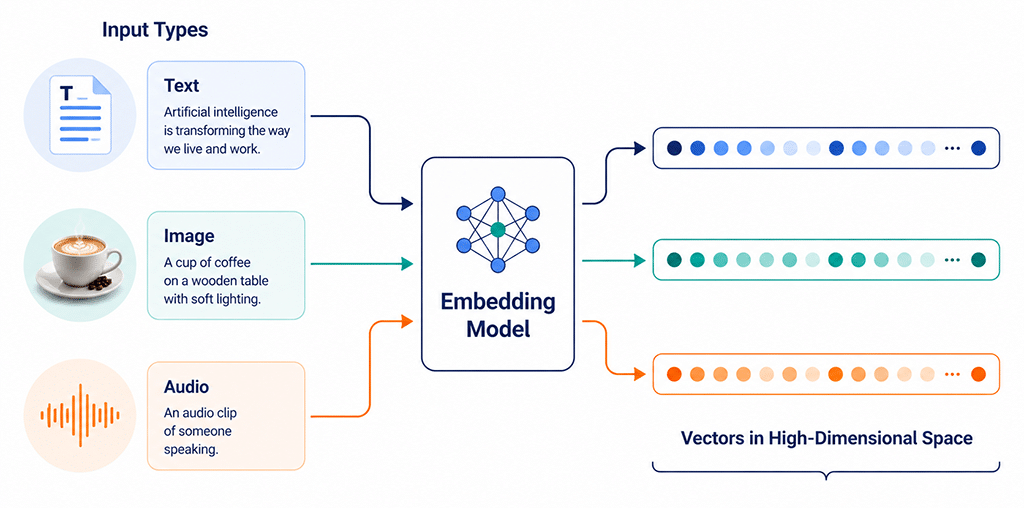
To handle these questions, you first turn whatever you’re searching — text, images, audio, anything really — into a long list of numbers called a vector or an embedding. Different inputs produce different vectors. Things that mean similar stuff produce vectors that sit close to each other in this high-dimensional space.
The vector database’s job is simple but tricky. Store millions or billions of these vectors. When somebody hands you a new vector, find the ones that are closest to it. Quickly. That’s basically it.
It sounds straightforward. It is not. Doing this fast at scale requires some genuinely clever data structures and algorithms, which is why vector databases became their own thing rather than just a feature of existing databases.
Why this got popular almost overnight
Vector search isn’t new. Recommender systems have been doing variations of this for fifteen years. What changed recently is the availability of good embedding models.
A few years ago, getting a decent vector representation of a piece of text required training your own model, which was expensive and finicky. Now you can call an API or run an open source model locally and get state-of-the-art embeddings for basically nothing. Sentence-transformers, OpenAI’s embedding models, Cohere, BGE, Instructor, GTE — there are dozens of solid options.
Once embeddings became cheap and easy, the bottleneck moved to storing and searching them. Hence the explosion of vector databases.
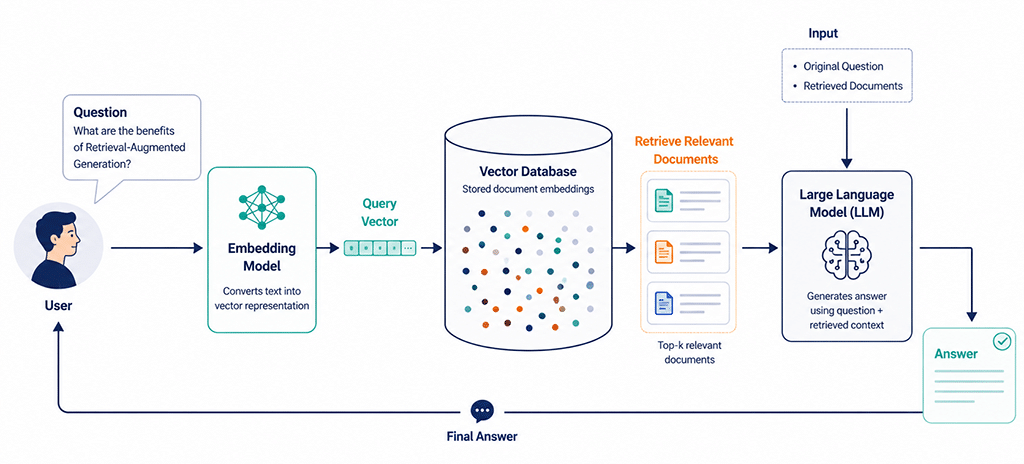
The other accelerant has been the rise of retrieval-augmented generation. RAG, if you want the acronym. The basic idea is, instead of trying to fine-tune a giant language model on your specific data, you keep the model generic and store your data as embeddings. When a user asks a question, you find the relevant chunks of your data via vector search and stuff them into the prompt. The model then answers using that context.
This pattern turns out to be enormously useful for chatbots, internal documentation search, customer support tools, and a hundred other things. And every one of those needs a vector database underneath it.
What’s inside a vector?
Let me get a bit more concrete about what an embedding looks like. You take a sentence. Say, “The cat sat on the mat.” You feed it into an embedding model. What comes out is a list of numbers, usually somewhere between 256 and 1536, depending on the model. Each number is just a floating-point value, something like 0.0234 or -0.4891. Looking at the list, you can’t make any sense of it. The numbers don’t correspond to anything you can name.
But here’s the magical bit. If you feed in “A feline rested on the rug,” you get a different list of numbers. And if you computed the mathematical distance between these two lists, treating them like points in a 768-dimensional space, that distance would be small. Much smaller than the distance between “The cat sat on the mat” and “The stock market opened higher today.”
The embedding model learned, through training on huge amounts of text, that semantic meaning can be encoded as positions in this weird high-dimensional space. Things that mean similar stuff end up near each other. Things that mean different stuff end up far apart.
Vector databases store these lists, billions of them sometimes, and let you ask the question, “Here’s a new list, give me the hundred existing lists closest to it.” That’s the entire core operation. Everything else is convenience features on top.
Why a regular database struggles with this
You might think, fine, just put the numbers in a Postgres table with a thousand columns and write a query. Let me explain why that falls apart.
The problem is the cost of comparison. To find the vectors closest to your query vector, you must compare your vector against every stored vector. With a few thousand vectors, that’s fine. With ten million, the process is very slow. With a billion, it becomes basically impossible to do in real time.
Vector databases solve this by building index structures that let you skip most of the comparisons. The most popular approach is something called HNSW, which stands for Hierarchical Navigable Small World. The details don’t matter much for application developers, but you can find approximately the closest matches in logarithmic time instead of linear time. Searching a billion vectors becomes possible in milliseconds.
You don’t always get the exact closest matches. You get something very close to them, almost always, with much better performance. For nearly all real applications, this trade-off is fine. Nobody cares whether they got the actual top ten most similar support tickets or the top ten most similar tickets out of the actual top fifteen. The difference is invisible to the user.
The other thing vector databases do that’s hard to replicate in regular databases is metadata filtering combined with vector search. You can ask, “Find me documents similar to this query, but only ones from the last thirty days, only in English, only tagged with ‘invoice’.” Doing this efficiently while also doing approximate nearest neighbour search is its own engineering puzzle, and the better vector databases handle it well.
The open source landscape, briefly
There are a lot of options here, and the landscape moves fast. But here’s the rough lay of the land as it stands.
Qdrant is written in Rust, very fast, has a clean API, and supports rich filtering. It’s become one of my personal favourites for projects where I need to self-host. The community is active and the docs are good.
Milvus is one of the older names, originally from Zilliz. It’s designed for very large scale, supports multiple index types, and integrates well with cloud-native infrastructure. If you’re going to have hundreds of millions of vectors, Milvus is worth a serious look.
Weaviate has a slightly different philosophy. It’s built around a schema with semantic understanding, can do hybrid search combining vector and keyword search out of the box, and has some interesting modules for working with images and other media. It’s a bit heavier to run but powerful.
Chroma is the easy-on-ramp option. Lightweight, easy to embed in Python applications, popular for prototypes and small projects. Not the fastest at scale, but the friction to get started is the lowest of any option here.
pgvector is the interesting middle path. It’s an extension for Postgres that adds vector search capabilities. Performance isn’t as good as the purpose-built options at very large scale, but if you’re already using Postgres, the operational simplicity of not running a separate database is huge. For many real-world applications, pgvector is more than enough.
There are others. FAISS from Meta, technically a library more than a database. LanceDB for embedded use cases. Vespa from Yahoo, which is very capable for hybrid search. The list keeps growing.
I’d suggest starting with either Chroma or pgvector for prototyping, and moving to Qdrant or Milvus if you find yourself needing more performance or features.
Let’s use a vector database
Theory only gets you so far. Let me show you what working with a vector database looks like, using Qdrant as an example.
First, get it running. The easiest way is Docker.
docker run -p 6333:6333 qdrant/qdrant
That’s it. Qdrant is now running on port 6333, ready to accept connections.
Now in your Python code, install the client and an embedding model.
pip install qdrant-client sentence-transformers
Here’s a tiny script that creates a collection, adds some documents, and searches them.
from qdrant_client import QdrantClient

from qdrant_client.models import Distance, VectorParams, PointStruct

from sentence_transformers import SentenceTransformer

client = QdrantClient(host=”localhost”, port=6333)

model = SentenceTransformer(“all-MiniLM-L6-v2”)

client.create_collection(

collection_name=”docs”,

vectors_config=VectorParams(size=384, distance=Distance.COSINE),

)

documents = [

“The cat sat on the mat.”,

“A dog ran through the park.”,

“Linux is a popular operating system.”,

“Python is widely used for data science.”,

“Cats and dogs are common household pets.”,

]

vectors = model.encode(documents).tolist()

client.upsert(

collection_name=”docs”,

points=[

PointStruct(id=i, vector=v, payload={“text”: documents[i]})

for i, v in enumerate(vectors)

],

)

query = “Tell me about pet animals”

query_vector = model.encode(query).tolist()

results = client.search(

collection_name=”docs”,

query_vector=query_vector,

limit=3,

)

for r in results:

print(f”Score: {r.score:.4f} - {r.payload[‘text’]}”)
Run that and you’ll see the search returns the cat sentence, the dog sentence, and the cats-and-dogs sentence as the top three. The Linux and Python sentences are further away. Nobody told the database about pets specifically. The embedding model encoded the meaning, and the database found the closest matches.
The first time you see this work, it feels a little like magic. It’s not magic, of course. It’s just a lot of maths behind a clean API.
Where pgvector fits in
If you’re already running Postgres, pgvector is genuinely worth knowing about. It’s an extension that adds a vector data type and vector similarity operators to your existing database.
Setting it up is straightforward.

CREATE EXTENSION vector;

CREATE TABLE documents (

id SERIAL PRIMARY KEY,

content TEXT,

embedding vector(384)

);
Insertion looks like regular Postgres.
INSERT INTO documents (content, embedding) VALUES

(‘The cat sat on the mat.’, ‘[0.1, 0.2, ...]’);
Searching for similar vectors uses a new operator.
SELECT content

FROM documents

ORDER BY embedding <-> ‘[0.15, 0.21, ...]’

LIMIT 5;
That <-> operator computes the Euclidean distance between two vectors. There are also operators for cosine distance and inner product. You can build indexes on the vector column using HNSW or IVFFlat algorithms, which makes search fast even at millions of rows.
The big advantage of pgvector is that you can do vector search and traditional SQL queries in the same database and in the same query. Want to find documents similar to this query, but only from this customer, only created in the last month, and only tagged as urgent? One query. With most pure vector databases, this kind of compound filtering requires either denormalising your data or making multiple round trips.
For a lot of teams, pgvector is the right starting point. You only graduate to a dedicated vector database when you need the performance or features they offer.
Real-world patterns I keep seeing
A few patterns come up over and over in real projects.
Semantic search over internal documentation: Probably the most common entry point. Take all your wikis, runbooks, support articles, whatever. Chunk them into pieces of a few hundred words each. Embed each chunk. Store the embeddings. When a user asks a question, embed the question, find the closest chunks, optionally show them as snippets and links. This alone can replace a surprising amount of manual searching.
Retrieval-augmented chatbots: Same as the above, but instead of just showing results, you feed the retrieved chunks into an LLM along with the user’s question and let the model write a natural answer. Most ‘AI assistant’ products you’ve used in the last year work roughly like this under the hood.
Product recommendations and similarity search: E-commerce sites use embeddings of product descriptions, images, and user behaviour to surface similar items. Vector databases make this fast even with millions of products.
Duplicate detection and deduplication: Got a support ticket queue with lots of repeats? Embed each ticket. Find clusters in the vector space. Now you have automatic deduplication that works even when the wording is completely different.
Image and audio search: Embeddings aren’t just for text. CLIP-style models produce embeddings of images that capture their meaning. You can search a million images by visual concept rather than by file name. Similar tools exist for audio.
The thing I find interesting is how often these projects start small and grow. Someone builds a quick prototype with Chroma to search a few hundred documents. Six months later it’s serving a thousand employees, and they’re moving to Qdrant or pgvector for production. The journey from ‘weekend hack’ to ‘core product feature’ is shorter for vector search than for almost any other AI capability.
Embedding choices matter more than database choices
Something I see developers underestimate is how much the choice of embedding model affects the quality of search results.
The same query against the same documents can produce dramatically different results depending on which model you used to generate the embeddings. A model trained on general English will work fine for most things but may struggle with technical jargon. A model trained specifically on code will give you great results for code search but mediocre results for prose. A multilingual model handles many languages but might be slightly less accurate on any single one than a language-specific model.
A few things to consider when picking a model
Dimension size matters for storage and speed. Smaller embeddings, like 384 or 512 dimensions, are faster to store and search. Larger embeddings, like 1024 or 1536 dimensions, can capture more nuance but cost more. For most applications, smaller is fine.
Domain matches matter a lot. If you’re searching legal documents, look for a model fine-tuned on legal text. If you’re doing code search, models like CodeBERT or all-mpnet might serve you better than generic ones.
Multilingual support matters if your users are international. The BGE-M3 and multilingual-e5 models are great options here.
For most general purposes, all-MiniLM-L6-v2 from sentence-transformers is a solid starting point. It produces 384-dimensional embeddings, runs on a CPU, and is genuinely good for general English text. Start there. Switch later if you need something more specialised.
Things that bite people
I’ve made and watched others make a fair few mistakes with vector databases. A handful keep coming up.
Forgetting to normalise vectors: Some distance metrics, like cosine similarity, work best when vectors are normalised to unit length. Some embedding models output normalised vectors. Some don’t. Check your model’s documentation and your database’s expectations. Mismatches can silently produce bad results.
Bad chunking strategies: When you’re embedding documents, how you split them up matters enormously. Chunks that are too small lose context. Chunks that are too large dilute the signal. Most teams settle on chunks of around 200 to 500 tokens with some overlap, but this is worth experimenting with for your specific use case.
Ignoring the underlying metric: Most vector databases support multiple distance metrics. Cosine similarity is the most common for text embeddings, but Euclidean distance and inner product are also options. Picking the wrong one for your model can hurt result quality. When in doubt, check what the embedding model’s authors recommend.
Treating vector search as a replacement for keyword search: It isn’t. Vector search is great at finding semantically similar content. Keyword search is great at finding exact terms. The best systems combine both, often called hybrid search. If a user searches for an exact error code, keyword search will find it. If they search for the meaning behind it, vector search will. Use both where possible.
Not tracking embedding model versions: If you upgrade your embedding model, your old vectors are essentially garbage. They were generated by a different function. You need to re-embed your entire corpus when you change models. Plan for this and budget for it.
The operational stuff people forget
Running a vector database in production has some specific considerations that don’t always show up in tutorials.
Memory matters a lot: Index structures like HNSW are typically held in RAM for fast access. If you have ten million 768-dimensional vectors, you’re looking at tens of gigabytes of RAM just for the index. Some databases offer disk-based options that trade speed for cost, but plan for the RAM bill if you want fast search.
Backups and restores aren’t always as smooth as in mature databases: Vector databases are newer software. Test your backup and restore procedures before you need them.
Re-indexing is sometimes required: If you change your embedding model, if your data drifts significantly, and if you change index parameters, you may need to rebuild your indexes. This is fine if you plan for it. Painful if you don’t.
Monitoring is a bit different: Beyond the usual database metrics, you want to watch query latency, recall rates if you can measure them, and the distribution of vectors over time. Most vector databases now expose Prometheus-compatible metrics, which makes life easier.
Multi-tenancy gets tricky: If you’re building a SaaS where each customer has their own data, you need to decide whether each gets their own collection, you partition a shared collection, or you store everything together and filter aggressively. Each approach has trade-offs around performance, isolation, and cost.
What you can do this week
If you’re new to vector databases, here’s a path I’d suggest for getting hands-on.
This weekend, install Chroma or Qdrant locally. Pick a small dataset you understand — maybe a few hundred Wikipedia articles or your company’s docs. Embed them with sentence-transformers. Write a tiny script that does similarity search. Play with it for an hour.
Next week, build something tiny but real. A search interface for your own notes. A ‘find similar’ feature for your blog. A semantic FAQ for a side project. The point isn’t the product. The point is how the pieces fit together.
This month, learn about hybrid search and how to combine vector and keyword results. Read about how chunking strategy affects retrieval quality. Try a different embedding model and compare results. Get a sense of how much these choices matter in practice.
Beyond that, the path naturally branches into whatever direction your work pulls you. RAG pipelines if you’re building AI features. Recommendation systems if you’re in e-commerce or media. Internal search tools if you’re at a larger company with lots of documentation.
Where is this all heading
A few trends worth keeping an eye on.
Hybrid search is becoming standard: Most vector databases now have first-class support for combining vector and keyword results, often using algorithms like Reciprocal Rank Fusion. Pure vector search is no longer the default approach.
Embeddings are getting smaller and better: Models like Matryoshka embeddings let you generate vectors that can be truncated to smaller sizes without losing too much quality. This is great for storage and speed.
Multimodal search is becoming practical: Models that produce embeddings spanning text, images, and audio in the same space are improving fast. Searching for an image with a text query, or finding audio matching a description, is becoming routine.
Specialised hardware is starting to matter: Some vector databases are starting to use GPUs or specialised search hardware to accelerate similarity computation. For very large scale workloads, this could change the cost structure significantly.
The lines between vector databases and traditional databases keep blurring. Postgres has pgvector. MongoDB has Atlas Vector Search. Elasticsearch has dense vector fields. Redis has vector similarity. The question increasingly isn’t “Should I use a vector database?” but “Which of my existing systems is the best place to store these vectors?”
Quiet plumbing that powers loud AI
Vector databases are perhaps the least glamorous infrastructure in the AI boom. Nobody writes blog posts about them the way they write about new language models. No founder gives a keynote about the genius of their indexing algorithm. But every AI app you’ve used in the last year — the chatbots, the search tools, the recommendation engines, the document assistants — has one of these things humming away underneath it, quietly making the rest possible.
Getting comfortable with vector databases right now is a bit like getting comfortable with relational databases in the late nineties. The technology will get cheaper, easier, and more invisible. But the people who really understand what’s happening have an edge. Pick one, install it tonight, build something silly with it tomorrow. Six months from now, when somebody on your team asks why you’re using Qdrant instead of MySQL, you’ll have a good answer ready. And probably a coffee in your hand.