



















































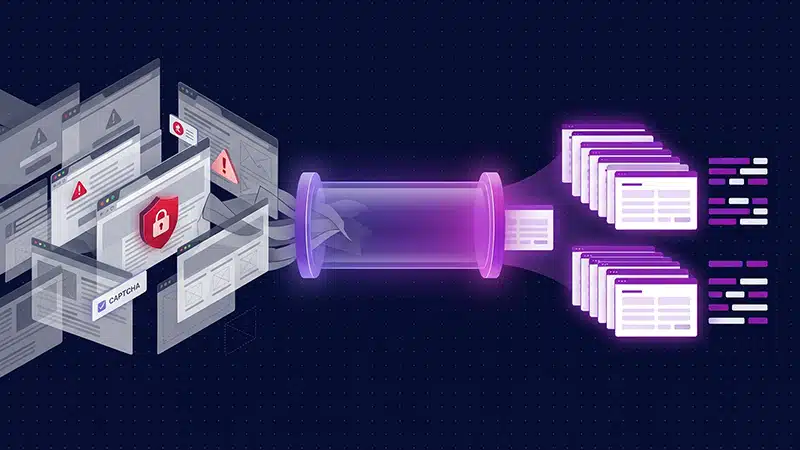

Web scraping gets a lot easier when it’s split into two halves and separate tools are used for each half.
Almost every scraper starts the same way. You open a Python shell, pull down a page with requests, parse it with BeautifulSoup, pick out the three fields you need, and feel briefly unstoppable. Then you point the same script at a real site and the cracks show up fast. The response comes back as a 403 instead of HTML. The page arrives, but the part you wanted is missing because a JavaScript bundle fills it in after load. Or the scraper runs fine for a week and then returns empty rows one morning because someone on the other side renamed a CSS class. None of these are exotic problems. They are the normal texture of scraping the modern web, and most of the effort in any real project goes into fighting them rather than into the data you actually care about.
This article is about splitting that work into two clean halves. One half is crawling, which open source tooling handles very well and has for years. The other half is the genuinely hard part: getting past anti-bot defences, running a browser when a page needs one, and turning messy HTML into structured records without hand-writing selectors for every site. That second half is where a single API call earns its place. I will use Scrapy for the crawling and the Zyte API for the hard parts, while being honest about where you do not need either.
What makes web scraping hard
Strip away the tooling and scraping comes down to three recurring walls, and the title of this article names all three.
The first is getting blocked. Certain sites can employ a number of techniques to restrict your access to public data. Your script that worked from your laptop starts returning 403 and 429 responses once it runs from a data centre IP, and dodging that reliably means rotating IP addresses, matching browser fingerprints, solving challenges, and respecting per-site quirks. This is a full-time job and is the reason so many hobby scrapers quietly stop working.
The second is JavaScript-rendered content. A growing share of pages ship almost no data in the initial HTML. What you get is a skeleton, and a script that fetches the real content and paints it into the page in your browser. Fetch that page with a plain HTTP client and the fields you want are simply not there. To see them you need to run an actual browser engine, wait for the right network calls to finish, and only then read the DOM.
The third is brittle extraction. Even when you can fetch a page, you still have to pull the fields out of it, and the usual approach is a stack of CSS or XPath selectors tuned to one site’s markup. Those selectors are fragile by nature. A layout change, an A/B test, or a seasonal redesign can silently break them, and you often find out only when your data goes blank or wrong. Multiply that by every site you scrape and maintenance becomes the main cost of the whole operation.
The rest of this is about taking down each of those walls with as little code as possible.
One API call, three hard problems
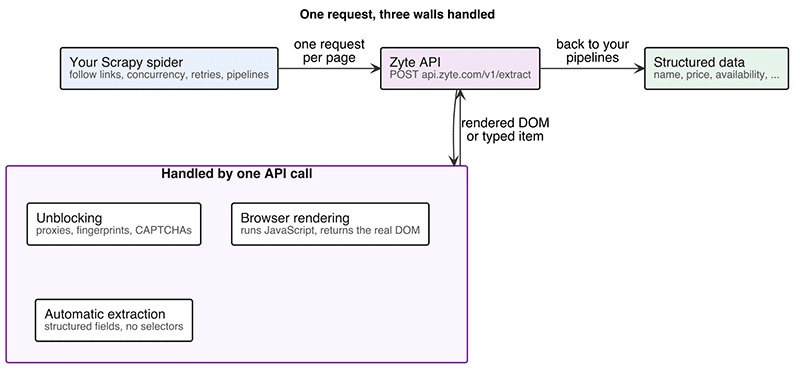
Instead of assembling a proxy pool, a browser farm, and a pile of per-site parsers yourself, you send one HTTP request to a single endpoint and ask for exactly the level of help you need. The Zyte API works this way. Every request is a POST to https://api.zyte.com/v1/extract, authenticated with HTTP basic auth where your API key is the user name and the password is empty. What you get back depends entirely on which fields you set in the JSON body (Figure 1).
Start with the simplest case: you just want the HTML, but the site keeps blocking you. You ask for the raw response body and let the API handle the unblocking.
curl --user YOUR_ZYTE_API_KEY: \

--header ‘Content-Type: application/json’ \

--data ‘{“url”: “https://books.toscrape.com”, “httpResponseBody”: true}’ \

--compressed \

https://api.zyte.com/v1/extract
The response is JSON, and httpResponseBody comes back Base64-encoded, so you decode it to get the HTML. When I ran this against the sandbox site above, the decoded body was 51,274 bytes of ordinary markup, fetched without me running a single proxy. Unblocking is no longer infrastructure you operate; it is just a field you set to true.
When the page needs a real browser, you flip a different field. Setting browserHtml to true tells the API to load the page in a headless browser, run its JavaScript, and return the rendered DOM instead of the raw source. The same request can carry a list of actions to click, scroll, or wait for a selector before capturing, take a screenshot, or set geolocation to fetch the page as if from a specific country. You are still sending one request to one endpoint; you are just describing more of what a browser would do.
The part that changes how you build scrapers is automatic extraction. Instead of asking for HTML at all, you ask for a structured data type and let the API’s extraction models do the parsing. For a product page you set product to true:
import requests

resp = requests.post(

“https://api.zyte.com/v1/extract”,

auth=(“YOUR_ZYTE_API_KEY”, “”),

json={

“url”: “https://books.toscrape.com/catalogue/a-light-in-the-attic_1000/index.html”,

“product”: True,

},

)

product = resp.json()[“product”]

print(product[“name”], product[“price”], product[“currency”], product[“availability”])
You do not write a single selector. The response carries a product object with fields already named and typed. Running the snippet above prints A Light in the Attic 51.77 GBP InStock, and the full object includes currencyRaw as the original £ string, a sku, a brand with its own name, a breadcrumbs array walking Home, Books, Poetry, the mainImage.url, a description, and a metadata block. That metadata even reports an extraction probability, which was 0.997 on this page, so you can flag low-confidence results instead of trusting everything blindly. Product is not the only type available. The same pattern covers productList, article and articleList, jobPosting, forumThread, and search results through serp, each returning its own structured shape. Figure 2 shows the real response for the book above, pretty-printed in a terminal.
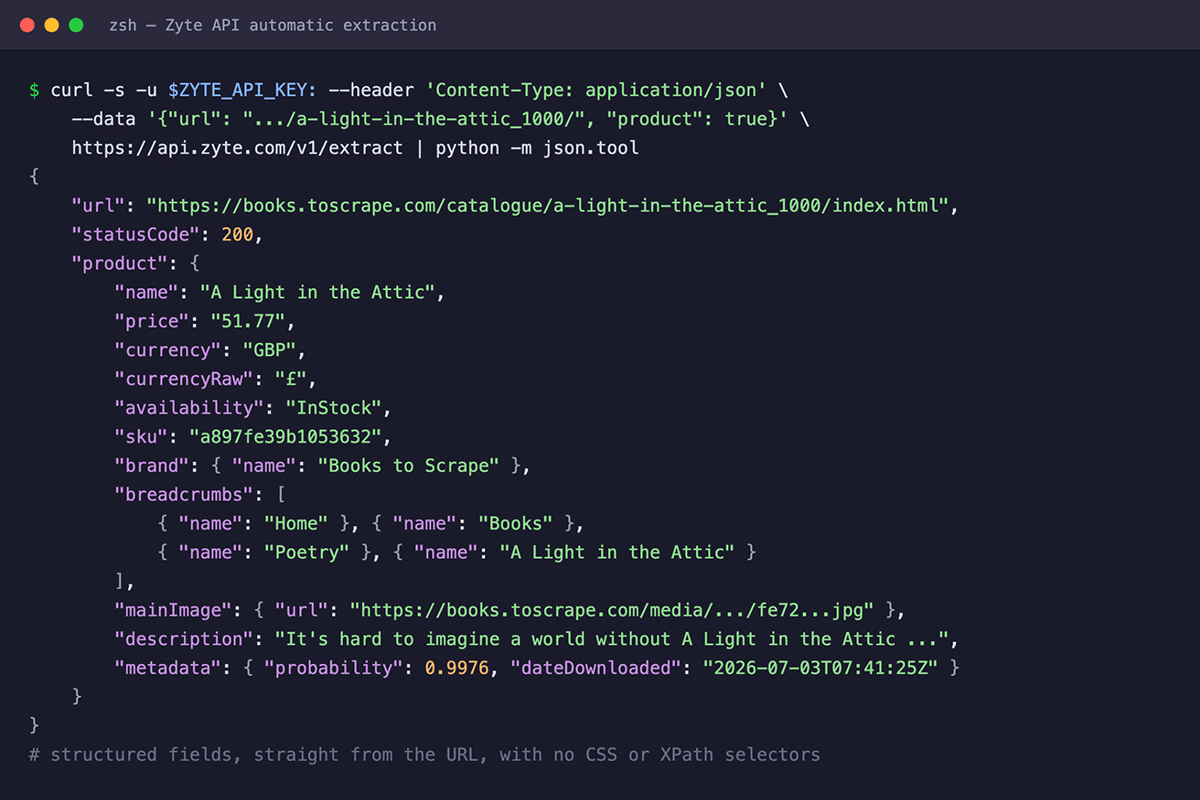
The reason this matters goes back to the third wall. When extraction is a model asking “what is the product on this page” rather than a selector asking “what is inside div.price_color,” a layout change on the target site no longer breaks your parser. That is the difference between maintaining a scraper and running one.
Scrapy: The open source engine for web scraping at scale
A single API call is perfect for one page or a handful. The moment you want a whole catalogue, though, you need something to drive the crawl: to follow links, manage concurrency, retry failures, throttle politely, and push clean records out the other end. That is exactly what Scrapy is for, and it has been the workhorse of Python web scraping for well over a decade. It is fully open source and is developed and maintained by Zyte, the same one behind the API from the previous section.
The unit of work in Scrapy is a spider, a class that says where to start and what to do with each response. Here is an example against another sandbox site, quotes.toscrape.com, which paginates through a few hundred quotes.
import scrapy

class QuotesSpider(scrapy.Spider):

name = “quotes”

start_urls = [“https://quotes.toscrape.com/page/1/”]

def parse(self, response):

for quote in response.css(“div.quote”):

yield {

“text”: quote.css(“span.text::text”).get(),

“author”: quote.css(“small.author::text”).get(),

“tags”: quote.css(“div.tags a.tag::text”).getall(),

}

next_page = response.css(“li.next a::attr(href)”).get()

if next_page is not None:

yield response.follow(next_page, callback=self.parse)
A lot happens in these few lines. Each dictionary you yield becomes a scraped item that Scrapy routes through its output machinery. The response.follow call at the end is the crawling loop: it finds the ‘next’ link, resolves it even though it is relative, and schedules another request that runs parse again on the next page. You never write a while loop or track which pages you have visited. Save the file and run it with a single command:
scrapy runspider quotes_spider.py -O quotes.json
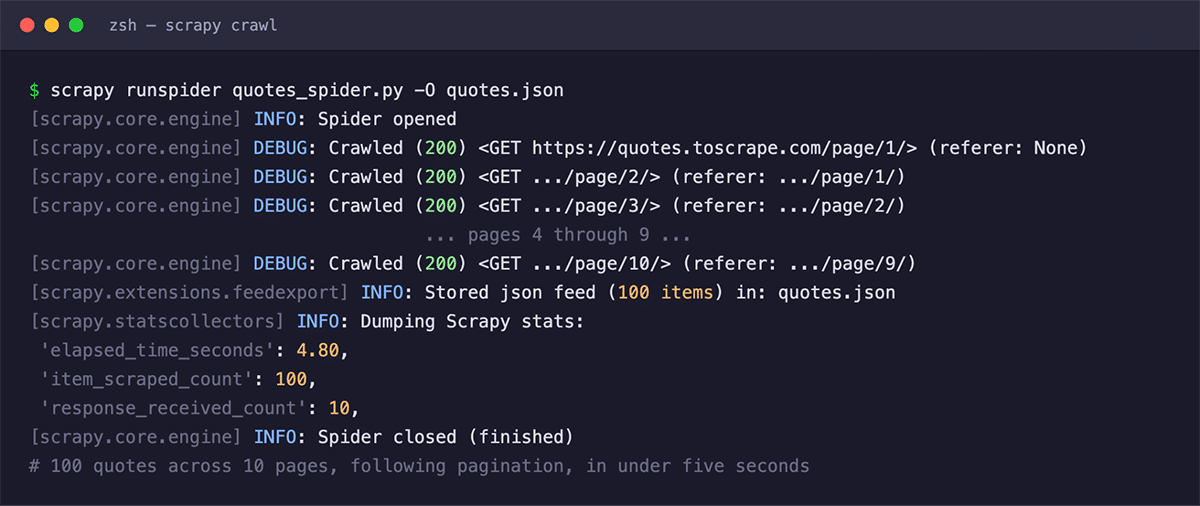
When I ran exactly this, Scrapy walked all ten pages and wrote 100 items to quotes.json in under five seconds, following pagination nine links deep without any book-keeping from me (Figure 3). For free, and without appearing in the spider code, you also get asynchronous requests handled concurrently, automatic retries on transient failures, auto-throttling so you do not overwhelm the target, and item pipelines where you can validate, clean, or store records as they stream through.
Scrapy’s flexibility comes largely from its middleware layers, and there are two kinds. Downloader middlewares sit between the engine and the network, so they are where request and response handling gets customised: proxies, retry logic, custom headers, or handing a request off to something other than the built-in downloader. Spider middleware sits between the engine and your spider, processing the responses that come in and the items and requests that go out. You rarely write these from scratch, but they are the seam that lets Scrapy integrate cleanly with other tools, which is exactly what we do next.
Composing the two: Scrapy for scale, Zyte API for the walls
Scrapy is a superb crawler, but on its own it uses a plain HTTP downloader, so it hits the same three walls as any other client. The natural move is to keep Scrapy as the engine and route its actual fetching through the Zyte API, which is what the scrapy-zyte-api package does. Zyte’s own convention for wiring up Scrapy plugins is the addon system, so setup is a couple of lines in your project’s settings.py rather than a scattering of middleware entries.
# settings.py

ADDONS = {

“scrapy_poet.Addon”: 300,

“scrapy_zyte_api.Addon”: 500,

}
You supply your key through the ZYTE_API_KEY environment variable or the same setting, and the add-on does the rest. It registers the download handlers, the downloader and spider middlewares, and the request finger-printer, switches Scrapy to the asyncio reactor, and turns on transparent mode so that every request your spiders make is routed through the Zyte API automatically. Unblocking and, when you ask for it, browser rendering now apply to your whole crawl without touching a single spider.
The scrapy_poet.Addon line is what makes the next step work, and it is easy to miss. With scrapy-poet in the mix, you can declare what data you want as a type annotation on your callback and let it be injected, extraction and all. A complete product spider looks like this:
import scrapy

from zyte_common_items import Product

class BooksSpider(scrapy.Spider):

name = “books”

start_urls = [

“https://books.toscrape.com/catalogue/a-light-in-the-attic_1000/index.html”

]

def parse(self, response, product: Product):

yield product
That product: Product argument is the whole trick. scrapy-poet sees the annotation, asks the Zyte API to extract a product from the page, and hands your callback a fully populated Product object. Running this spider yielded one item with the name A Light in the Attic, a price of 51.77 in GBP, InStock availability, and the complete Home > Books > Poetry breadcrumb trail, and the crawl stats confirmed the request had gone out with the product set. You now have Scrapy’s crawling, concurrency, and pipelines on the outside, and structured extraction with no selectors on the inside. If I had left out the scrapy-poet add-on, that same spider would fail with a missing-argument error, because nothing would be there to inject the product, which is why both add-on lines earn their place in the settings.
Zyte API provides an array of other functionality as well, like changing your request geolocation to get localised content and taking screenshots of a page from API call. These are out of scope of this article but feel free to refer the official documentation at
https://docs.zyte.com/.
When to use what
The point of separating the crawl from the hard parts is that you can spend effort and money only where a wall actually stands. It is easy to reach for a paid API by reflex, so here is the decision I made (Figure 4).
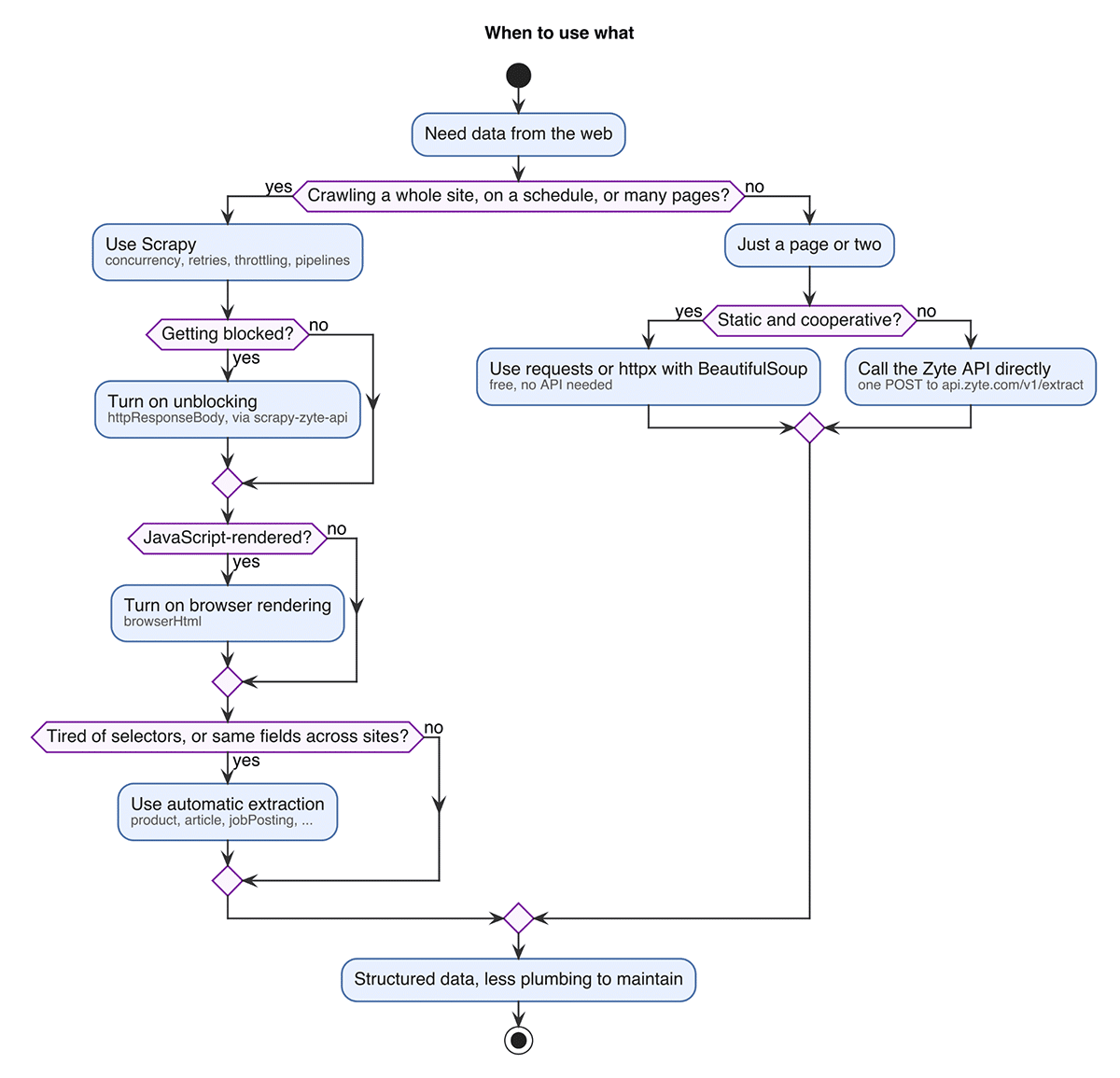
If the site is static, cooperative, and you need a page or two on a one-off basis, do not overthink it. requests or httpx with BeautifulSoup are the right tools – they are free, and adding anything more is wasteful. Open source gets you a long way, and a lot of useful scraping never needs more than this.
If you are crawling a whole site, running the job on a schedule, or working across thousands of pages, that is when Scrapy pays for itself. The concurrency, retries, throttling, and pipelines you would otherwise reinvent are exactly what it gives you, and it is still entirely open source.
From there, add capability only against the wall you actually hit. If you are getting blocked, turn on unblocking and let the API manage proxies and fingerprints instead of running that fleet yourself. If the content is rendered client-side, ask for browser rendering rather than standing up and babysitting your own headless browsers. And if you are tired of selectors breaking, or you need the same product, article, or job-posting fields across many different sites, automatic extraction is where the API changes the economics of the whole project. The rule I follow is to crawl with open source and reach for the API at the wall, once I have actually hit one.
Bonus: Let an AI coding agent write the scraper for you
One more shift is changing how the code above gets written in the first place. Zyte publishes a plugin for Claude Code, the terminal-based AI coding agent, distributed as a set of agent skills rather than as an MCP server. You install it once:
claude plugin marketplace add zytedata/claude-skills
claude plugin install zyte-web-data@zyte-ai
Then you describe the site in plain language, something as short as ‘Scrape books.toscrape.com’, and the agent works through the pipeline for you. It explores the site to find listing and detail pages, proposes an extraction schema with sample data so you can sanity-check the fields, generates a Scrapy spider with web-poet page objects along the lines of the ones above, and smoke-tests the result.
Wrapping up
The reason web scraping feels harder than it should is that we tend to treat it as one problem when it is really two. Crawling a site, following its links, and streaming out records is a solved problem, and Scrapy solves it well without asking you for a cent. Getting past bot defences, rendering JavaScript, and extracting clean structured data across sites that keep changing is the genuinely hard part, and that is the part worth handing to a single API call so you stop maintaining infrastructure and start using data. Split the work along that line and most scraping projects get dramatically smaller. If you want to go deeper, the Scrapy documentation at docs.scrapy.org is the best place to learn the framework, and the Zyte API reference at docs.zyte.com documents every field mentioned here and many more.