





















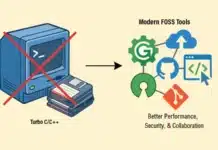
































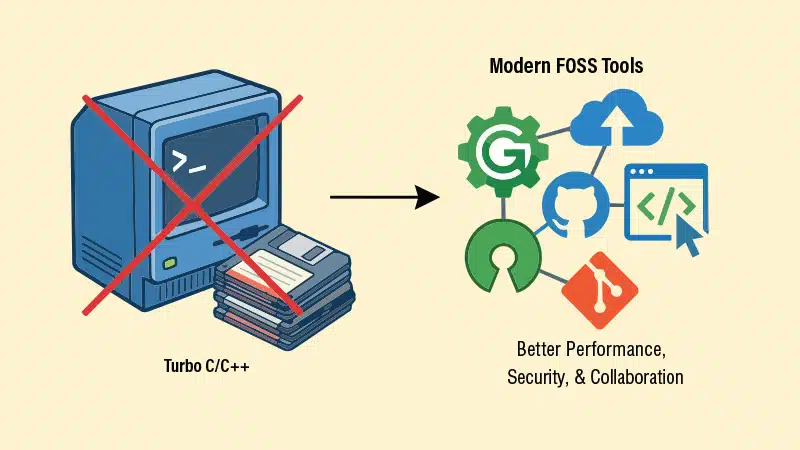

Thousands of schools and colleges continue to teach C and C++ using Turbo C/C++, a compiler that was last updated more than three decades ago. This outdated software can easily be replaced with free and open source tools that work equally well on Windows and Linux.
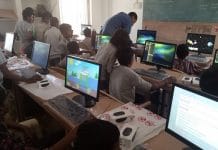
Walk into the computer lab of many schools, colleges and coaching institutes, and you will be greeted by a familiar sight: a blue screen with yellow text, running inside a black window. This is Turbo C++, running inside the DOSBox emulator, because modern computers can no longer run it directly. Many of us learnt our first programs on that blue screen, and there is genuine affection for it. But affection is not a good reason to teach with a tool that the rest of the world retired a generation ago.
This old compiler can do concrete harm to students. A common free and open source (FOSS) replacement can work the same way on Windows and Linux, so that no institute needs to change its operating system to make the switch.
A museum piece in the computer lab
Turbo C appeared in the late 1980s, and Turbo C++ 3.0, the version commonly seen in labs today, was released by Borland in 1991. The development of this 16-bit MS-DOS program stopped long ago, and Borland itself no longer exists as an independent company. Since a modern 64-bit Windows system cannot run 16-bit DOS programs at all, institutes install DOSBox, an emulator of a dead operating system, just to run a discontinued compiler to teach a very living language. The emulation brings its own friction, with awkward full-screen behaviour, clumsy copy-paste and needless crashes. To add to this, most copies of Turbo C++ 3.0 circulating on the internet are of doubtful licence status. We are, in effect, introducing lakhs of students to programming every year on abandoned software of uncertain legality, when legally free and actively maintained alternatives exist.
The language is not the compiler
Before going further, one clarification will make everything else in this article easier to follow, especially for readers who have taught with Turbo C for decades. C and C++ are languages, defined on paper by an international committee under the ISO. The committee publishes a document, called the standard, which states exactly what the language contains: its keywords, its grammar, and its library functions such as printf() and scanf(). A compiler is a separate piece of software that reads our program and translates it into a form the machine can execute. Turbo C, GCC and Clang are all compilers; each is one vendor’s implementation of the same languages.
An IDE (integrated development environment) is a third thing altogether: the convenient window in which we type the program, with menus and a key to compile and run it. Turbo C++ bundled the compiler and the IDE into a single blue screen, which is why many of us came to think of them as one and the same. They are not. When I recommend ‘GCC with Code::Blocks’, I am simply recommending a modern compiler (GCC) together with a modern window to use it from (Code::Blocks), the very roles the Turbo compiler and the Turbo editor played earlier.
Why does the standard matter so much? Because it is the common agreement that lets a program written on one computer compile on every other. Whatever the standard defines, every compiler must accept; whatever a single vendor adds on its own is an extension, which works only on that vendor’s compiler. Most of the problems described below arise because Turbo C++ stopped following the standard three decades ago, and because its private extensions were mistaken for the language itself.
What the outdated software is costing our students
It predates the language standards themselves
The first official ISO standard for C++ was published in 1998, a full seven years after Turbo C++ 3.0. The ‘C++’ taught on Turbo is therefore a pre-standard dialect. There is no Standard Template Library (STL), the backbone of modern C++ programming, so students never meet std::vector, std::string, std::map or the standard algorithms such as sort(); they fall back on raw C-style arrays and character arrays, missing the safety and efficiency the STL provides.
To take one everyday example: to store the marks of a class whose strength is not known in advance, the Turbo student must either declare an oversized array or wrestle with malloc() and realloc(). The modern student, however, simply declares a std::vector, which grows by itself as elements are added and reports its own size when asked. There are no namespaces, so the line using namespace std; that every modern textbook carries is meaningless in the lab. Header files are written as #include <iostream.h> instead of the standard #include <iostream>. The compiler happily accepts void main(), which the standard has never permitted. Exception handling is absent, templates exist only in a primitive early form, and the only casts available are the dangerous C-style casts, with no trace of the safer static_cast and dynamic_cast.
Since 1998, the language has been revised again and again, through C++11, C++14, C++17, C++20 and C++23, bringing smart pointers (objects that release memory automatically when it is no longer needed, preventing the leaks that plague hand-written new/delete code), auto type deduction (the compiler works out the type of a variable by itself), lambda expressions (small functions written right where they are used), and much else that a Turbo C++ student never even hears of. Modern C++ is almost a different and far more pleasant language. A student who learns C++ only on Turbo has learnt a dialect that no current compiler accepts as it is.
The C language has moved on, but the classroom has not
Turbo C implements roughly the C of 1989 (C89), plus Borland’s own extensions. The language has since been revised four times. C99 brought // single-line comments, the freedom to declare variables where they are first needed instead of only at the top of a block, the 64-bit long type, the stdint.h header with exact-width types like int32_t, stdbool.h, inline functions and designated initialisers. C11 added _Static_assert, type-generic programming with _Generic, and a standard threads library. C17 tidied up the standard, and C23, the current edition, has made bool, true and false proper keywords, and added nullptr, binary literals like 0b1010, and much more. Recent releases of GCC already support C23. None of this exists in the Turbo C universe. Students there are studying the C of 1989 and are being told that it is C.
Non-standard libraries taught as if they were the language
This is perhaps the most damaging habit of all. Ask students who have learnt on Turbo C to name the functions they use most often, and clrscr() and getch() will appear near the top. Both come from conio.h, which is not part of the C standard at all. It is a Borland-specific library tied to DOS. The reason is worth spelling out. Functions like clrscr() and getch() work by calling MS-DOS and the PC’s BIOS directly, services that existed on a 1991 computer. Linux and modern Windows are organised entirely differently and offer no such services, so no standard compiler can provide these functions. The C standard deliberately includes only what can be provided on every kind of computer, which is precisely why conio.h was never a part of it.
The same trap exists in computer graphics. Institutes still use graphics.h to teach the subject, but that is the Borland Graphics Interface (BGI), a proprietary library built for 16-bit MS-DOS; graphics today are handled by standard, cross-platform libraries such as OpenGL, Vulkan and SDL, all freely available. Teaching BGI is like teaching students to drive a horse-drawn carriage in the era of electric cars. The story repeats with dos.h, the home of delay(). Nothing in the classroom tells students that any of these are non-standard. They naturally assume that whatever the compiler accepts is ‘C’. The shock comes later, when they paste their program into an online compiler, an online judge or GCC, and it fails at the very first line: fatal error: conio.h: No such file or directory.
The problem is not that a vendor library was used; every platform has its own libraries. The problem is that an entire generation is graduating without ever being told the difference between the C language and one vendor’s extensions to it. And there is a further cost: frozen in the DOS era, Turbo C++ cannot interface with any modern third-party library at all, whether for networking, database connectivity or GUI development. That entire world stays invisible to the student.
It teaches facts about computers that are no longer true
Turbo C is a 16-bit compiler, so sizeof(int) is 2, and an int ranges from -32,768 to 32,767. It exposes the segmented memory model of DOS, with its near, far and huge pointers; no ordinary array or data segment may exceed 64KB, and the whole program is confined within the 640KB conventional memory of DOS, at a time when modern computing routinely handles gigabytes of data. All of this was true once. Today, on every machine our students will use, an int is 4 bytes, pointers are 8 bytes, and segmented memory is history. Yet viva questions and textbook margins across the country still confidently state that ‘the size of int is 2 bytes’. When the lab tool itself is wrong about the machine, students memorise wrong answers and defend them sincerely in examinations and interviews.
Bad habits are never corrected
Modern compilers are strict but helpful teachers. GCC and Clang, invoked with the -Wall and –Wextra options, warn about uninitialised variables, wrong printf() format specifiers, missing return statements and much else. These warnings are free tuition. Turbo C, in contrast, silently accepts void main(), tolerates missing prototypes, and knows nothing of the fact that the dangerous gets() function was deprecated in C99 and removed from the language altogether in C11. It has no address sanitiser to catch memory errors, and its blue-screen debugger is archaic. A modern IDE lets students set breakpoints, step through code line by line, watch variables change and inspect memory as the program runs, which transforms how a learner understands program execution. For a teacher, this is a classroom aid, not a luxury: place a breakpoint inside a loop, run the program, and the whole class can watch, live, how the loop variable changes on every pass and exactly when a condition fails. Concepts that once needed dry-run tables on the blackboard become directly visible. Students trained on a permissive compiler write careless code and never find out.
The penalty is paid by the students, outside the lab
Every popular coding platform, from CodeChef and HackerRank to LeetCode, compiles submissions with GCC or Clang under current standards; a program carrying #include <conio.h> or void main() simply will not compile there. Competitive examinations and placement tests assume standard behaviour. Every hour of muscle memory a student builds on Turbo C is an hour of unlearning that the student, and not the institute, will later pay for.
The replacement is free, and it is already the world standard
The replacement does not have to be searched for, evaluated or purchased. It already exists — it is free and open source software (FOSS), and it is the compiler most of the world uses: GCC, the GNU Compiler Collection. A word on the term is in order. FOSS is free of cost, and more importantly, its source code is open for anyone to study, modify and share. It is developed and maintained in public by a worldwide community, which is why GCC has stayed continuously up to date for nearly four decades while Turbo C froze. It is not freeware of unknown origin, and certainly not a pirated copy; installing it across an entire institution is completely legal and costs nothing. GCC is the default compiler on every Linux distribution and is installed with a single command (sudo apt install build-essential on Ubuntu and its derivatives). On Windows, the MinGW-w64 project provides the very same GCC as a native Windows compiler. Clang, from the LLVM project, is the other major FOSS compiler, and is well known for its beginner-friendly error messages. Both track the official standards closely. The essential point for institutes with mixed labs is this: the same compiler, with the same behaviour and the same error messages, is available on Windows and on Linux. A truly common toolchain is possible.
Code::Blocks: A familiar IDE for Windows and Linux
The real attachment of teachers is usually not to Borland’s compiler but to the convenience of a single window where one can type a program, press a key and see the output. That convenience is fully preserved. Code::Blocks is a free and open source IDE, released under the GPL, that runs on Windows and Linux (and on macOS as well). It offers a modern editor with syntax colouring and code completion, a Build and Run button, and an integrated graphical debugger, all in one window, in a layout that any Turbo C user will find familiar within an hour.
Setting it up is easier than setting up Turbo C ever was. On Windows, download the Code::Blocks installer that comes bundled with MinGW; this one setup file installs the IDE and GCC together, with nothing further to configure. In practice, this means visiting codeblocks.org, choosing the download where the name contains mingw-setup, and clicking through an ordinary Windows installer. The first time the IDE opens, it detects the compiler by itself. From then on, the routine is the familiar one: type the program and press F9 to build and run, the same reflex as Ctrl+F9 in Turbo C. On Linux, install Code::Blocks along with gcc and g++ from the distribution’s repository. The lab manual can then carry a single, identical set of instructions for both operating systems.
Institutes are not short of alternatives either. Geany is an extremely light FOSS editor-cum-IDE that runs happily on old machines. Visual Studio Code is free and hugely popular with senior students (VSCodium is its fully FOSS build). Online compilers such as OnlineGDB run standard GCC in the browser when nothing can be installed. Whatever front end an institute chooses, the compiler underneath is the same GCC, so every student’s program behaves in the same way.
‘But my programs use clrscr() and getch()!’
This is the first practical objection, and it deserves an honest answer. Most textbook programs never needed these functions for their logic; getch() was typically the last line of a program, added only to hold Turbo’s output window open. In Code::Blocks, the console window stays open by itself, so that line can simply be deleted. Where a genuine pause is needed, the standard getchar() function (or cin.get() in C++) works on every compiler. Programs that truly need screen control, with menus, colours and cursor positioning, should use the ncurses library on Linux and the compatible PDCurses library on Windows; both are FOSS, and this is how real text-mode applications are actually written. As a quick stopgap, system(“cls”) on Windows or system(“clear”) on Linux will clear the screen, though it is better to design programs that do not depend on it. And here lies a bonus: explaining to students why getch() worked in one compiler and not in another is itself a valuable lesson on the difference between a language standard and a vendor’s extension.
What actually changes in the code
The first question from faculty is usually a practical one: how different will the programs look? The honest answer is: very little. Here is the classic first program as it appears in a Turbo C++ lab manual, followed by its standard equivalent.
/* Turbo C++ version */
#include <iostream.h>
#include <conio.h>

void main()
{
clrscr();
cout << “Hello, world”;
getch();
}

// Standard version (compiles on GCC, Clang and every modern compiler)
#include <iostream>
using namespace std;

int main()
{
cout << “Hello, world”;
return 0;
}
The table below summarises the handful of mechanical changes that cover almost every program in a typical lab manual.
| Turbo C/C++ habit | Standard replacement |
| #include <iostream.h> | #include <iostream> followed by using namespace std; |
| void main() | int main(), with return 0; at the end |
| clrscr(); | Usually just delete it; system(“cls”) / system(“clear”) if truly needed |
| getch(); to hold the screen | Delete it (the IDE keeps the window open); cin.get() if a pause is wanted |
| gets(str); | fgets(str, sizeof(str), stdin); |
| graphics.h exercises | Rework using SDL or OpenGL |
That is the whole of it. A faculty member who converts two or three programs by hand will find that all the rest follow the same pattern.
Answering the usual objections
‘The syllabus prescribes Turbo C.’
In almost every case, the syllabus prescribes the C or C++ language; the choice of compiler is left to the institute. Where an old lab manual mentions Turbo C by name, a one-line amendment is all that is needed, not a curriculum revision. CBSE has already moved school computer science to Python; university C courses can at least move to a living C compiler.
‘Our teachers know only Turbo C.’
The language is the same one they already teach. A half-day orientation on the new IDE is sufficient, and the changes to existing programs are the mechanical ones summarised in the table below.
‘Our lab machines are old.’
GCC with Geany or Code::Blocks runs comfortably on hardware that struggles to open a modern browser. Better still, a lightweight Linux distribution can revive machines that cannot even be upgraded to the current version of Windows, after which the operating system, the compiler and the IDE are all legally free.
‘Updating question banks and lab records is work.’: The edits are mechanical and one-time. Weigh that against students losing marks and opportunities, year after year, for writing void main() outside the lab.
And the cost of all this? Zero. No licence fees, ever, and no software of doubtful origin on institute machines.
A simple migration plan
- Choose one lab, or one semester’s batch, as a pilot.
- On Windows machines, install the Code::Blocks bundle that includes MinGW. On Linux machines, install gcc, g++ and Code::Blocks from the repository.
- Conduct a half-day faculty session covering how to create, compile, run and debug a program, along with the small mechanical changes to old code.
- Update the lab manual: int main() everywhere, standard headers only, and compilation with -Wall as a habit. Rework the few exercises that depend on conio.h, or route them through ncurses/PDCurses.
- Tell the students why the change is being made. The distinction between standard C and vendor extensions will serve them for their whole careers.
- Extend the change to all labs from the following term, and retire DOSBox with honour.
The ultimate test is employability
The purpose of teaching programming is not to complete a syllabus; it is to prepare students for the world they will work in. Measured against that goal, Turbo C/C++ fails completely. Graduates who trained on it enter the industry carrying an unlearning curve, because no real-world codebase uses <iostream.h>; the world writes <iostream> and the std:: namespace. Making the switch gives students far more than a new compiler. Moving to GCC or Clang through Code::Blocks or VS Code introduces them to the FOSS ecosystem itself, and to the habit that marks out a good programmer everywhere: writing clean, portable, ISO-standard code that will compile anywhere, on any machine, under any operating system.
Turbo C/C++ served its purpose well; an entire generation of Indian programmers wrote their first programs on it. Respecting the past, however, does not imply not moving with the times. Our students will spend their worklife on modern, open source toolchains. Let their very first compiler be one of them.