































































This practical walkthrough of how Ansible works gives an insight into why it excels at configuration management and IT automation.
Ansible, created by Michael DeHaan, is an open source IT automation engine that simplifies the orchestration of tasks such as software deployment and system configuration. Other advanced tasks like continuous deployment and rolling updates with zero-downtime are also supported by this automation engine. Ansible was released in 2012 and is currently a Red Hat product and part of the Ansible Automation Platform.
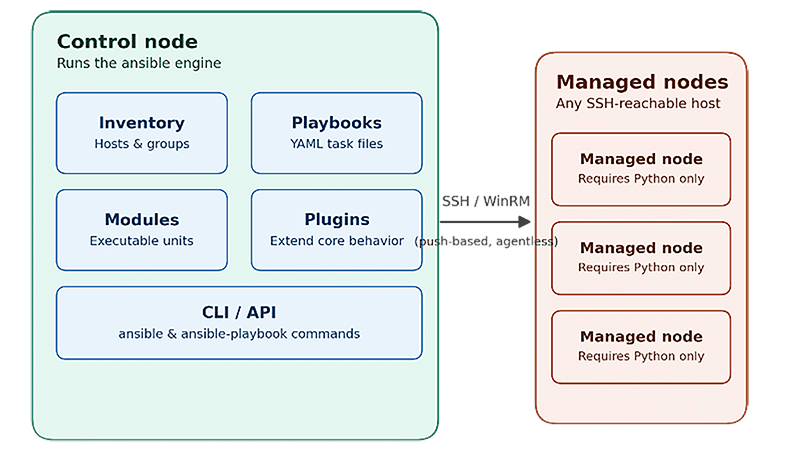
Ansible does not need in-built agents and custom security infrastructures like other automation tools. It uses SSH (or WinRM for Windows) to communicate with the target system. Then, Ansible copies modules, executes them, and removes them. Nothing is left on the target system. As a result of this architecture, Ansible has a low maintenance cost when it is used throughout an enterprise.
Ansible architecture
Ansible’s architecture favours simplicity and ease of maintenance. For example, all the models that it manages are passive. As a result of this design choice, the control node does all the thinking and contains everything. Inventories (lists of hosts), playbooks (YAML files), modules (files that support tasks), and plugins (files that support enhancements) are all located on the control node. The ansible and ansible-playbook commands provide control of all these files and resources. These commands also support a Python API.
Managed nodes are the servers being configured. There is no agent, daemon, or persistent process to install on them — only an SSH server and a Python interpreter. When a playbook runs, Ansible connects over SSH (or WinRM for Windows), copies the relevant module code to the host as a small script, executes it, captures the result, and removes it. Nothing is left running afterward, which is what makes the model ‘agentless’ and lets a new managed node be brought under Ansible’s control in minutes.
This push-based, agentless design is also why idempotency matters so much architecturally: since the control node re-evaluates and re-pushes on every run rather than a resident agent enforcing state continuously, each module is written to check current state first and only make changes when something is out of alignment.
Why Ansible?
Organisations often build large fleets of servers, containers, and cloud resources, and managing those fleets manually is slow and error prone. With Ansible, administrators can specify the desired state of a system in a simple human-readable file, and Ansible can make that state a reality on as many machines as the administrator desires.
Compared to alternatives such as Puppet, Chef, or SaltStack, Ansible is often preferred because it:
- Requires no agent software on managed nodes — only SSH and Python.
- Uses YAML, a format that is easy to read even for people who are not full-time developers.
- Has a very low learning curve, allowing teams to become productive within days.
- Integrates cleanly with cloud providers, container platforms, and CI/CD pipelines.
- Is backed by a large open source community and an extensive library of ready-made modules.
Key features of Ansible are:
- Agentless architecture: Connects over SSH/WinRM; nothing to install or maintain on target hosts.
- Idempotency: Running the same playbook repeatedly produces the same end state without unwanted side effects.
- Declarative playbooks: YAML files describe the desired end state rather than step-by-step procedures.
- Inventory management: Hosts can be grouped logically (web servers, databases, etc) in static or dynamic inventories.
- Extensive module library: Has thousands of built-in modules covering package management, cloud provisioning, networking, and more.
- Roles and reusability: Playbooks can be organised into reusable, shareable roles via Ansible Galaxy.
- Push-based execution: The control node initiates all actions, giving predictable, on-demand automation.
Installing Ansible
Before installing Ansible, the following should be in place:
- A control node running Linux or macOS (Ansible does not run natively as a controller on Windows).
- Python 3.9 or later installed on the control node.
- SSH access (with key-based authentication recommended) from the control node to all managed nodes.
- Python installed on each managed node so Ansible modules can execute.
- Sudo/administrative privileges on managed nodes for tasks that require elevation.
- Basic familiarity with YAML syntax for writing playbooks.
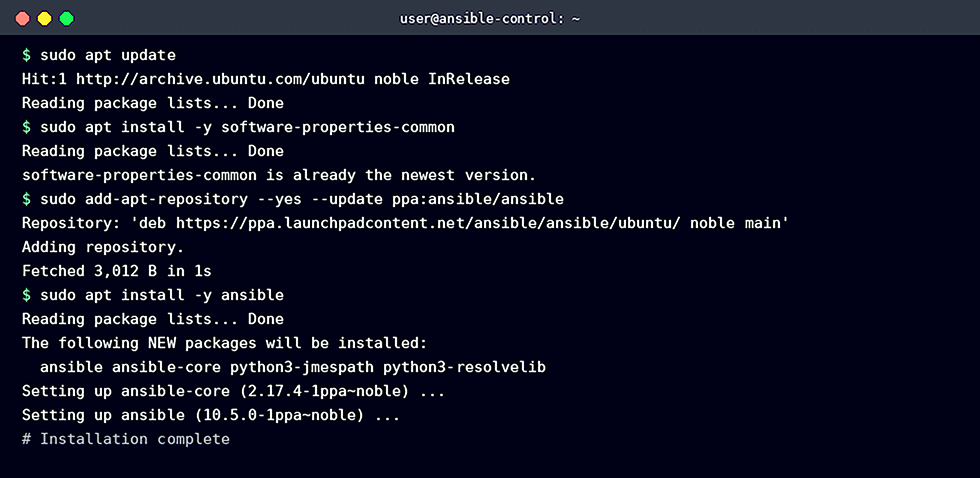
On a Debian/Ubuntu-based control node, Ansible can be installed via the official PPA to ensure an up-to-date version:
sudo apt update
sudo apt install -y software-properties-common
sudo add-apt-repository --yes --update ppa:ansible/ansible
sudo apt install -y ansible
On RHEL/CentOS/Fedora systems, the equivalent installation uses:
sudo dnf install -y ansible-core
Alternatively, Ansible can be installed in a Python virtual environment on any platform using pip:
python3 -m pip install --user ansible
Configuring environment variables
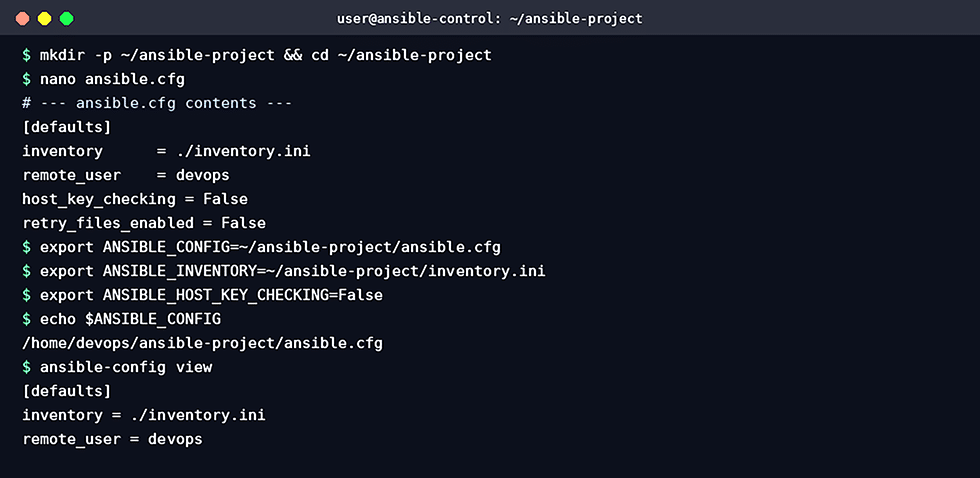
Ansible’s behaviour can be controlled through a configuration file (ansible.cfg) and a set of environment variables, which is useful for keeping project-specific settings out of the global system configuration. A typical project sets the following:
- ANSIBLE_CONFIG points to a project-specific ansible.cfg file.
- ANSIBLE_INVENTORY points to the inventory file listing managed hosts.
- ANSIBLE_HOST_KEY_CHECKING disables SSH host key prompts in lab/test environments (use with caution in production).
mkdir -p ~/ansible-project && cd ~/ansible-project

# ansible.cfg

[defaults]

inventory = ./inventory.ini

remote_user = devops

host_key_checking = False

export ANSIBLE_CONFIG=~/ansible-project/ansible.cfg

export ANSIBLE_INVENTORY=~/ansible-project/inventory.ini
Verifying installation
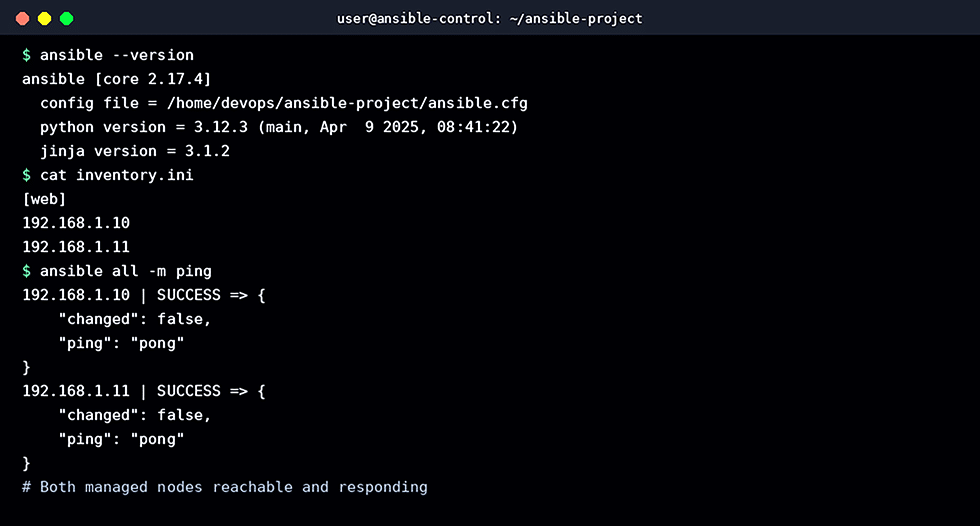
Once installed and configured, the installation should be verified by checking the version, confirming the configuration file in use, and testing connectivity to managed nodes with the built-in ping module (which checks Python availability over SSH, not ICMP).
ansible --version

cat inventory.ini

ansible all -m ping
A SUCCESS response with ‘pong’ for each host shows that the control node can reach each managed node and that Ansible modules can be executed — the environment is ready for building and executing playbooks.
Case study: Scaling web server deployment at a retail company
A mid-sized e-commerce company ran a load balanced web application that spanned 12 web servers. New releases of the application and new security patches were performed by the manual process of SSH-ing into each of the 12 web servers. This introduced an issue of configuration drift.
- Manual deployments were slow and blocked releases to a single maintenance window per week.
- Configuration drift caused intermittent bugs that only appeared on some servers.
- Onboarding a new server took a full day of manually replicating existing configuration.
- There was no record of exactly what had been changed on each host over time.
The operations team introduced Ansible as a lightweight automation layer. All 12 web servers were added to an inventory grouped under [webservers], and the existing manual steps were translated into a single, version-controlled playbook covering package updates, application code deployment, configuration file templating, and service restarts.
# deploy_webservers.yml

- name: Deploy and configure storefront web servers

hosts: webservers

become: true

serial: 3 # rolling update, 3 servers at a time

tasks:

- name: Ensure required packages are present

ansible.builtin.apt:

name: [‘nginx’, ‘php8.2-fpm’]

state: present

- name: Deploy latest application release

ansible.builtin.git:

repo: ‘https://git.example.com/storefront.git’

dest: /var/www/storefront

version: ‘{{ release_tag }}’

- name: Template nginx site configuration

ansible.builtin.template:

src: templates/storefront.conf.j2

dest: /etc/nginx/sites-available/storefront.conf

notify: Reload nginx

handlers:

- name: Reload nginx

ansible.builtin.service:

name: nginx

state: reloaded
The serial: 3 directive rolled the update out three servers at a time rather than all at once, so the site kept serving traffic from the remaining nine servers while each batch was updated and verified — a simple form of rolling deployment with no extra tooling required.
As a result:
- Release time dropped from roughly four hours to about 20 minutes of mostly unattended execution.
- Every server converged to an identical, version-controlled configuration, eliminating drift-related bugs.
- New servers were brought into production by simply adding them to the inventory and re-running the existing playbook.
- The playbook itself became living documentation — anyone could read the YAML to see exactly what a production web server looked like.
Ansible makes the automation of repetitive IT tasks like provisioning, configuring, and deploying applications an easy and agentless task. The use of standard SSH and human-readable YAML Playbooks makes its use less cumbersome. This allows teams to adopt an automation approach that is consistent, repeatable, and can be executed with reduced errors.
After verifying installation and configuring the environment variables, the next step is to start building an inventory of actual infrastructure and creating playbooks and roles.