


























































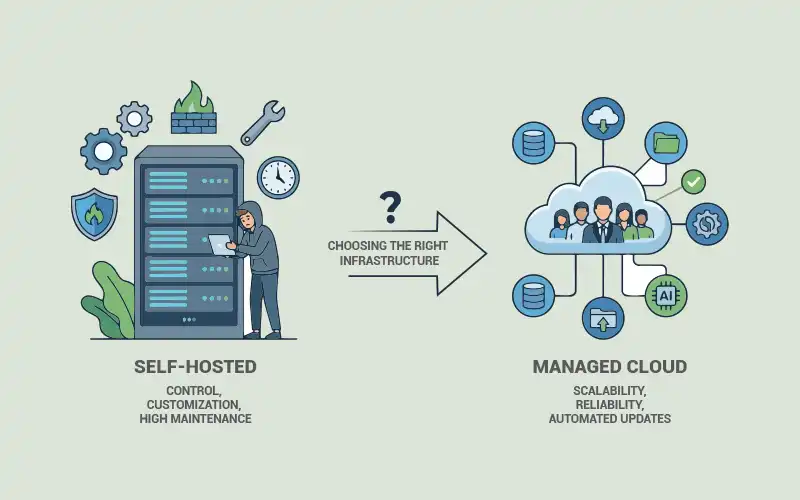

This comparison between a self-hosted and managed cloud will help you decide which one is ideal for your organisation.
A few years ago, building an online app meant buying physical servers, manually installing operating systems, and managing your own network and hardware maintenance. Today, you can deploy a globally distributed service in under 10 minutes. That’s a wild shift.
But this has also created a genuinely hard decision for development teams: should applications run on self-hosted infrastructure, or should the team rely on managed cloud services? In a self-hosted infrastructure, the operational burden is on the organisation whereas in managed hosting, it is on the provider.
This isn’t just a technical choice. It touches your cost model, your security strategies, long-term scalability, and how much control you want over your stack.
Self-hosting gives you full control and lower long-term costs, but your team is responsible for all the maintenance, security, and scaling. Managed cloud is faster to deploy and easier to operate but expect vendor lock-in and unpredictable bills at scale.
How we got here
To understand modern infrastructure, it is vital to understand how application deployment has evolved over the years.
Bare metal was the default
Early internet hosting meant dedicated physical machines. You installed Linux, configured networking by hand, and scaled by literally buying more servers. In short, you had complete control over hardware and software, but you needed to make a significant upfront investment. If you wanted to scale an application, you needed to purchase additional servers, install them in data centres, and configure them manually. As the web application grew more complex, this model became difficult to maintain.
Then came virtualization
Hypervisors like KVM and Xen changed the economics. Suddenly, one physical server could run multiple virtual machines. VPS providers like Linode and DigitalOcean were born from this. Customers could rent these servers, which reduced hardware costs and improved flexibility. You had access to a virtual server without buying or owning any hardware, which was a huge deal at the time.
Cloud platforms took it further
The next major transformation came with large-scale cloud providers. Platforms like Amazon Web Services, Google Cloud Platform, and Microsoft Azure introduced fully managed infrastructure services.
Managed databases, object storage, auto-scaling, and global failover — all these abstracted away. Dev teams stopped thinking about servers (infrastructure management) and started thinking about features and application logic. For many companies, this was genuinely transformative.
And now? Self-hosting is making a comeback
Honestly, it makes sense. Cloud costs have increased a lot at scale. Data regulatory and data sovereignty laws have gotten stricter. And open source tooling has matured to the point where a small team can run and build sophisticated infrastructure without relying on cloud providers.
Let’s understand self-hosting infrastructure
Self-hosting means your organisation controls the infrastructure. That could be:
Bare metal: Physical servers, usually for high-performance workloads like ML or large databases.
VPS: Virtual machines from providers like Hetzner or DigitalOcean (hardware’s theirs, OS is yours).
On-premises: Your own data centre, common in banking, healthcare, and government.
Self-managed Kubernetes: Using tools like K3s or Rancher to run containerised workloads with cloud-like orchestration, but on your own infrastructure.
Here are a few reasons why teams prefer self-hosting.
Full control over the stack: You can tune your PostgreSQL config, install extensions like PostGIS or TimescaleDB, and configure custom networking. Cloud providers don’t let you do that. This matters a lot for teams with specific requirements.
Data privacy and compliance: If you’re dealing with GDPR, HIPAA, or any regulation that cares about where data lives, self-hosting simplifies things significantly. Your data stays in environments you control. No external service provider in the chain.
Predictable costs: Cloud hosting services usually operate on a usage-based billing model. It sounds flexible until you get an unpredictable invoice. Self-hosting is mostly capex. You buy hardware or sign infrastructure contracts upfront. This often works out for stable, high-traffic workloads and is considerably cheaper over time.
Open source alignment: There’s a solid ecosystem here. Proxmox for virtualization, Ceph for distributed storage, Prometheus and Grafana for monitoring, Traefik for ingress, and Ansible for config management. You can build a serious stack without relying on a single proprietary service.
However, self-hosting still has many drawbacks.
Maintenance is a real challenge: Security patches, OS upgrades, hardware failures, performance monitoring — someone must do all of this. If there is no strong automation, it can consume most of the engineering time.
Scaling isn’t automatic: Cloud environments scale on demand. In self-hosted setups, you’re provisioning servers or virtual machines manually when the load increases. This requires planning and lead time.
Security is entirely on you: Your team needs to manage firewalls, encryption, access controls, vulnerability, etc. Security tools like Fail2Ban, Trivy, and Falco help, but they need proper configuration and someone who knows them well.
You need DevOps expertise: This is where small teams often get stuck. Hiring DevOps engineers who understand distributed systems, Kubernetes, and networking is expensive. Small teams can’t afford the high cost of hiring these experts, so they sometimes avoid using them.
Self-hosted vs managed cloud: A comparison
| Factor | Self-hosted | Managed cloud |
| Control | You have full control over the OS, hardware, and networking. You configure what you want and how you want. | Locked to what the provider offers. It works for most teams, but don’t expect kernel-level tweaks. |
| Cost model | Higher upfront (hardware, contracts). Predictable after that. Cheaper long-term at scale. | Pay-as-you-go sounds great until the bill arrives. Flexible, but hard to forecast accurately. |
| Scalability | Manual. You provision, configure, and expand. It needs proper planning. | Auto-scaling is built in. Handles traffic spikes without you having to manage anything. Big win for unpredictable workloads. |
| Security | Entirely your problem. Firewalls, patching, and access controls are all on your team. No one to blame but yourself. | Shared responsibility. Provider secures the underlying infrastructure; you secure your app and data. Easier baseline, but don’t get complacent. |
| Maintenance | Your team handles everything such as patches, upgrades, hardware failures. It needs solid automation, or it gets painful fast. | Most operational tasks are automated. Less toil and a smaller ops team are needed. |
Managed cloud: The other side
Managed cloud flips the entire work model on which self-hosting works. Here, you interact with higher-level services such as managed databases, object storage services, serverless computing platforms, and managed Kubernetes clusters, etc, and the provider handles everything underneath.
Examples of managed cloud services include Amazon RDS, Google Kubernetes Engine, AWS Lambda, and S3. You don’t touch OS updates, hardware replacement, or network configs. Instead, the provider does.
The advantages of managed cloud are:
Deployment speed: New services go live fast, without any procurement or hardware setup.
Auto-scaling: If traffic spikes, the platform handles it. It is critical for consumer apps with unpredictable loads.
Reduced ops burden: Small teams can run complex infrastructure without dedicated DevOps headcount.
Built-in redundancy: Most providers run across multiple availability zones with 99.9%+ uptime SLAs.
Ecosystem integrations: Cloud providers have pre-built versions of almost everything — ML tools, analytics platforms, messaging systems.
There are a few disadvantages too.
- Vendor lock-in is a major drawback. If your app is deeply tied to provider-specific APIs, migrating is painful and expensive.
- Pricing is hard to predict. Costs may depend on compute usage, storage consumption, network bandwidth, and data transfer. Data egress charges can increase operational costs.
- Customisation has limits because managed cloud services are specially designed for common use cases. Kernel-level tuning, custom networking setups, and specialised hardware access are often not possible in managed environments.
Open source technologies play a vital role in closing the gap between self-hosted and managed cloud infrastructure. They help you easily replicate a lot of cloud functionality on your own infrastructure.
Open source tools include MinIO for object storage, Supabase as a backend platform, Dokku or CapRover for PaaS-style deployments, and OpenFaaS for serverless workloads. Combined with Terraform or Pulumi for Infrastructure as Code, a competent team can build cloud-like capabilities without paying cloud-like prices.
This is genuinely changing the scenario for mid-sized companies.
Instead of choosing between self-hosting and managed cloud, many organisations prefer to choose hybrid infrastructure strategies. For example, they use self-hosted infrastructure for core databases and managed cloud for large-scale data processing.
Multi-cloud strategies take this further by distributing workloads across providers to reduce single-vendor dependency. Kubernetes makes this more practical by providing a consistent deployment layer across different environments.
If you opt for a self-hosted cloud, ensure you follow these practices:
Automate your backups: Restic and BorgBackup are ideal tools for automating backup. They store encrypted copies in remote locations. So, don’t skip this.
Set up proper monitoring: Prometheus + Grafana give you real-time visibility into system health. They give an alert before they impact the user.
Centralise your logs: ELK stack or Grafana Loki allow engineers to analyse logs across distributed systems. Distributed systems without centralised logging are a debugging nightmare.
Tighten your security: Your infrastructure security should include strict firewall policies, encrypted communication, and strong authentication. Use WireGuard or Tailscale for secure remote access. Don’t expose management interfaces to the public internet.
What’s coming next?
A few trends are worth watching.
- Edge computing is pushing computing closer to end users. K3s makes it practical to run lightweight clusters at the edge that sync back to central systems.
- Platform engineering is growing. Many companies are building internal developer platforms to simplify infrastructure management for development teams. Backstage is the popular tool for this. It lets developers deploy without managing infrastructure directly.
- Decentralised storage is still early, but peer-to-peer storage architectures could eventually challenge traditional cloud storage economics.
There’s no one-size-fits-all answer here. Managed cloud wins on speed, simplicity, and operational overhead. Self-hosting wins on control, privacy, and long-term cost at scale.
For most teams, the smart move is a hybrid approach. They should opt for the managed cloud where convenience matters, and go for self-hosted where control or cost efficiency matters more.
Choose what fits your workload, your team’s capabilities, and your budget. Don’t default to either extreme without running the numbers.