This second article in the two-part series presents a step-by-step approach to fine-tuning a large language model for domain-specific knowledge.
As discussed in the previous article carried in the March 2026 issue of OSFY, large language models (LLMs) possess broad general knowledge but often lack the depth and reliability required for specialised or proprietary domains.
In this second article, we discuss and demonstrate in detail how to adapt a general-purpose base LLM into a domain-specialised coding assistant for C and Linux system programming tasks using fine-tuning techniques such as LoRA and QLoRA. The approach illustrated can be extended to fine-tune and adapt a base LLM for proprietary hardware architectures, enabling its effective use as a coding assistant for system software development tasks.
Practical blueprint for fine-tuning Mistral-7B for coding assistance in C and Linux system programming
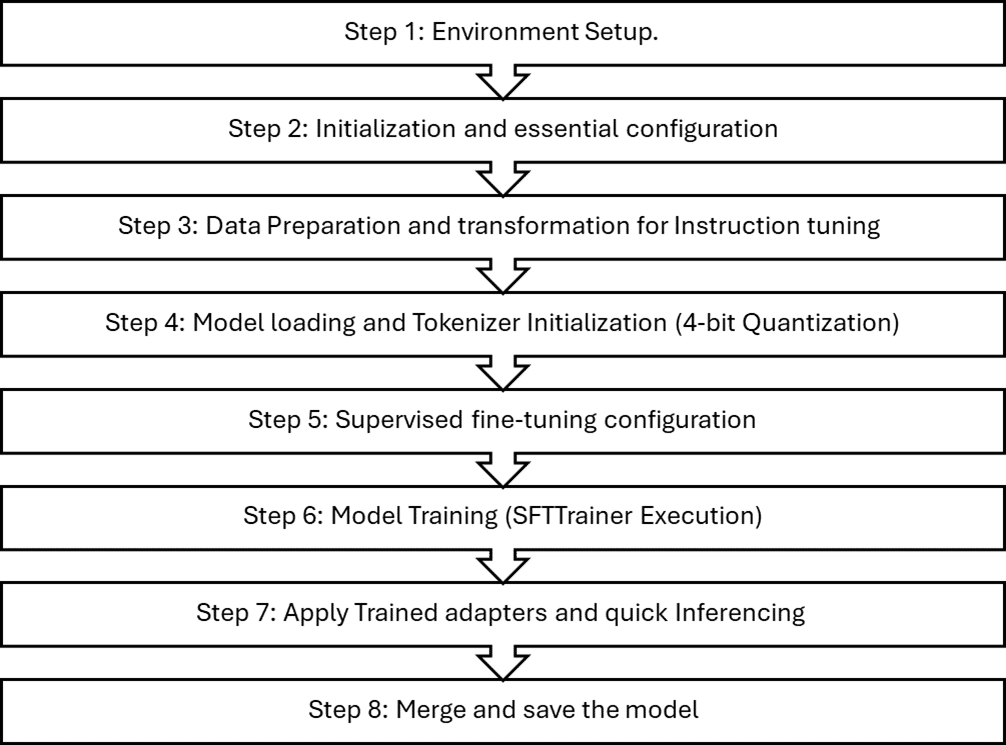
This blueprint demonstrates the end-to-end fine-tuning of the Mistral-7B model on a free-tier Google Colab T4 GPU. To fit within the T4’s 16GB VRAM, the model is loaded in 4-bit form using the bitsandbytes library, reducing memory usage while preserving performance. This enables efficient forward and backward passes, and makes parameter-efficient methods such as LoRA and QLoRA practical on constrained hardware. Only the lightweight adapter parameters are updated during training, ensuring stable fine-tuning within strict GPU memory limits. We have broadly classified the entire fine-tuning pipeline in the eight steps shown in Figure 1.
Step 1: Environment setup
Install and configure all the dependency stacks of Hugging Face and TRLs (technology readiness levels) required for PEFT (Parameter-Efficient Fine-Tuning) using LoRA and QLoRA:
# Keep it simple: use current Colab PyTorch + CUDA + NumPy

!pip install -q --upgrade pip

# Install latest Hugging Face + TRL stack that supports NumPy 2.x

!pip install -q \

  transformers \

  accelerate \

  datasets \

  trl \

  peft \

  bitsandbytes \

  einops \

  wandb

!pip install -U bitsandbytes
Step 2: Initialisation and essential configuration
This configuration block initialises all essential hyperparameters and environment settings required for QLoRA-based fine-tuning of the Mistral-7B-Instruct model. It establishes the base model path, output directory for checkpoints, and key training parameters.
import trl, transformers

import importlib, pkgutil

print(“trl:”, trl.__version__)

BASE_MODEL = ‘mistralai/Mistral-7B-Instruct-v0.2’

OUTPUT_DIR = ‘/content/qlora-mistral-sysprog’

USE_4BIT = True  # QLoRA

SEQ_LEN = 1024   # keep <= 2048 for T4 comfort

EPOCHS = 10       # increase for real training

LR = 2e-4

BATCH_SIZE = 1

GRAD_ACCUM = 8

WARMUP_RATIO = 0.03

SAVE_STEPS = 50

LOG_STEPS = 1

VAL_SET_SIZE = 0  # set >0 if you add a validation split
We have described the key training parameters, which can be initialised and updated as per your use case and fine-tuning requirements.
USE_4BIT=True(QLoRAenablement)
Flag to enable quantisation; this will be used to activate 4-bit quantization and QLoRA enablement.
SEQ_LEN=1024
SEQ_LEN is the maximum number of tokens the training pipeline feeds to the model in a single sample (per forward/backward pass). Choose SEQ_LEN as per your data set size and VRAM limit. For fine-tuning of this particular use case on T4, SEQ_LEN size of 1024 is chosen.
EPOCHS=8
An epoch is one complete cycle through the entire training dataset. Since adapters have relatively few trainable parameters, they converge quickly; 3-5 epochs are often sufficient for narrow domains. Use 8-10 only if the dataset is small and regularisation is in place (dropout, early stopping). Choose the epoch count as per the distribution of your training dataset samples; too many epochs can lead to model overfitting.
LR = 2e-4
Learning rate (LR) is a fundamental hyperparameter in gradient-descent-based optimisation. It controls how large a step the model takes when updating its trainable parameters (weights, biases, or LoRA adapter matrices) based on the computed gradients. With LoRA/QLoRA, slightly higher LR than full-fine-tuning is typical; we have taken LR 2e-4 Safe grid: {1e-4, 2e-4} for general SFT.
BATCH_SIZE = 1 (per device)
Batch size refers to the number of training samples the model processes in a single forward + backward pass before updating the parameters (in this case weight and bias of LoRA adapters). Here we have taken a tiny batch size of 1 per device and used gradient accumulation. GRAD_ACCUM =8 accumulates gradients over 8 micro-batches to emulate a larger effective batch while staying within VRAM. Effective batch ≈ BATCH_SIZE × GRAD_ACCUM. Typical sweet spot on T4 is 8-16 when SEQ_LEN ≤ 1024
WARMUP_RATIO = 0.03
Warmup ratio is the fraction of total training steps during which the learning rate (LR) is gradually increased from 0 up to its target value. We have taken a 3% warmup of total steps to help stabilise early updates with low-precision weights. Use an appropriate warmup ratio as per your dataset and use case.
SAVE_STEPS=50,LOG_STEPS=1
Frequent logging is handy for debugging early instability. On Colab, saving too often increases I/O overhead; if training is slow, consider SAVE_STEPS=200-500 once stable.
Step 3: Data preparation and transformation for instruction tuning
For this blueprint, synthetic training samples were generated in JSONL format; however, for real-world fine-tuning workflows, you should curate or collect domain-specific datasets representative of your target use cases.
{“instruction”: “Provide a minimal C snippet that demonstrates the POSIX mmap() usage with proper error handling.”, “input”: “”, “output”: “```c\n#include <stdio.h>\n#include <unistd.h>\n#include <fcntl.h>\n#include <sys/stat.h>\n#include <sys/types.h>\n#include <sys/mman.h>\n\nint main(int argc, char **argv) {\n int fd=open(\”/etc/hosts\”,O_RDONLY); off_t sz=lseek(fd,0,SEEK_END); lseek(fd,0,SEEK_SET); char* p=mmap(NULL,sz,PROT_READ,MAP_PRIVATE,fd,0); if(p!=MAP_FAILED) write(1,p, sz>64?64:sz); munmap(p,sz); close(fd);\n return 0;\n}\n```”}
Load the JSON dataset into the fine-tuning pipeline and transform each record into an instruction-response format that aligns with the requirements of instruction-tuned supervised training.
from datasets import load_dataset

from transformers import AutoTokenizer

tokenizer = AutoTokenizer.from_pretrained(BASE_MODEL, use_fast=True)

ds = load_dataset(“json”, data_files={

    «train»: «/content/sample_data/sysprog_train_large.jsonl”,

    «valid»: «/content/sample_data/sysprog_valid_small.jsonl”,

})

def to_chat_format(example):

    user = example[“instruction”]

    if example.get(“input”):

        user += f»\n\nInput:\n{example[‘input’]}”

    messages = [

        {«role»: «user», «content»: user},

        {«role»: «assistant», «content»: example[«output”]},

    ]

    text = tokenizer.apply_chat_template(messages, tokenize=False, add_generation_prompt=False)

    return {“text”: text}

train_ds = ds[“train”].map(to_chat_format, remove_columns=[c for c in ds[“train”].column_names if c != “text”])

valid_ds = ds[“valid”].map(to_chat_format, remove_columns=[c for c in ds[“valid”].column_names if c != “text”])

def format_example(example):

    instruction = example[‹instruction›]

    input_text = example.get(‘input’,’’)

    output_text = example[‘output’]

    if input_text:

        prompt = f»### Instruction:\n{instruction}\n\n### Input:\n{input_text}\n\n### Response:\n”

    else:

        prompt = f»### Instruction:\n{instruction}\n\n### Response:\n»

     # Add EOS so the model learns to end responses

    text = prompt + output_text + tokenizer.eos_token

    return {‘text’: prompt + output_text}

train_ds = ds[‘train’].map(format_example)

train_ds = train_ds.remove_columns([c for c in train_ds.column_names if c!=’text’])

train_ds = train_ds.shuffle(seed=42)
Step 4: Model loading and tokenizer initialisation (4‑bit quantization)
Prepare and load the Mistral 7B pretrained model and tokenizer for parameter-efficient fine-tuning (PEFT) for Google Colab T4 GPUs, using 4-bit QLoRA to reduce VRAM while maintaining training stability. We have used the bitsandbytes library for model quantization. Here are some of the important configurations and parameters used.
bnb_4bit_quant_type=nf4
Uses NormalFloat4 (NF4), a data-aware 4-bit quantization optimised for accuracy in low precision.
bnb_4bit_use_double_quant=True
Applies a secondary quantization to quantization constants, further reducing memory overhead.
bnb_4bit_compute_dtype=torch.float16
Because the free-tier Google Colab T4 GPU lacks native bfloat16 support, the training pipeline explicitly configures matrix-multiplication operations to use float16 precision to ensure computational compatibility and stable kernel execution.
device_map=auto
This places layers across available devices (e.g., GPU/CPU) for best fit without manual partitioning.
model.config.use_cache = False
Disables KV cache and forces the model to recompute attention instead of caching it, which is essential for correct gradient computation and stability in LoRA/QLoRA fine-tuning.
model.gradient_checkpointing_enable()
Trades compute for memory by discarding most intermediate activations and recomputing them during backprop. For LLM fine-tuning—especially with LoRA/QLoRA on memory-constrained GPUs—it is one of the most effective levers to fit longer sequences or larger effective batches without changing model fidelity.
prepare_model_for_kbit_training(model:)
This adjusts modules for low-precision fine-tuning, enables input gradients where needed so adapters can learn while base weights remain quantized/frozen, and casts numerically sensitive ops (e.g., norms/heads) to higher precision for stability.
from transformers import AutoTokenizer, AutoModelForCausalLM, BitsAndBytesConfig

from peft import LoraConfig, TaskType

from peft import prepare_model_for_kbit_training

import torch

bnb_config = BitsAndBytesConfig(

    load_in_4bit=USE_4BIT,

    bnb_4bit_quant_type=›nf4›,

    bnb_4bit_use_double_quant=True,

    bnb_4bit_compute_dtype=torch.float16,

)

tokenizer = AutoTokenizer.from_pretrained(BASE_MODEL, use_fast=True)

tokenizer.padding_side = “right”

if tokenizer.pad_token is None:

  tokenizer.pad_token = tokenizer.eos_token

model = AutoModelForCausalLM.from_pretrained(

    BASE_MODEL,

    torch_dtype=torch.float16,

    quantization_config=bnb_config if USE_4BIT else None,

    device_map=”auto”

)

model.config.use_cache = False

model.gradient_checkpointing_enable()

if USE_4BIT:

    model = prepare_model_for_kbit_training(model)
Step 5: Supervised fine-tuning configuration
Prepare LoRA adapter architecture and the full supervised fine-tuning configuration used by the SFTTrainer to execute parameter-efficient optimisation of the model. All core hyperparameters and training parameters have been initialised and explained in the previous steps of the pipeline. Some of the important LoRA configuration and SFT configuration parameters are described below.
from trl import SFTTrainer
from trl import SFTConfig

from peft import LoraConfig, TaskType

from peft import LoraConfig, get_peft_model

from peft import LoraConfig, TaskType

lora_config = LoraConfig(

    r=16,

    lora_alpha=32,

    target_modules=[

        «q_proj”, “k_proj”, “v_proj”, “o_proj”,

        «gate_proj”, “up_proj”, “down_proj”,

    ],

    lora_dropout=0.05,

    bias=»none»,

    task_type=TaskType.CAUSAL_LM,

)

sft_config = SFTConfig(

    output_dir=OUTPUT_DIR,

    num_train_epochs=EPOCHS,

    per_device_train_batch_size=BATCH_SIZE,

    gradient_accumulation_steps=GRAD_ACCUM,

    learning_rate=LR,

    lr_scheduler_type=”cosine”,

    warmup_ratio=WARMUP_RATIO,

    logging_steps=LOG_STEPS,

    save_steps=SAVE_STEPS,

    save_total_limit=2,

    # PURE FP16 — NO BF16 EVER

    fp16=False,

    bf16=False,

    half_precision_backend=”cuda”,

    # VERY IMPORTANT

    optim=”paged_adamw_8bit” if USE_4BIT else “adamw_torch”,

    #optim = «adamw_torch”,

    max_grad_norm=1.0,

    gradient_checkpointing=True,

    # SFT

    max_length=SEQ_LEN,

    dataset_text_field=”text”,

    packing=False,

)

trainer = SFTTrainer(

    model=model,

    train_dataset=train_ds,

    args=sft_config,          # <- SFTConfig with all settings

    processing_class=tokenizer,  # <- replaces old `tokenizer=` arg

    peft_config=lora_config,

)
r=16: Low-rank dimension of adapter matrices that controls adapter capacity versus memory.
lora_alpha =32: lora_alpha is a gain that scales the adapter’s low-rank update before it is added to the frozen weight. The scaling factor is (alpha/rank). With lora_alpha=32 and r=16, the adapter contribution is effectively doubled, giving LoRA more influence over the model’s behaviour while leaving the backbone untouched.
target_modules=[“q_proj”, “k_proj”, “v_proj”, “o_proj”, “gate_proj”, “up_proj”, “down_proj”]: target_modules selects the projection matrices where LoRA adapters are inserted, choosing attention (q/k/v/o) guides context routing, while choosing MLP (gate/up/down) shapes token-wise transformations. Together, these enable strong, parameter-efficient adaptation during fine-tuning.
lora_dropout=0.05: This randomly disables 5% of LoRA adapter activations during training to prevent overfitting, stabilise optimisation, and ensure the low-rank updates generalise well without overspecialising to the fine-tuning dataset.
optim=(“paged_adamw_8bit” if USE_4BIT else “adamw_torch”): In LLM fine-tuning, the optimiser is the algorithm that updates LoRA adapter parameters according to gradients, controlling how fast, how stable, and how effectively the model learns from the training data. For our case we have used the adamw_8bit optimiser function provided by bitsandbytes library. This is suited for QLoRA and free tier T4 GPU VRAM requirement.
Max_grad_norm=1.0: This enables gradient clipping so that the total gradient magnitude never exceeds 1.0, preventing unstable updates and ensuring smooth, safe LoRA/QLoRA fine-tuning of large language models.
Step 6: Model training (SFTTrainer execution)
trainer.train() runs the full supervised fine-tuning loop, updating only LoRA adapter weights using the optimiser and training strategy defined earlier. After training, model.save_pretrained() stores the learned LoRA updates and configuration, while tokenizer.save_pretrained() saves the tokenization rules so the fine-tuned model can be correctly reloaded for inference or further training.
trainer.train()

trainer.model.save_pretrained(OUTPUT_DIR)

tokenizer.save_pretrained(OUTPUT_DIR)
Step 7: Apply trained adapters and quick inferencing
This piece of code applies trained adapters on the base model (Mistral 7B) and runs the quick inferencing. Some important parts of the code are explained below.
from transformers import AutoTokenizer, AutoModelForCausalLM, BitsAndBytesConfig

from peft import PeftModel

from peft import prepare_model_for_kbit_training

import torch

BASE_MODEL_NAME = BASE_MODEL

LORA_DIR = OUTPUT_DIR

bnb_config = BitsAndBytesConfig(

load_in_4bit=USE_4BIT,

bnb_4bit_quant_type=’nf4’,

bnb_4bit_use_double_quant=True,

bnb_4bit_compute_dtype=torch.float16,

)

tokenizer = AutoTokenizer.from_pretrained(BASE_MODEL, use_fast=True)

tokenizer.padding_side = “right”

if tokenizer.pad_token is None:

tokenizer.pad_token = tokenizer.eos_token

base_model = AutoModelForCausalLM.from_pretrained(

BASE_MODEL_NAME,

quantization_config=bnb_config,

device_map={“”: 0},

)

base_model = prepare_model_for_kbit_training(base_model)

infer_model = PeftModel.from_pretrained(

    base_model,

    LORA_DIR,

    is_trainable=False,

)

infer_model.eval()

infer_model.config.use_cache = True

infer_model.config.pad_token_id = tokenizer.pad_token_id

infer_model.config.eos_token_id = tokenizer.eos_token_id

infer_model.config.bos_token_id = tokenizer.bos_token_id

def generate(prompt, max_new_tokens=300):

    inputs = tokenizer(prompt, return_tensors=”pt”).to(infer_model.device)

    with torch.no_grad():

        output = infer_model.generate(

            **inputs,

            max_new_tokens=max_new_tokens,


            do_sample=True,

            temperature=0.7,

            top_p=0.9,

            top_k=50,

            repetition_penalty=1.1,

            pad_token_id=tokenizer.pad_token_id,

            eos_token_id=tokenizer.eos_token_id,

        )

    return tokenizer.decode(

        output[0, inputs.input_ids.shape[1]:],

        skip_special_tokens=True,

    )

test_prompt = (

    «### Instruction:\n»

    «Demonstrate pthread condition variables with a producer/consumer of a single-slot buffer.\n\n”

    «### Response:\n»

)

print(generate(test_prompt))
PeftModel.from_pretrained(base_model, LORA_DIR, is_trainable=False): This attaches LoRA adapters learned during fine-tuning on top of the frozen, quantized backbone—yielding parameter-efficient domain adaptation with minimal memory/latency overhead.
model.eval(): This disables dropout; use_cache=True activates KV caching for fast autoregressive decoding; special token IDs are synchronised with the tokenizer to ensure clean termination and padding.
A helper generate() function tokenizes prompts on the model device, runs inference under torch.no_grad(), and uses stochastic decoding (temperature, top-p, top-k, repetition penalty) to balance diversity and coherence, returning only the newly generated tokens beyond the prompt.
Step 8: Merge and save the model
# Merge and save the model

merged_model = infer_model.merge_and_unload()

merged_model.save_pretrained(f”{OUTPUT_DIR}_merged”)

tokenizer.save_pretrained(f”{OUTPUT_DIR}_merged”)

print(f”Merged model saved to: {OUTPUT_DIR}_merged”)
This stage finalises the fine-tuned model by merging LoRA adapter weights into the underlying quantized base model to produce a single, standalone checkpoint suitable for deployment. The call to merge_and_unload() collapses the learned low-rank LoRA updates into the original linear layers, removing the PEFT wrapper and eliminating the need for LoRA adapters at inference time. This yields a consolidated model with all fine-tuning deltas baked directly into its weights, improving runtime simplicity, compatibility, and portability across inference engines.
The merged model is then saved using save_pretrained(), along with the tokenizer, to a new directory. This directory contains a fully self-contained model artifact that can be served without requiring PEFT components, LoRA configuration files, or training scaffolding. The result is a clean, production-ready set of model files optimised for real-world deployment scenarios
This is a practical, end-to-end blueprint to fine-tune Mistral-7B-Instruct into a C and Linux system-programming assistant using PEFT with QLoRA and 4-bit quantization on a Colab T4 GPU. The workflow is reproducible and emphasises memory-efficient, stable training to enable domain adaptation on constrained hardware.