


























































As data volumes grow and analytical needs become more demanding, understanding the storage layer is no longer optional for engineers and architects. Whether you are choosing a new database, optimising an existing query, or designing a data platform, the row-versus-column question sits at the foundation of every decision that follows.
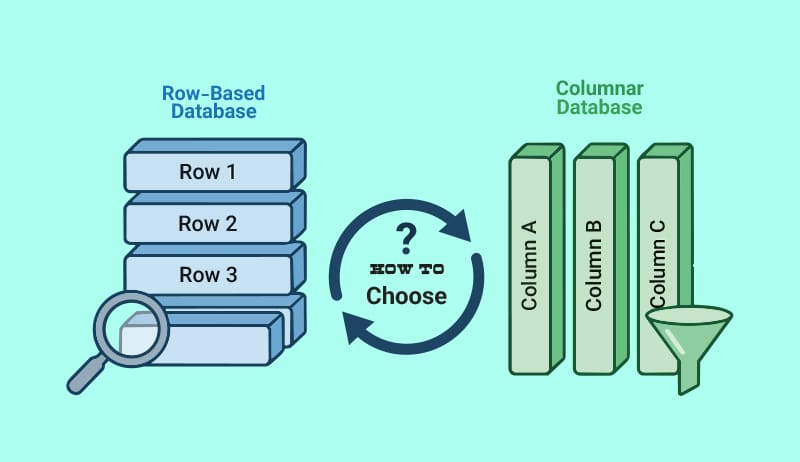
Nearly every other factor, including query speed, compression effectiveness, write throughput, and scalability complexity, is influenced by how a database saves data on disk. The two prevalent storage paradigms, columnar (also known as column-oriented) and row-based (also known as row-oriented), make essentially distinct trade-offs that correspond with radically different workloads. Row-based databases store all attributes of a single record contiguously. Columnar databases store all values of a single attribute together. This seemingly simple distinction drives a cascade of design consequences that practitioners must understand to choose the right tool for each problem.
In a traditional row-oriented database, a table with columns (ID, name, age, salary) is laid out so that every field of a given row lives next to each other on disk or in memory:
Disk page (row-based):
  [1 | Alice | 30 | 95000]
  [2 | Bob   | 25 | 72000]
  [3 | Carol | 35 | 110000]
When you look up a single employee by ID, the database reads one disk block and retrieves all the columns at once. This makes OLTP (online transaction processing) operations — inserts, updates, point lookups — extremely efficient.
A columnar database stores each column in its own contiguous section. The same table looks like this on disk:
Disk page (columnar):
  id:     [1, 2, 3]
  name:   [Alice, Bob, Carol]
  age:    [30, 25, 35]
  salary: [95000, 72000, 110000]
A query like SELECT AVG(salary) FROM employees reads only the salary column, skipping name, age, and ID entirely. For tables with hundreds of columns and billions of rows, this selective I/O is transformative.
Table 1 summarises the key trade-offs between the two storage models.
| Characteristics | Row-based | Columnar |
| Storage pattern | Row by row | Column by column |
| Read pattern | Fetch full rows | Fetch specific columns |
| Write speed | Very fast | Moderate |
| Aggregation speed | Slow (reads all columns) | Very fast (reads only needed cols) |
| Compression | Low ratio | High ratio (same-type data) |
| Best workload | Transactional (OLTP) | Analytical (OLAP) |
| Examples | PostgreSQL, MySQL, Oracle | Redshift, BigQuery, ClickHouse |
When to use each model
Use row-based databases when:
- Your workload is dominated by inserts, updates, and deletes (OLTP).
- Queries frequently retrieve whole rows by primary key or a small set of rows.
- You need strong ACID guarantees with low-latency writes.
- Your application is a web backend, CRM, ERP, or payment system.
Use columnar databases when:
- You run analytical queries (OLAP) that aggregate millions or billions of rows.
- Queries touch only a few columns out of many (e.g., SELECT region, SUM(revenue) …).
- Storage cost and I/O bandwidth are primary concerns.
- You need a data warehouse, BI platform, or real-time analytics layer.
Row-based example: PostgreSQL
PostgreSQL is one of the most popular row-based databases. Below is a schema and query pattern suited to transactional OLTP workloads:
-- Create a row-based orders table
CREATE TABLE orders (
  order_id   SERIAL PRIMARY KEY,
  customer_id INT NOT NULL,
  product_id  INT NOT NULL,
  quantity    INT NOT NULL,
  unit_price  NUMERIC(10,2),
  created_at  TIMESTAMPTZ DEFAULT now()
);

-- Index for fast point lookups (row-based strength)
CREATE INDEX idx_orders_customer ON orders (customer_id);

-- Efficient point lookup — reads a single row
SELECT * FROM orders WHERE order_id = 42;

-- Insert is fast because one contiguous row is written
INSERT INTO orders (customer_id, product_id, quantity, unit_price)
VALUES (101, 55, 2, 29.99);
PostgreSQL also provides the pg_column_store extension (and Citus) for hybrid scenarios, but its native heap storage is fully row-oriented.
Columnar example: ClickHouse
ClickHouse is an open-source columnar OLAP database that can ingest billions of rows and return aggregations in milliseconds.
-- ClickHouse columnar table
CREATE TABLE orders (
  order_id    UInt64,
  customer_id UInt32,
  product_id  UInt32,
  quantity    UInt16,
  unit_price  Decimal(10,2),
  created_at  DateTime
)
ENGINE = MergeTree()
ORDER BY (created_at, customer_id);

-- Analytical aggregation — only reads unit_price & quantity
SELECT
  toStartOfMonth(created_at) AS month,
  sum(quantity * unit_price)  AS total_revenue
FROM orders
WHERE created_at >= ‘2025-01-01’
GROUP BY month
ORDER BY month;
ClickHouse reads only the two columns involved, applies vectorised SIMD operations across millions of rows, and returns results orders of magnitude faster than the equivalent query in PostgreSQL on the same hardware.
Performance characteristics at scale
Consider a 1-billion-row sales table with 20 columns. A query computing monthly revenue involves only two columns. Table 2 compares PostgreSQL and ClickHouse performance across various metrics.
Table 2: Performance comparison of PostgreSQL and ClickHouse
| Metric | PostgreSQL (Row) | ClickHouse (Columnar) |
| Data scanned | ~200GB (all columns) | ~20GB (2 columns) |
| Query time (cold) | ~380 seconds | ~1.2 seconds |
| Storage size | ~150GB | ~18GB (compressed) |
| Suitable workload | OLTP/point reads | OLAP/aggregations |
These numbers are illustrative but consistent with publicly reported benchmarks from ClickHouse, Snowflake, and Redshift engineering blogs. Actual results vary by hardware, indexing, and query complexity.
Architectural patterns and best practices
The Lambda architecture
A common enterprise pattern separates a row-based operational store from a columnar analytical store. Change Data Capture (CDC) tools such as Debezium stream row-level changes from PostgreSQL or MySQL into a columnar warehouse (Redshift, Snowflake, BigQuery) in near real time. This decouples OLTP and OLAP workloads cleanly.
Materialised views for pre-aggregation
In columnar databases, materialised views can pre-compute expensive aggregations and refresh them on a schedule. ClickHouse Materialized Views use an INSERT trigger pattern:
-- Materialised view: pre-aggregate daily revenue

CREATE MATERIALIZED VIEW daily_revenue_mv

ENGINE = SummingMergeTree()

ORDER BY (day, region)

AS

SELECT

toDate(created_at) AS day,

region,

sum(quantity * unit_price) AS revenue

FROM orders

GROUP BY day, region;
Partitioning strategies
Columnar databases gain additional speed from partition pruning. Partition by a high-cardinality time or category column to skip irrelevant data files entirely.
- Time partitioning: Partition by year/month for time-series data (BigQuery, Redshift).
- Range partitioning: Split by numeric ranges for customer segments.
- Hash partitioning: Distribute data evenly across nodes when no natural ordering exists.
The open source ecosystem offers mature, production-grade options for both storage models. The tools given below are grouped by storage paradigm, covering relational databases, analytical engines, embedded stores, and replication/streaming layers.
Row-based (OLTP) open source tools
PostgreSQL
The world’s most advanced open source relational database. PostgreSQL uses a heap-based row store with MVCC (Multi-Version Concurrency Control) for high-throughput OLTP. It supports JSON, full-text search, geospatial data via PostGIS, and logical replication — making it a near-universal choice for application backends.
Licence: PostgreSQL licence (Permissive)
URL: postgresql.org
MySQL/MariaDB
MySQL remains the most deployed open source RDBMS, powering most LAMP-stack applications. MariaDB is its fully open source fork with additional storage engines (Aria, Spider, ColumnStore). Both use InnoDB as their default row-based storage engine, offering clustered primary-key indexes and row-level locking.
Licence: GPL v2
URL: mysql.com/mariadb.org
SQLite
A serverless, self-contained, row-based SQL engine embedded in an application process. SQLite is the most widely deployed database in the world (mobile apps, browsers, IoT). It stores an entire database in a single cross-platform file. Ideal for local state, testing, and edge devices where network latency is unacceptable.
Licence: Public domain
URL: sqlite.org
CockroachDB
A distributed, horizontally scalable SQL database modelled after Google Spanner. CockroachDB stores rows in a distributed key-value store (RocksDB), providing ACID transactions, geo-partitioning, and PostgreSQL wire-protocol compatibility. It auto-rebalances shards across nodes without downtime.
Licence: BSL 1.1 / CCL
URL: cockroachlabs.com
Columnar (OLAP) open source tools
ClickHouse
Originally built at Yandex for web analytics, ClickHouse is now the fastest open source columnar database for real-time analytical queries. Its MergeTree engine stores data in sorted, compressed column files. It supports vectorised SIMD execution, approximate aggregations, and materialised views. Commonly used for observability, product analytics, and ad-tech pipelines.
Licence: Apache 2.0
URL: clickhouse.com
Apache Parquet and Apache Arrow
Parquet is the de facto open columnar file format used by data lakes (S3, GCS, HDFS). It stores data in row groups with per-column encoding and compression. Arrow is the in-memory columnar format designed for zero-copy inter-process data sharing at CPU cache speed. Together they form the backbone of the modern data lakehouse stack.
Licence: Apache 2.0
URL: parquet.apache.org / arrow.apache.org
DuckDB
Often called ‘SQLite for analytics’, DuckDB is an embeddable, in-process columnar OLAP engine with no server required. It reads Parquet, CSV, and JSON files directly, integrates natively with Python and R, and uses a vectorised push-based execution model. A data scientist can run billion-row aggregations on a laptop in seconds.
Licence: MIT
URL: duckdb.org
Apache Druid
A high-performance, distributed, real-time analytics database designed for sub-second OLAP queries on event data. Druid ingests streaming data from Kafka in real time, stores it in compressed columnar segments, and serves queries across historical and real-time data simultaneously. Widely used for user-facing analytics dashboards.
Licence: Apache 2.0
URL: druid.apache.org
Apache Pinot:
Originally developed at LinkedIn and open sourced in 2015, Pinot is a columnar OLAP store optimised for user-facing analytics at very low latency (single-digit milliseconds). It stores data in columnar segments with rich index support: inverted, range, star-tree, bloom filter, and text indexes. Used at LinkedIn, Uber, and Walmart for real-time dashboards serving millions of end users.
Licence: Apache 2.0
URL: pinot.apache.org
Row-based and columnar databases are not competitors — they are complementary tools solving different problems. Row-based storage excels at the random, transactional access patterns of applications; columnar storage excels at the sequential, aggregation-heavy patterns of analytics.
The practical path forward for most organisations is a two-tier strategy: keep a battle-tested row-based database for transactions and invest in a modern columnar engine for analytics — connecting them with a reliable streaming or batch pipeline. This architecture scales to petabytes while keeping both workloads performant and cost-efficient.