
















































Want to bring AI in-house but are worried about compliance issues? Ollama and Docker can help you out.
So here is something that happened to me last month in Mumbai.
I was at a client’s office, a mid-sized NBFC, and their tech head pulled me aside after the meeting. He looked tired. Said his board had been pushing him for three months to “do something with AI” but his compliance team kept blocking every single proposal. RBI rules, customer data, the usual story.
“Vishal bhai,” he said, “is there any way we can use these AI tools without my data going to America?”
Yes. There is. And that is what I want to talk about in this article.
This whole self-hosted AI thing was a niche topic until about a year ago. Now it is showing up in almost every serious conversation I have with CTOs and CIOs. Two tools have made it possible for normal teams to actually do this without drowning in setup work — Ollama and Docker. Let me walk you through how they fit together, what works, what does not, and the things I wish someone had told me when I started.
The case for keeping AI in-house
I was sceptical about self-hosting two years ago. The hardware was painful. The models were not impressive. Setup took days. I told a few clients to just stick with the paid APIs and wait it out.
That was the right call then. It is the wrong call now.
Today’s open models are good. Really good. Llama 3.1, Mistral, Phi-3, Gemma, Qwen, DeepSeek. Some of these run on a workstation that costs less than three months of API bills for a busy team. A few of them even run on Mac Minis with the M-series chips. I have a colleague who runs Llama 3.2 on his laptop while travelling.
Cost is part of the story. But when I sit across the table from CTOs, here is what they tell me:
- Their data cannot leave India. Or in some cases, cannot leave a specific data centre.
- They want response times that do not depend on whether AWS has a bad day.
- They want to test ten different prompts without watching a meter tick up.
- They are tired of being held hostage by one company’s pricing decisions.
These are not made-up problems. These are the things blocking AI projects from going live.
What is Ollama?
Spend a Saturday afternoon with Ollama. Seriously. It is one of those rare pieces of software where the first impression is “wait, is that really all I have to do?”
Think of Ollama as the Docker of language models. It hides the ugly parts — the model file formats nobody understands, the graphics card driver headaches, the Python environment chaos that we have all been through.
You install it. You run Ollama and run Llama 3.1. A few minutes later you have a working AI model with an API on port 11434. That is genuinely it.
There is also this thing called a Modelfile. It looks and feels exactly like a Dockerfile. You pick a base model, add your system prompt, set things like temperature and context length, and save the whole thing as your own model. Why does this matter? Because now your prompts are config, not code. They live in Git. Your team can review them. Your auditor can see them. Your prompts are not buried inside some Python file that only one person remembers writing.
The model library covers most of what you would want. Llama, Mistral, Mixtral, Gemma 2, Phi-3, Qwen 2.5, DeepSeek. Embedding models, too, which you will need the moment you start building search.
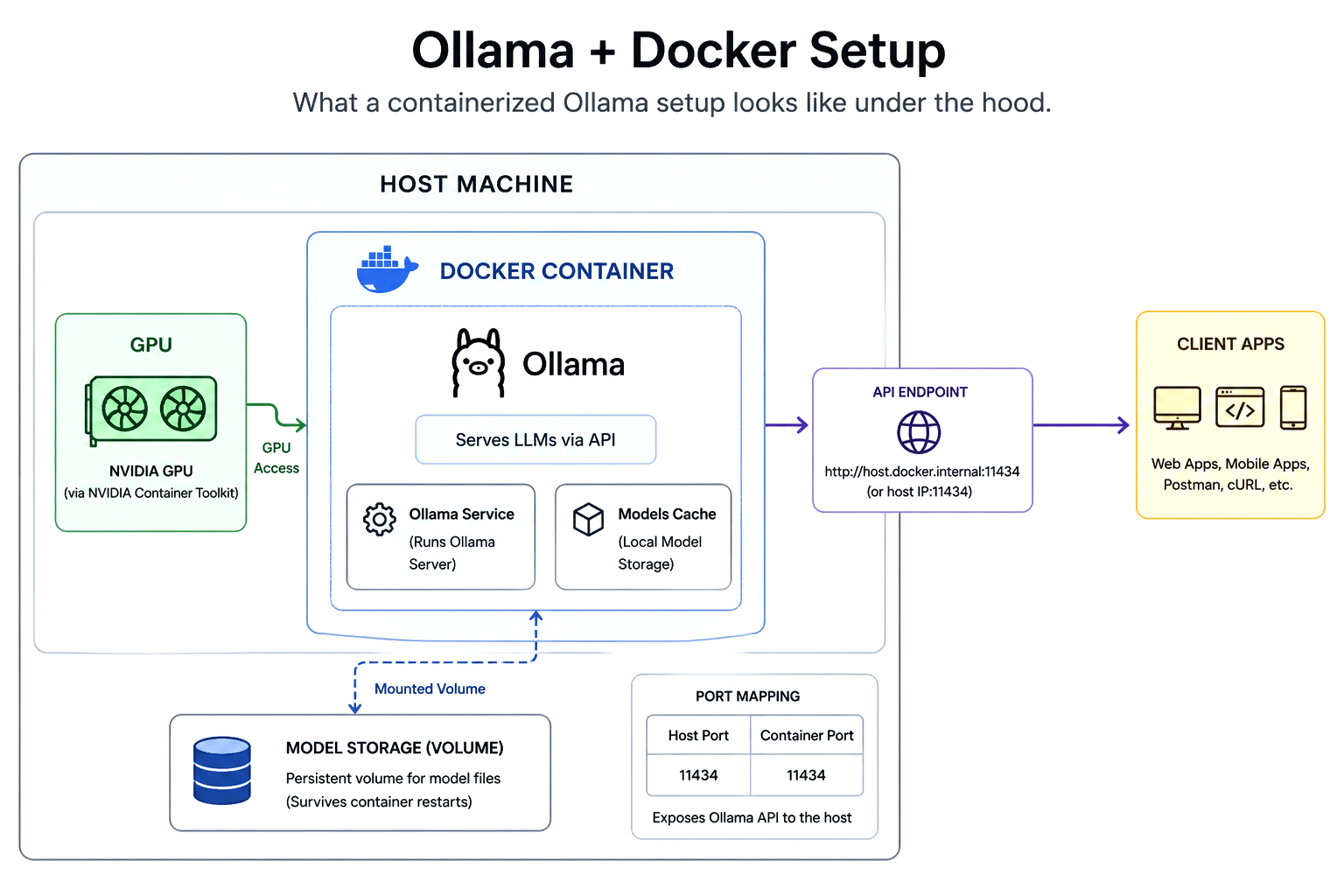
Why Docker is part of this story
People ask me this all the time. If Ollama is already easy, why bother with Docker on top?
I had the same question. So I tried to move a setup from my laptop to a server. Then I tried to move it from one server to another. Then I tried to give the same setup to a junior developer to work on.
Three different machines. Three different sets of problems. Each time.
Docker fixes this. Your setup behaves the same on every machine. Period. No more “but it worked on my laptop” debates.
It also keeps things contained. The Ollama process inside a container cannot accidentally break other things on the same machine. You set memory limits, network rules, security policies in one place.
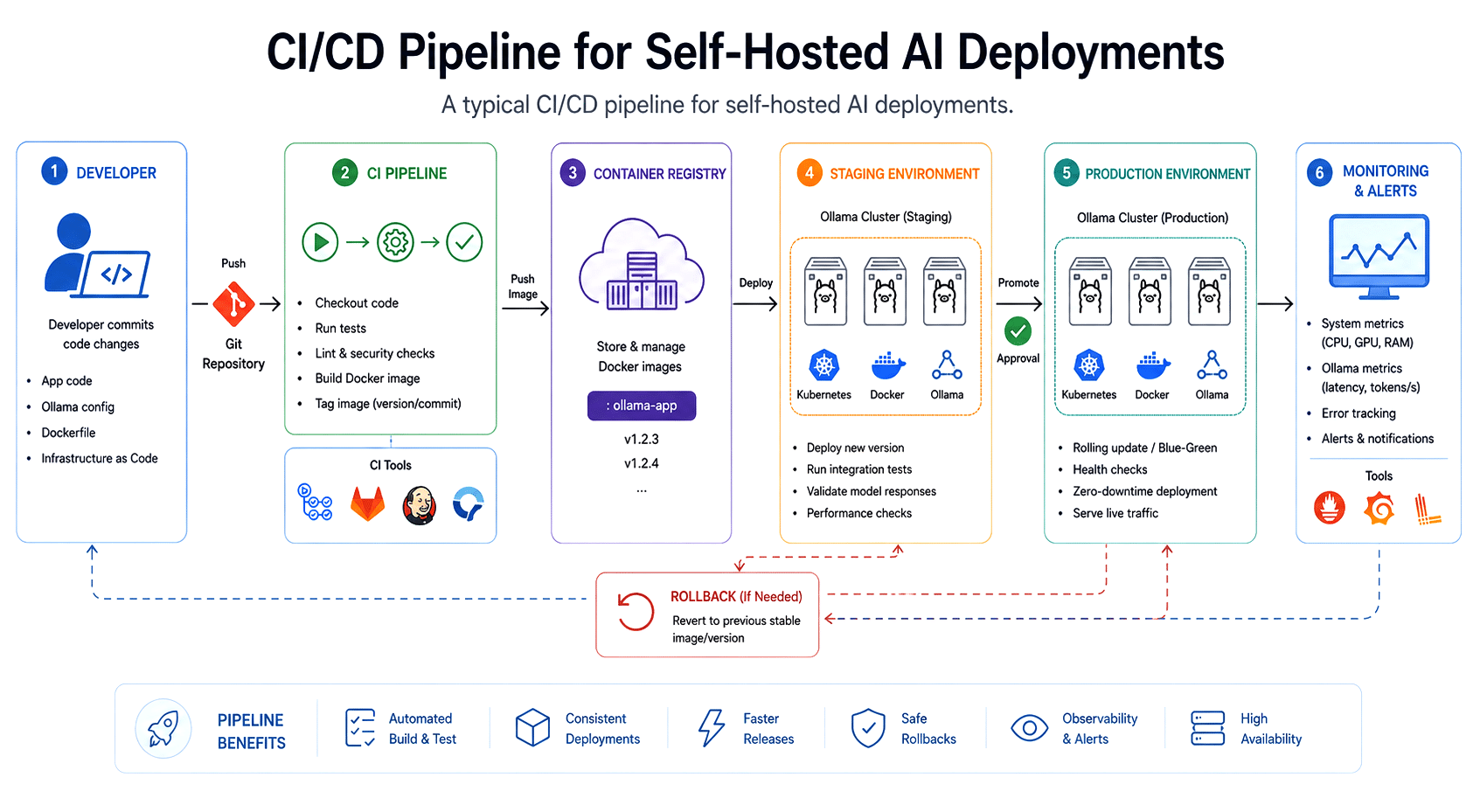
Once you have a Docker image, you are basically ready for Kubernetes whenever you need it. Scaling, rolling updates, health checks. All standard stuff.
You can also run multiple Ollama containers on one machine. Each with a different model. Each with different limits. This sounds fancy but it is genuinely useful. My team had three people testing different models last week. Same machine. No fights.
And here is the simplest reason of all. Your team probably already lives in Docker. Adding Ollama is just one more service in something they already understand.
Building this thing step by step
Okay, let us actually do it. I am assuming Linux with Docker installed. Windows works through WSL2. macOS works with small changes.
Step 1: Install Docker and the NVIDIA Container Toolkit
If you have a graphics card, you want Docker to use it. Otherwise that GPU is just an expensive paperweight.
curl -fsSL https://nvidia.github.io/libnvidia-container/gpgkey | \

sudo gpg --dearmor -o /usr/share/keyrings/nvidia-container-toolkit-keyring.gpg


curl -s -L https://nvidia.github.io/libnvidia-container/stable/deb/nvidia-container-toolkit.list | \

sed ‘s#deb https://#deb [signed-by=/usr/share/keyrings/nvidia-container-toolkit-keyring.gpg] https://#g’ | \

sudo tee /etc/apt/sources.list.d/nvidia-container-toolkit.list

sudo apt update

sudo apt install -y nvidia-container-toolkit

sudo nvidia-ctk runtime configure --runtime=docker

sudo systemctl restart docker
Test it: docker run –rm –gpus all nvidia/cuda:12.4.0-base-ubuntu22.04 nvidia-smi. Your GPU should show up.
Step 2: Run Ollama in Docker
docker run -d \

--gpus=all \

-v ollama_data:/root/.ollama \

-p 11434:11434 \

--name ollama \

--restart unless-stopped \

ollama/ollama
A small thing that will save your life later. That -v ollama_data:/root/.ollama part. It saves your downloaded models. Forget this once and you will redownload a 40GB model. Do it twice and you will set a reminder. I learned this on a slow office connection. It was not a good day.
No graphics card? Drop the –gpus=all flag. Smaller models like Phi-3 or Llama 3.2 3B run fine on CPU.
Step 3: Pull a model and try it
docker exec -it ollama ollama pull llama3.1:8b

docker exec -it ollama ollama run llama3.1:8b
Done. You have a working AI model. Test the API:
curl http://localhost:11434/api/generate -d ‘{

“model”: “llama3.1:8b”,

“prompt”: “Explain Kubernetes in one paragraph.”,

“stream”: false

}’
Step 4: Move to Docker Compose
Once you stop playing around, please use Compose. Three months from now you will not remember which flags you used. I promise.
version: ‘3.8’

services:

ollama:

image: ollama/ollama:latest

container_name: ollama

restart: unless-stopped

ports:

- “11434:11434”

volumes:

- ollama_data:/root/.ollama

deploy:

resources:

reservations:

devices:

- driver: nvidia

count: all

capabilities: [gpu]

open-webui:

image: ghcr.io/open-webui/open-webui:main

container_name: open-webui

restart: unless-stopped

ports:

- “3000:8080”

environment:

- OLLAMA_BASE_URL=http://ollama:11434

volumes:

- openwebui_data:/app/backend/data

depends_on:

- ollama


volumes:

ollama_data:

openwebui_data:

docker compose up -d
You now have Ollama plus Open WebUI running together. Open WebUI gives your team a clean ChatGPT-style screen at port 3000.
I have used this exact setup in client demos more times than I can count. People see the familiar interface, realise their data stays inside their network, and the conversation immediately gets serious. It is almost predictable now.
Step 5: Build your own model with a Modelfile
This is where it starts feeling like proper engineering. Suppose you want a model that always behaves like a support bot for your product.
docker exec -it ollama bash

cat > /tmp/SupportBot << ‘EOF’

FROM llama3.1:8b

PARAMETER temperature 0.3

PARAMETER num_ctx 8192

SYSTEM “””

You are a polite, concise support assistant for TechCrave’s cloud platform.

Always provide step-by-step solutions. If you do not know an answer,

say so honestly and suggest contacting human support.

“””

EOF

ollama create supportbot -f /tmp/SupportBot
Now you have a supportbot model. Push that Modelfile to Git. Treat it like any other config. Update it through the same review process you use for code.
How everything fits together
The architecture is not complicated. That is the whole point.
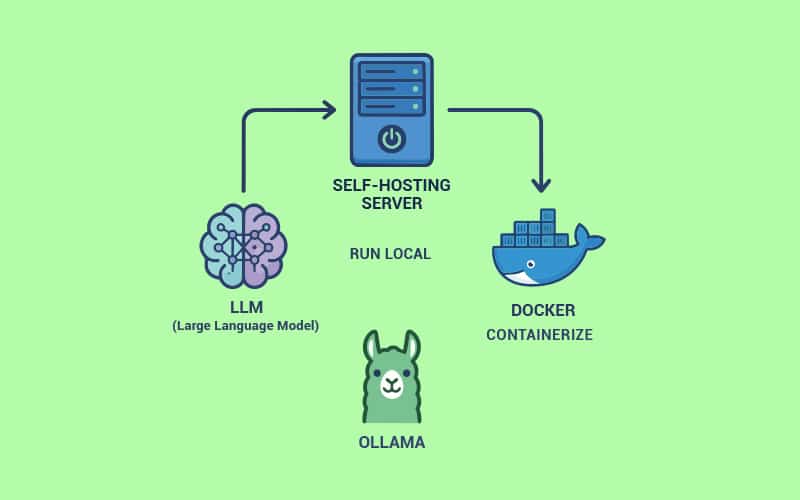
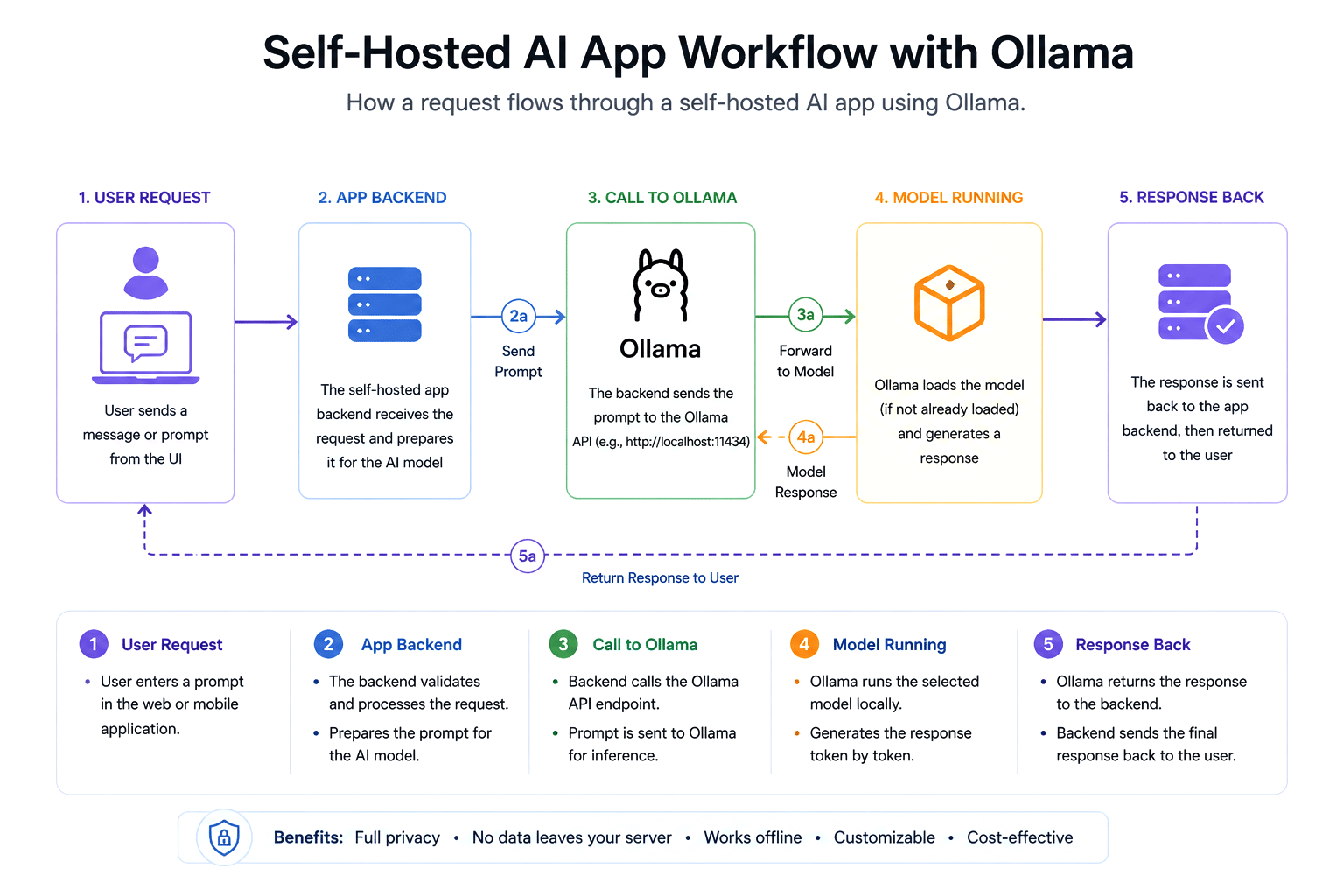
Your apps talk to Ollama through HTTP. Ollama loads the model into memory, runs it, and sends the answer back. Docker manages the lifecycle. That is basically it.
In a real client setup, the path goes something like this. Request comes in. Hits an Nginx or Traefik proxy. Lands at the app backend container. Backend builds the prompt, sometimes pulling extra context from a vector database like Qdrant or Weaviate. It calls Ollama on the internal Docker network. Ollama runs the model. The backend cleans up the response. The user gets their answer. Everything stays inside the customer network. Nothing crosses out.
Monitoring uses regular tools. Prometheus for metrics. Loki for logs. Grafana to see what is happening. No exotic stack. Which is why it works.
Where this is being used right now
A few patterns keep showing up in our projects.
Internal knowledge bots are the most common. Companies plug Ollama into a retrieval setup so their staff can ask questions about internal wikis, HR policies, contracts, technical docs. Sensitive stuff never leaves the office.
Code helpers are next. Engineering teams hook up code-focused models like CodeLlama or DeepSeek-Coder to their IDEs and CI pipelines. Their proprietary code never sees an external API.
Customer support drafting is big in BFSI. Banks use private AI to suggest reply drafts to their support agents. Faster handle times. No customer information leaving the network.
Document work is huge in legal and consulting firms. Summarising long files, finding clauses, answering questions about case papers. All local.
Edge deployments are the newest one. A manufacturing client of ours runs Phi-3 on devices on their factory floor. AI that works even when the internet does not.
The Ollama and Docker combination keeps hitting the same sweet spot. Simple enough to maintain. Serious enough to deploy.
The honest pros and cons
I will be straight with you here.
The wins are real. You control your data. Your costs are predictable. You can fine-tune and customise as much as you want. You are not stuck with one vendor’s pricing whims. For teams with steady AI usage, the total cost over a year almost always beats paying per token.
The trade-offs are also real. Open models are good but still trail the very best paid models on certain hard tasks. Complex reasoning. Very long context. Tricky math. If your app desperately needs top-tier quality on subtle work, self-hosting may not be the right answer for that specific piece. Hardware costs upfront. A 70B parameter model needs serious GPU memory, often multiple A100s or H100s. That money has to come from somewhere. And the operations work shifts to your team. Patches, upgrades, monitoring, capacity planning. That is now your job.
So no, this is not a magic replacement for paid APIs. It is a strong option that fits a lot of use cases, sometimes better than the alternatives. Your job is to figure out where your workload fits.
Things I would not skip
A short list. All learned the hard way. Sometimes painfully.
- Pin your model versions. Use specific tags like llama3.1:8b-instruct-q4_K_M. Not ‘latest’. The day a model behaves oddly after a silent update, you will thank me.
- Use named volumes for model storage. Models are huge files. Treat that cache like gold.
- Watch GPU memory and response latency. Set alerts before your users notice anything wrong.
- Put rate limits at the gateway. Even your own staff can accidentally hammer an endpoint and bring it down.
- Use quantized models when you can. Q4 or Q5 versions often give you 95 percent of the quality at a fraction of the memory.
- Run separate Ollama instances for inference and embedding if your traffic is heavy. Long generations should not block embedding calls.
- Schedule a regular review for new model releases. New ones drop constantly. Pick a cadence. Do not chase every release.
- Put authentication in front of Ollama. By default, there is none. I have seen teams forget this. It is not a fun day when it goes wrong.
- Plan for scale on day one. Build your app as if it talks to a pool of Ollama instances. Even if you start with one.
Where I think this is going
A few honest predictions for a two to three-year horizon based on what I see in the field.
Open models will keep narrowing the gap with the big paid ones. The pace of progress over the last eighteen months has genuinely surprised me. Does not look like slowing.
Hardware will get more friendly. Consumer GPUs with more VRAM. New chip designs like Apple Silicon and AMD’s unified memory are becoming real options for medium models.
Tooling will mature. Better scaling, easier fine-tuning, standardised monitoring, tighter integration with vector databases, and agent frameworks. Ollama itself is moving fast. Projects like vLLM, TensorRT-LLM, and llama.cpp keep pushing efficiency.
The biggest shift, in my honest view, is that enterprise AI is going hybrid. Paid APIs for cutting-edge or low-volume work where peak quality matters. Self-hosted models for high-volume, sensitive, cost-conscious work. Mixed setups will be the default. Anyone selling you a one-or-the-other story is selling you something else.
A few closing thoughts
Looking back at the last two years, I have to admit I find this exciting.
We went from “you need a PhD and a cloud contract to run a real AI model” to “spin one up in fifteen minutes with one Docker command.” That is not a small change. That is the kind of shift that opens up new possibilities for teams that were locked out earlier.
Ollama and Docker together are a great example of what I have always loved about open source. Practical tools built well. Quietly remove the friction. Put real power in the hands of developers and the businesses they work for. Good infrastructure should be invisible. These tools are getting close.
If you have been waiting for the right moment to bring AI in-house, I think the wait is over. Pick a use case. Find a server. Write a Compose file. Start building. The cost of entry has never been lower. The strategic value of owning your AI stack has never been higher.
The future of enterprise AI will not be built in someone else’s data centre. It will be built on infrastructure your team controls, with tools your team understands, using models your team can look inside.
Ollama and Docker are quietly making that future real, one container at a time.