



























































A company’s data is priceless and must be resilient to security threats. Fortunately, there are a host of open source tools that can ensure it’s protected from breaches.
Millions of records containing customer password information, patient medical records, and customer financial information are continuously being leaked. A common cause is that the data was stored in plain text format or transmitted over unencrypted communications. Had this data been encrypted, the attacker could not have accessed it. Encryption converts readable data (i.e., plaintext data) into an unreadable format (e.g., ciphertext) that can be converted back to the original state only by using a valid cryptographic key.
Historically, strong encryption was seen as costly, complex, and only available to larger corporations that had a dedicated IT security team and a commercial software licence. This is no longer true. Many free, open source encryption tools are being used around the world and outnumber the proprietary tools in this domain. Examples include OpenSSL, which provides SSL for a significant percentage of HTTPS internet traffic today, and LUKS, which is included in nearly every Linux distribution. Let’s Encrypt has issued millions of free TLS/SSL certificates since 2014. The fact that the source code is public makes it possible for cryptographers from many parts of the globe to evaluate it continuously, and vulnerabilities are identified sooner compared to closed systems.
Regulatory forces further support the encryption of personal and financial data, either mandating or strongly encouraging it in accordance with frameworks such as the General Data Protection Regulation (GDPR), Health Insurance Portability and Accountability Act (HIPAA), Payment Card Industry Data Security Standard (PCI DSS), and India’s Digital Personal Data Protection Act of 2022.
Understanding the two states of data
Data at rest
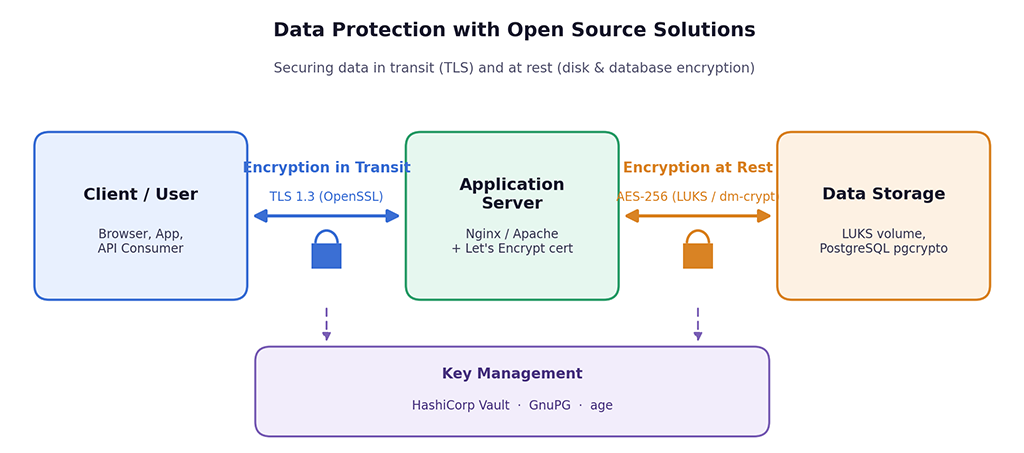
Information kept permanently is known as ‘data in storage’. Data in storage can be found in hard disk drives (HDD), solid state drives (SSD), database files (DB), backup tapes (BT), object storage, and removable devices (e.g., USB). Attackers are highly motivated to attack such data because it provides a large-area target and has a long-lasting effect. For example, if an attacker steals a laptop or a backup of a database, they have access to all the records accumulated over several years. Threats include physical theft of devices, decommissioned drives that were never wiped, insider access to storage systems, and attackers who gain a foothold on a server and read files directly. Encryption at rest ensures that the raw bytes on the storage medium are ciphertext, so possession of the medium alone yields nothing.
Data in transit
Data in transit is information moving between systems: a browser talking to a web server, microservices exchanging API calls, database replication streams, file transfers, and emails. While travelling, data traverses networks the sender does not control — public Wi-Fi, internet backbones, cloud provider infrastructure where it can be passively sniffed or actively intercepted through man-in-the-middle attacks, ARP spoofing, or rogue access points. Encryption in transit wraps the communication in a secure channel, typically using the Transport Layer Security (TLS) protocol, guaranteeing confidentiality (no eavesdropping), integrity (no tampering), and authentication (you are talking to the genuine server).
A complete data protection strategy must address both states: perfectly encrypted disks do not help if credentials cross the network in plaintext, and flawless TLS does not help if the database behind it stores card numbers unencrypted.
Encrypting data in transit with open source tools
OpenSSL and TLS 1.3
OpenSSL is the foundational open source cryptography library that implements the TLS protocol along with a comprehensive toolkit of ciphers, hashes, and certificate utilities. Web servers such as Nginx and Apache, mail servers, and countless applications link with it to provide encrypted channels. The current best practice is to enable TLS 1.3, which removes the legacy weak ciphers of earlier versions, encrypts more of the handshake, and provides forward secrecy by default. This means that even if a server’s private key is compromised later, previously recorded traffic cannot be decrypted. Administrators use the OpenSSL command-line tool to generate private keys, create certificate signing requests, inspect certificates, and test server configurations.
Let’s Encrypt and Certbot
A TLS certificate proves a server’s identity, and until 2015 obtaining one meant paying a commercial certificate authority. Let’s Encrypt changed this by offering free, automatically issued certificates through the ACME protocol. Its companion client, Certbot, handles the entire lifecycle: it proves domain ownership, installs the certificate into the web server configuration, and renews it automatically before its 90-day expiry. This automation removed the most common excuse for running unencrypted websites, and HTTPS adoption on the web has climbed above 90 percent largely as a result. For internal services, the same ACME workflow can be replicated privately with the open source step-ca certificate authority.
VPNs — WireGuard and OpenVPN
Not all traffic is web traffic. Site-to-site links, remote administration, and access to internal networks are best protected with a virtual private network. WireGuard is an open source implementation that uses about 4000 lines of code in the kernel; it implements ChaCha20-Poly1305 encryption using Curve25519 for key exchange, establishing a tunnel nearly instantaneously, and is also significantly easier to configure and audit compared to previous generations.
OpenVPN is a well-tested and versatile VPN solution that can support both TLS-based tunnels and more platforms overall than WireGuard.
OpenSSH for administration and file transfer
OpenSSH is so ubiquitous that it is easy to forget it is an encryption tool. Every SSH session, SFTP transfer, and SCP copy is protected with strong modern ciphers, replacing the plaintext Telnet and FTP protocols of the past. SSH also provides secure port forwarding, allowing legacy applications that cannot speak TLS themselves to be tunnelled through an encrypted channel.
Table 1: A comparison of open source encryption tools
| Tool | Category | Encryption scope | Key features |
| OpenSSL | In transit | TLS/SSL for network traffic | Industry-standard TLS 1.3 library; certificate generation; wide protocol and cipher support |
| Let’s Encrypt (Certbot) | In transit | HTTPS certificates | Free automated CA; 90-day auto-renewing certificates; ACME protocol |
| WireGuard | In transit | VPN tunnels | Modern, lightweight VPN; ChaCha20-Poly1305; built into the Linux kernel |
| OpenSSH | In transit | Remote access and file transfer | Encrypted shell sessions, SFTP/SCP, port forwarding and tunnelling |
| LUKS/dm-crypt | At rest | Full-disk/volume encryption | AES-256-XTS; native Linux block-device encryption; multiple key slots |
| VeraCrypt | At rest | Disk and container encryption | Cross-platform; hidden volumes; plausible deniability; TrueCrypt successor |
| GnuPG (GPG) | At rest | File and email encryption | OpenPGP standard; hybrid public-key encryption; digital signatures |
| Age | At rest | File encryption | Simple modern CLI; X25519 keys; minimal configuration |
| pgcrypto (PostgreSQL) | At rest | Column-level database encryption | In-database encryption functions for sensitive fields |
| HashiCorp Vault | Key
management |
Secrets and key lifecycle | Centralised secrets storage; dynamic credentials; encryption-as-a-service; audit logging |
Encrypting data at rest with open source tools
Full-disk encryption — LUKS and dm-crypt
On Linux, the standard for block-device encryption is dm-crypt, managed through the LUKS (Linux Unified Key Setup) format via the crypt setup utility. LUKS encrypts entire disks or partitions with AES-256 in XTS mode, so every file, temporary file, and swap page written to the device is automatically ciphertext. Its key-slot design allows up to eight independent passphrases or key files to unlock the same volume, enabling recovery keys and multi-administrator access. The ideal option for laptops, servers, and USB flash drives is full-disk encryption that serves the primary level of protection against the most common and basic types of viral threats. Many installers for Linux nowadays provide the capability to encrypt a hard disk using LUKS encryption via one box on the installation program. Many cloud VMs can use this method of encrypting attached volumes.
Cross-platform containers – VeraCrypt
TrueCrypt has been replaced by VeraCrypt, which is an audited successor that offers encrypted disks and containers for Windows, MacOS X, and Linux systems. The main feature of VeraCrypt is that it offers a way to create an encrypted container (file). This means you can create a single file that can be mounted as a virtual disk to encrypt your folder of sensitive files and/or transfer a USB stick with encrypted data between multiple operating systems securely. VeraCrypt also supports hidden volumes which provide plausible deniability by hiding an encrypted volume in the free space of another encrypted volume.
File-level encryption: GnuPG and Age
Disk encryption secures data only when the drive is disconnected from a power supply or other devices, but when the operating system has been loaded and the hard disk has been unlocked, file data is no longer encrypted and any user or application that has the permission can obtain read access. File encryption adds a second finer level of protection.
The OpenPGP standard defines GPG (Gnu Privacy Guard) as an open source implementation of OpenPGP to allow users to encrypt files using hybrid cryptography. This uses both symmetric and asymmetric encryption, i.e., data is encrypted with a random generated symmetric key, and the symmetric key is also encrypted using the public key of the recipient. GPG also provides the ability to digitally sign files, which confirm the authenticity of the user. It has historically been used as the standard and most widely used application for encrypted email and signing of software distributions.
For teams that do not want to deal with the complexities of GPG, Age (Actual Good Encryption) provides a simple alternative with the use of X25519 keys. No configuration files are needed, and its simple method to encrypt files makes it very effective for backing up and automating processes.
Database and application-level encryption
Database systems must receive special consideration since they hold the largest and most sensitive records. The pgcrypto extension of PostgreSQL allows for column-level encryption, meaning that national identity numbers and payment information are stored as encrypted data (ciphertext) when at rest (i.e., when not being processed), thereby protecting these fields from anyone who accesses a raw dump of the database files. Both MariaDB and MySQL support tablespace activity records and are transparent to both the data-at-rest encrypted version and the log file. Percona provides open source encryption related applications for MongoDB. The best design uses application layer encryption to encrypt sensitive fields before submission to the database, meaning that neither the database administrator or the backup operator has ever accessed that data as plain text.
Key management: The critical foundation
The process of encryption turns the question of how to protect data into that of how to protect keys. The problems associated with the management of keys are the main reason for the failure of many real-world encrypted applications. A key that is hard coded into a program, checked into a Git repository, or found next to the data it is supposed to secure only creates an illusion of security. To ensure there is actual protection, sound practice is dependent on several principles including but not limited to:
Separate keys from data
Store encryption keys in a dedicated system, never on the same disk or in the same database as the ciphertext they unlock.
Centralise secrets
HashiCorp Vault and the fully open source fork OpenBao provide encrypted storage for keys and credentials, fine-grained access policies, complete audit logs, and an encryption-as-a-service API that lets applications encrypt data without ever holding the key material themselves.
Rotate and version keys
Regular rotation limits the blast radius of a leaked key. Envelope encryption wrapping many data keys with a single master key makes rotation practical at scale.
Plan for recovery
Lost keys mean permanently lost data. Maintain securely stored, access-controlled recovery keys and test the restoration procedure, not just the backup.
Enforce least privilege
Humans and services should access only the keys they require, for the shortest time necessary, with every access recorded.
Challenges and practical considerations
There are several obstacles to deploying encryption and planning ahead for these will surely help to build resilient systems. Although performance is the primary concern, in reality it is primarily a legacy issue. AES encryption is almost costless on hardware that has AES-NI capabilities, which will be just about every CPU built in the last several years. Also, TLS 1.3 has resulted in far less connection setup delays compared to previous versions of TLS.
Much more significant than performance-related concerns are those associated with operations. Expired certificates are still one of the leading causes for downtime across all platforms. NCertbot and ACME should be viewed as the preferred option for automating the deployment of encryption keys. The issue of unattended reboots due to full-disk encryption on servers can be solved by using tools for network-bound disk encryption (e.g., Clevis and Tang) that will automatically release an encryption key when a server connects to the trusted network.
Encryption can create a conflict with different types of functions; for example, an encrypted database column cannot be indexed, searched, or have regular monitoring on the encrypted traffic that was sent through a legacy network. So, how do we mitigate these negative effects on our overall security? One way is to only encrypt specific columns that contain sensitive information and to do most of the inspection via the endpoints rather than traditional methods like monitoring the network through a monitoring program.
Open source software requires constant monitoring and updates to keep everything secure; this was very clearly demonstrated by the Heartbleed vulnerability in 2014, which showed that even very commonly used encryption algorithms have not been updated quickly enough since their last release to fix a major security issue. However, since these types of issues are in the public domain, they are usually fixed much faster than those that depend on a company’s willingness to fix them.
To sum it up, there are quite a few open source solutions to secure data while in storage or when being changed between locations. They can be used for free. One way is to create an open source stack using the most up-to-date security protocols for all network connections — use WireGuard to create private tunnels for business communication, LUKS for full disk encryption on all company devices, GnuPG or Age to provide file-level encryption, a database encryption method to protect sensitive information contained within a database, and HashiCorp Vault or OpenBao to secure the keys that tie everything together.
By using these methods, an organisation can easily meet or exceed the level of protection expected from commercially available security options. Encryption must be an organisational priority — the processes associated with certificate/key lifecycle management must be automated so that they are no longer dependent on the memory of individuals. Organisations that invest in these practices will ensure their data is always available regardless of any other technical controls that may fail.